Vamcaster - A Technical Review and Installation Guide for Podca
-
Vamcaster - A Technical Review and Installation Guide for Podcast & Video Streaming Professionals
The digital landscape for content creators, particularly podcasters and video streamers, has never been more competitive. A strong online presence is paramount, and for many, WordPress combined with Elementor offers a powerful, flexible foundation. This review dives deep into the Vamcaster - Podcast & Video Streaming Elementor Template Kit, examining its utility, design, performance implications, and providing a comprehensive installation guide. As someone who’s wrestled with countless themes and kits, I approach Vamcaster with a critical eye, dissecting whether it truly delivers on its promise to streamline the creation of a professional, media-rich website.
Initial Impressions: Design Philosophy and Target Audience
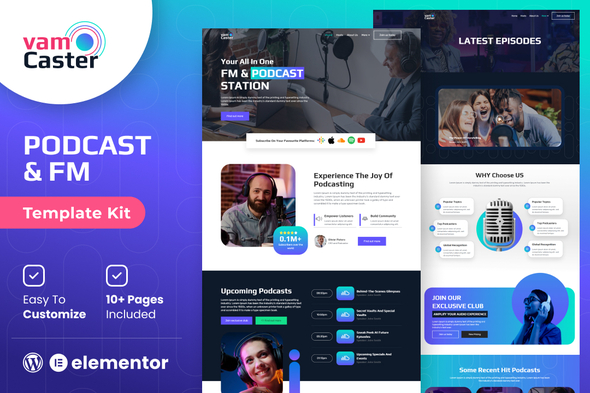
Upon first inspection, Vamcaster immediately communicates a modern, sleek aesthetic. It's clear the designers aimed for a contemporary look that prioritizes content visibility. The color palette leans towards a muted, professional spectrum with strategic use of accent colors to draw attention to call-to-actions and key elements. Typography choices are clean and legible, balancing readability with a touch of modern flair. This isn’t a template kit that tries to reinvent the wheel; rather, it refines established web design patterns for its niche.
Who is Vamcaster built for? Primarily, it targets independent podcasters, video content creators, and small media production houses looking to establish or upgrade their online hub without resorting to custom development from scratch. Its strength lies in its pre-configured layouts for episode archives, single episode pages, about sections, and contact forms – all standard requirements for a media-centric site. If you're running a personal podcast, a niche video series, or even a small agency showcasing client work, Vamcaster presents itself as a viable starting point. It's less suited for complex subscription platforms or large-scale media libraries requiring intricate database integrations beyond what standard WordPress plugins can offer. The focus here is presentation and ease of content delivery.
Deep Dive into Design and Aesthetics
Vamcaster's visual language is consistent across its various templates. You'll find a common thread in its use of bold imagery, ample white space, and a clear hierarchy for information. The header and footer designs are functional, providing intuitive navigation and essential links without being overly cluttered. I appreciate the deliberate choice to make the "Episodes" or "Videos" section prominent, often featuring a hero section with the latest content, complete with embedded players.
Responsiveness and Adaptability
A template kit in 2024 without robust responsiveness is dead on arrival. Vamcaster holds up well across various devices. Testing its layouts on standard breakpoints for desktop, tablet, and mobile reveals a well-executed adaptive design. Text reflows cleanly, images scale appropriately, and interactive elements remain usable on touchscreens. This isn't groundbreaking, but it's a fundamental requirement met effectively. The Elementor framework naturally assists in this, but the kit's pre-built sections demonstrate thoughtful consideration for mobile users, avoiding common pitfalls like overflowing elements or tiny, unclickable buttons.
Accessibility Considerations
While Elementor itself offers some accessibility features, template kits often don't explicitly focus on them beyond basic semantic HTML. Vamcaster, by virtue of its clean structure and good contrast ratios in its default state, provides a decent baseline. However, users will still need to ensure their custom content (image alt tags, video captions, proper heading structures within rich text areas) adheres to accessibility best practices. It's not a kit that guarantees WCAG compliance out of the box, but it doesn't actively hinder it either. This is a common situation with template kits; the responsibility largely falls to the implementer.
Feature Set Analysis: What's Under the Hood?
Vamcaster delivers a standard suite of pages crucial for any podcast or video streaming website:
- Home Page: Typically features a hero section for the latest episode, a grid or list of recent episodes, an "about us" section, and calls to action for subscribing or exploring content.
- About Page: Dedicated space for the creator's story, team members, mission statement, and potentially testimonials.
- Episodes/Videos Archive: A structured layout to display all your content, often with pagination and filtering options.
- Single Episode/Video Page: The core of the kit, providing a dedicated page for each piece of content. This usually includes a prominent media player, episode description, show notes, related content, and social sharing options.
- Blog/News: Integration for written content, allowing creators to supplement their audio/video with articles.
- Contact Page: Standard form integration (usually via Elementor forms or a third-party plugin like Contact Form 7), map embedding, and contact details.
Podcast/Video Specific Elements
The strength of Vamcaster lies in its specialized components. You'll find Elementor sections pre-designed for:
- Embedded Media Players: Placeholders for services like YouTube, Vimeo, SoundCloud, Spotify, or self-hosted audio/video players. The kit doesn't provide a player itself but integrates seamlessly with embeds.
- Episode Information Panels: Clearly structured areas for episode titles, descriptions, guest names, release dates, and download links.
- Subscription Call-to-Actions: Buttons and icons linked to popular podcast directories (Apple Podcasts, Google Podcasts, Spotify) or video platforms.
- Host/Guest Profiles: Sections to introduce hosts or highlight guests with images, bios, and social links.
While the kit provides the visual framework, the actual management of podcast feeds (RSS), statistics, and advanced player features will still rely on dedicated WordPress plugins like Seriously Simple Podcasting, PowerPress, or integrated platform solutions. Vamcaster acts as the attractive storefront, not the backend inventory system.
Technical Underpinnings and Performance Considerations
Vamcaster, as an Elementor Template Kit, leverages the Elementor Pro page builder extensively. This is an important distinction. While you can typically import some parts with the free Elementor plugin, to unlock the full design flexibility, theme builder capabilities (headers, footers, single post templates), and advanced widgets, Elementor Pro is almost certainly a prerequisite. This isn't a flaw of Vamcaster, but a fundamental aspect of working with professional Elementor kits.
Code Quality and Potential Bloat
Elementor-built sites can sometimes suffer from code bloat if not managed carefully. Template kits can exacerbate this if they introduce excessive nested sections or overly complex widget structures. Vamcaster appears to maintain a relatively clean structure within Elementor's capabilities. It relies on Elementor's native styling rather than extensive custom CSS, which is generally good for maintainability. However, the sheer volume of elements on some pages, combined with large media files (which the user provides), can impact load times. Optimizing images, serving video content efficiently (via CDN or streaming services), and good caching practices will be essential for peak performance.
SEO Structure
The kit uses appropriate HTML heading tags (H1, H2, H3) within its pre-designed layouts, which is a good foundation for SEO. The hierarchical structure of content is generally clear. However, the actual SEO performance will depend heavily on the content itself, proper keyword usage, meta descriptions, and the implementation of a dedicated SEO plugin like Yoast SEO or Rank Math. Vamcaster provides a clean canvas; it doesn't inherently guarantee top search rankings.
Installation Guide: Bringing Vamcaster to Life
Installing an Elementor Template Kit isn't as simple as clicking 'Install' on a theme, but it offers far greater flexibility. Here's a step-by-step guide:
1. Prerequisites
- WordPress Installation: A fresh or existing WordPress installation. Ensure it's up-to-date.
- Theme: A lightweight, Elementor-compatible theme is recommended. "Hello Elementor" is the official choice, but Astra, Kadence, or GeneratePress also work exceptionally well.
- Elementor Plugin: Install and activate both the free Elementor plugin and, crucially, Elementor Pro. Most professional kits, including Vamcaster, rely heavily on Elementor Pro features.
- Hosting: Reliable web hosting with sufficient PHP memory (at least 256MB, preferably 512MB) and storage.
2. Obtaining the Vamcaster Kit
You'll acquire the kit, typically a .zip file, from its source. For those seeking premium WordPress assets, a resource like gplpal offers a wide selection, often including various template kits and themes. You might also find other relevant products browsing their Free download WordPress themes section.
Once downloaded, do NOT unzip the main file. Elementor expects the template kit as a single .zip file.
3. Installing the Elementor Template Kit Plugin
Elementor Template Kits require a dedicated plugin to import. Go to your WordPress Dashboard > Plugins > Add New. Search for "Elementor Template Kit Import" or "Template Kit Import" (usually by Envato). Install and activate this plugin.
4. Importing the Vamcaster Kit
With the import plugin active, navigate to WordPress Dashboard > Elementor > Tools. You should see a "Template Kits" tab or a "Import / Export" option that allows you to upload a kit. Click "Upload Template Kit .zip file" and select the Vamcaster .zip file you downloaded earlier. The plugin will analyze the kit and list all its templates.
During the import process, you'll likely be prompted to install required plugins (if any, beyond Elementor). Follow these prompts. Crucially, the import process will ask if you want to import "Template Kit Global Styling" and "Theme Builder templates".
- Global Styling: Select "Yes" to import Vamcaster's default fonts, colors, and global Elementor settings. This is essential for the kit to look as intended.
- Theme Builder Templates: Select "Yes" for headers, footers, single post templates, and archive templates. This will overwrite your existing theme's header/footer or Elementor's default theme builder settings. If you have existing Elementor theme builder components you want to keep, proceed with caution or make backups.
Allow the import process to complete. It might take a few minutes depending on your server and the kit's size.
5. Setting Up Your Pages
After importing, the individual page templates are available in your Elementor library. To use them:
- Go to WordPress Dashboard > Pages > Add New.
- Give your page a title (e.g., "Home").
- Click "Edit with Elementor".
- Inside Elementor, click the folder icon to open the Template Library.
- Navigate to the "My Templates" tab. You'll see all the Vamcaster page templates (e.g., "Vamcaster Home", "Vamcaster About", "Vamcaster Episodes").
- Insert the desired template onto your page.
- Repeat for all the main pages you need (About, Contact, Episodes, etc.).
Remember to set your newly created "Home" page as your site's front page in WordPress Dashboard > Settings > Reading.
6. Customization and Content Population
This is where your vision comes to life. Walk through each page and section:
- Logo & Branding: Update the logo in your Elementor header template. Adjust global colors and fonts in Elementor > Site Settings to match your brand.
- Content Replacement: Replace all placeholder text, images, and video embeds with your actual content. For podcasts, embed your audio player code or use a dedicated podcast plugin's shortcode/widget.
- Menu Navigation: Create your primary navigation menu in WordPress Dashboard > Appearance > Menus and assign it to the correct menu location within your Elementor header template.
- Footer Details: Update copyright information, social media links, and any secondary navigation in your Elementor footer template.
- Forms: Configure any contact forms (e.g., Elementor Forms) to send submissions to your email address.
- Episode Management: If using a podcast plugin, ensure your episode posts are correctly set up and displayed by the Vamcaster Single Episode and Episode Archive templates. You may need to adjust Elementor's Display Conditions for these templates to apply to your specific Custom Post Type (if your podcast plugin uses one).
7. Post-Installation Checklist
- Test Responsiveness: View your site on various devices and screen sizes.
- Check All Links: Ensure internal and external links work correctly.
- Test Forms: Submit all forms to confirm they are functioning.
- Review SEO Basics: Check page titles, meta descriptions, and heading structures.
- Performance Optimization: Implement caching (e.g., WP Super Cache, WP Rocket), image optimization, and consider a CDN.
Strengths of Vamcaster
Vamcaster's primary strength lies in its specialized focus. It doesn't attempt to be a general-purpose theme; it hones in on the specific needs of podcasters and video creators. The pre-designed layouts for episodes, archives, and media player integrations save a considerable amount of development time. Its clean, modern aesthetic is a strong selling point, offering a professional look without requiring extensive design expertise. The reliance on Elementor Pro means that once installed, customization is relatively straightforward for anyone familiar with the page builder, providing a low barrier to entry for content creators.
Weaknesses and Areas for Improvement
No template kit is perfect, and Vamcaster has its limitations. The most significant is its heavy reliance on Elementor Pro. While expected, this adds an additional cost and dependency. For users looking for a barebones, free solution, Vamcaster isn't it. The kit itself provides the visual shell; it doesn't offer any integrated podcasting or video management functionality. Users still need separate plugins for RSS feeds, media hosting, and advanced player features. This is by design, but it's important for users to understand they are buying a design overlay, not a complete content management system for media.
Another point for consideration is the level of customization required beyond content replacement. While Elementor makes visual tweaks easy, fundamentally altering the layout or adding highly complex, interactive features might still require deeper CSS knowledge or custom Elementor widget development. For a truly unique design that deviates significantly from the kit's structure, you might spend as much time reconfiguring as you would building from scratch.
Senior Developer's Perspective: Real-World Usage and Recommendations
From a senior web developer's vantage point, Vamcaster is a competent product within its niche. When would I recommend it? For clients with a clear vision for their podcast or video brand, but limited budget and time for custom development. If they already use WordPress and Elementor, it's a no-brainer. The kit accelerates the design phase significantly, allowing them to focus on content creation rather than pixel-pushing.
However, I'd caution against it for projects with highly specific, non-standard requirements. If the client needs a complex membership system tied to exclusive video content, advanced e-commerce for digital downloads, or a fully custom media player with unique interactions, Vamcaster (and arguably any template kit) becomes merely a starting point for individual sections. The underlying complexity would quickly outgrow the kit's scope, requiring extensive custom development on top of Elementor.
Maintenance is another factor. Elementor and WordPress updates are frequent. While kits are generally resilient, occasional styling breaks or compatibility issues can arise, especially if the kit relies on obscure Elementor add-ons. It's crucial for users to maintain regular backups and test updates in a staging environment. Scalability, too, is a consideration. A well-optimized Vamcaster site can handle significant traffic, but the core Elementor framework, if not optimized, can introduce performance bottlenecks for very high-traffic sites or those with thousands of episodes. At that scale, a headless WordPress setup or a custom-built solution might offer better long-term performance and flexibility.
Final Verdict
Vamcaster - Podcast & Video Streaming Elementor Template Kit delivers on its promise to provide a modern, functional, and attractive website foundation for media creators. Its carefully crafted layouts save valuable development time, offering a professional aesthetic right out of the box. While it necessitates Elementor Pro and relies on external plugins for core media management, this is a reasonable trade-off for the design flexibility it affords. For podcasters, streamers, or small media businesses seeking an efficient route to a strong online presence without diving into custom code, Vamcaster stands as a highly recommendable solution. It provides the visual elegance; you bring the compelling content.