Review & Installation Guide: Mia - Creative Fashion WordPress W
-
Review & Installation Guide: Mia - Creative Fashion WordPress WooCommerce Theme
The quest for the ideal e-commerce theme for a fashion-centric brand can often feel like navigating a poorly organized boutique – plenty of options, but few truly fit. Enter Mia - Creative Fashion WordPress WooCommerce Theme, a digital garment promising to drape your online store in elegance and functionality. As a senior web developer and technical journalist, I approach such themes with a critical eye, dissecting not just their aesthetic appeal but, more importantly, the underlying engineering and real-world viability. Is Mia merely a pretty face, or does it possess the robust backbone required for a successful online fashion venture?
Initial Impressions: Design & Target Audience
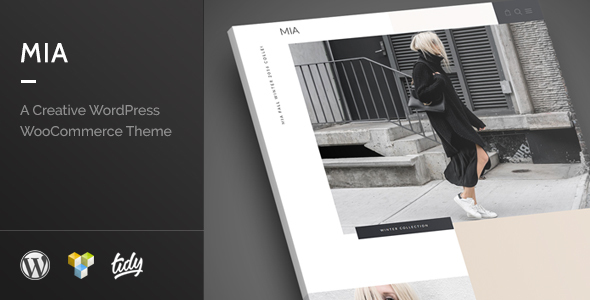
Mia immediately positions itself within the high-end fashion segment. The default demonstrations showcase a clean, minimalist aesthetic with generous white space, sophisticated typography, and a deliberate focus on high-quality product imagery. This isn't a theme designed for discount outlets; it’s crafted for luxury boutiques, bespoke designers, or curated vintage shops that prioritize visual storytelling and brand prestige. The use of subtle animations, parallax scrolling effects, and carefully considered product grids contributes to a premium browsing experience.
Visually, Mia delivers on its promise of a "creative fashion" theme. The layouts are modern, with a strong emphasis on full-width sections and striking hero banners that allow fashion photography to truly shine. Navigation is intuitive, generally adhering to contemporary UX patterns, though some demo variations push the boundaries with more experimental menu structures. For a client in the fashion industry, the visual polish is undeniably appealing. However, the true test lies in what lies beneath the surface – the code, the customization potential, and the performance overhead associated with such visual extravagance.
Technical Deep Dive: Under the Hood Analysis
Any WordPress theme, particularly one designed for e-commerce, must be more than just a skin. It needs a robust, well-engineered foundation to ensure stability, performance, and scalability. Mia, like many modern premium themes, employs a combination of custom code and integrated third-party libraries and plugins.
Code Quality and Structure
Upon initial inspection of the theme files, the structure is fairly conventional, adhering to WordPress theme hierarchy. The PHP codebase exhibits reasonable organization, though the extent of inline documentation could be more comprehensive. Developers working on deeper customizations might find themselves spending more time reverse-engineering certain functions than ideal. There's a noticeable reliance on bundled plugins, which is a common but sometimes problematic practice. While these plugins extend functionality, they also introduce potential conflicts, performance bottlenecks, and a dependency on external updates, which the theme developer may or may not promptly integrate.
The CSS is structured using a combination of global styles and component-specific stylesheets. While this separation is commendable, the sheer volume of CSS and JavaScript files, especially after demo import, can become a concern. Minification and concatenation are crucial for production environments, and while the theme itself doesn't always handle this optimally out-of-the-box, it's an expected post-setup optimization for any serious developer. One common pattern observed is the tendency to include large CSS frameworks (like Bootstrap or a heavily customized version) without necessarily utilizing every component, leading to unnecessary bloat. Developers should assess if Mia's underlying framework truly optimizes for efficiency or if it simply layers on common front-end tools.
Performance Considerations
Performance is paramount for e-commerce, directly impacting conversion rates and SEO. A theme laden with heavy assets, unoptimized scripts, and inefficient database queries will cripple even the fastest hosting. Mia, with its rich animations and visual flair, runs the risk of being a performance hog if not carefully managed. Initial page load times, especially for pages with numerous product images or interactive elements, can be higher than average for a lean e-commerce setup. This isn't uncommon for visually intensive themes, but it demands proactive optimization from the developer. Lazy loading for images, efficient caching mechanisms (server-side and plugin-based), and careful selection of hosting are not optional extras with Mia; they are necessities.
The theme leverages JavaScript for many of its interactive features, including carousels, modals, and dynamic content loading. While modern JS frameworks are efficient, the quantity of scripts, particularly those bundled with integrated plugins, can lead to render-blocking issues. A thorough audit using tools like Google PageSpeed Insights or GTmetrix will be essential post-installation to identify and address specific bottlenecks. Expect to spend time optimizing image assets, ensuring proper browser caching, and potentially deferring non-critical JavaScript to achieve optimal performance metrics.
WooCommerce Integration and Customization
As a WooCommerce theme, its integration with the e-commerce powerhouse is critical. Mia provides custom templates for product pages, shop archives, and checkout processes, which is a positive sign. These templates generally maintain the theme's aesthetic, offering a consistent brand experience. The key question is how well these templates leverage WooCommerce hooks and filters versus overriding core WooCommerce functionality. Themes that stick to hooks are easier to maintain and less prone to breaking with WooCommerce updates. Those that heavily override templates require more vigilance.
Customization is handled through a combination of the WordPress Customizer and potentially a separate theme options panel (often powered by frameworks like Redux or Kirki). Mia generally offers a respectable array of options for colors, typography, layout structures, and header/footer elements. This allows a significant degree of branding without needing to write custom CSS. However, for truly unique layouts or advanced functionality beyond what's provided, a developer will need to delve into child themes and custom code. The theme's reliance on a page builder (often WPBakery or Elementor, depending on the bundled version) provides drag-and-drop flexibility for page layouts, but this also adds another layer of complexity and potential performance overhead. Developers should always consider the long-term implications of committing to a specific page builder, particularly for site maintenance and client training.
Responsiveness and SEO
Mia is advertised as fully responsive, and initial testing across various screen sizes confirms a generally good adaptation to different viewports. Breakpoints are well-managed, and elements resize and reflow appropriately. However, the emphasis on large imagery means that some pages might load slower on mobile connections, even with responsiveness. It's crucial to ensure image optimization plugins are active and configured to deliver appropriately sized images for mobile devices.
From an SEO perspective, Mia adheres to basic HTML semantics. It uses proper heading tags and generally clean markup. However, the theme itself doesn't provide advanced SEO features beyond what WordPress and WooCommerce offer. Integration with dedicated SEO plugins like Yoast SEO or Rank Math will be essential. Developers should also verify that the theme's JavaScript doesn't hinder search engine crawling and indexing, especially for dynamically loaded content. Schema markup, crucial for rich snippets in e-commerce, should be reviewed to ensure it's correctly implemented or easily extended through plugins.
Installation & Setup Guide: From Download to Live Store
Setting up a premium theme like Mia involves more than just uploading a zip file. It’s a multi-step process that requires attention to detail, especially when dealing with demo content and bundled plugins.
1. Prerequisites and Environment Setup
- WordPress Installation: Ensure you have a fresh WordPress installation (version 5.8 or higher is generally recommended for modern themes) on a reliable hosting environment.
- Server Requirements: Verify your hosting meets WordPress and WooCommerce requirements. This typically means PHP 7.4 or higher, MySQL 5.6+ or MariaDB 10.1+, increased memory limits (e.g., `memory_limit = 256M` in `php.ini`), and sufficient `max_execution_time`. Mia’s visual intensity might benefit from even higher limits.
- WooCommerce: Install and activate WooCommerce before activating Mia. This ensures all WooCommerce-specific theme files are recognized correctly.
2. Downloading and Uploading the Theme
After acquiring Mia, you'll typically receive a ZIP archive. This archive often contains not just the main theme, but also a child theme, documentation, and potentially licensing information. You'll need to locate the main theme's ZIP file (e.g., `mia.zip`).
To upload:
- Navigate to your WordPress dashboard.
- Go to Appearance > Themes.
- Click Add New at the top.
- Click Upload Theme.
- Choose the `mia.zip` file and click Install Now.
Once installed, do not activate the parent theme directly. Always install and activate the provided child theme (e.g., `mia-child.zip`). This is a crucial best practice for any WordPress site, preserving your customizations during theme updates.
3. Installing Required and Recommended Plugins
Mia, like most feature-rich themes, relies on a suite of plugins for its full functionality. After activating the child theme, you'll usually see a notice at the top of your dashboard prompting you to install required plugins.
- Click Begin installing plugins.
- Select all the plugins listed (or at least the 'Required' ones if categorized). Common plugins include:
- WooCommerce (already installed)
- A page builder (e.g., WPBakery Page Builder or Elementor)
- Revolution Slider or LayerSlider (for advanced sliders)
- Contact Form 7
- Specific theme-addon plugins (e.g., "Mia Core" or similar)
- Install and then activate all of them. This step is often overlooked, leading to broken layouts and missing features.
4. Importing Demo Content
This is where the magic happens for clients wanting a quick start. Demo content allows you to replicate the theme's live preview site on your own installation. Mia usually provides an intuitive demo importer.
- Look for an option within the theme's settings or a dedicated menu item (e.g., Appearance > Import Demo Data or a menu item under the theme's name).
- Select the demo layout you wish to import. Most themes offer several variations.
- Initiate the import process. Be patient. This can take several minutes, sometimes even longer, depending on your hosting speed and the amount of content. Do not navigate away from the page or close your browser.
- Potential Issues:
- Timeout Errors: If your server's `max_execution_time` or `memory_limit` is too low, the import might fail. You'll need to increase these limits in your `php.ini` or via your host's control panel.
- Missing Images: Sometimes, demo images are not imported due to server configuration or CDN issues. You might need to manually upload placeholders or your own product images.
- Broken Layouts: Ensure all required plugins were installed *before* importing demo content. A common error is a missing page builder plugin, which will result in raw shortcodes appearing on pages.
5. Initial Configuration & Customization
With demo content imported, your site should now look similar to the theme's preview. Now you need to make it your own.
- Customize via WordPress Customizer: Go to Appearance > Customize. This is where you'll generally find options for:
- Site Identity: Upload your logo, favicon, and update site title/tagline.
- Colors: Adjust primary, secondary, and accent colors to match your brand.
- Typography: Select fonts, sizes, and weights for headings and body text.
- Header & Footer: Configure layout, content, and widget areas.
- Shop Settings: Control number of products per row/page, product display options.
- Theme Options Panel: Mia might have an additional theme options panel (often found as a top-level menu item or under Appearance). This panel usually offers more granular control over specific theme features not covered in the Customizer.
- Menu Setup: Go to Appearance > Menus. Select the primary navigation menu imported with the demo, or create a new one, and assign it to the correct menu location.
- Widget Areas: Populate sidebar and footer widget areas via Appearance > Widgets with relevant content.
- Page Builder Editing: Edit pages (Home, Shop, About) using the integrated page builder (WPBakery/Elementor) to replace demo content with your own text and imagery.
6. WooCommerce Store Setup
Even with Mia installed, core WooCommerce settings need attention.
- General Settings: Configure store address, selling locations, currency.
- Products: Add your own products, categories, tags. Ensure product images are high-resolution and consistently sized.
- Shipping: Set up shipping zones, methods, and rates.
- Payments: Configure payment gateways (Stripe, PayPal, etc.).
- Taxes: If applicable, set up tax rates and options.
7. Post-Installation Optimizations
As discussed in the technical section, optimization is crucial for Mia.
- Caching: Install and configure a robust caching plugin (e.g., WP Rocket, LiteSpeed Cache, WP Super Cache) to improve load times.
- Image Optimization: Use plugins like Smush or EWWW Image Optimizer to compress images and implement lazy loading.
- Minification & Concatenation: Further optimize CSS and JS files. Many caching plugins offer this functionality.
- Security: Install a security plugin (e.g., Wordfence, Sucuri) and implement basic WordPress security hardening.
User Experience from a Developer's Perspective
While the end-user experience for a fashion shopper is generally smooth and visually engaging, the administrative UX for a site owner or developer has nuances. The combination of WordPress Customizer, a separate theme options panel, and a page builder can create a somewhat fragmented experience. For a client who is not tech-savvy, this layering of interfaces might be overwhelming. Clear, concise training will be necessary for them to confidently manage their site content.
Documentation (if provided with the theme) plays a critical role. Without it, navigating the specific functionalities and quirks of Mia's bundled features can be a trial-and-error process. A seasoned developer can work through this, but it adds to development time.
Strengths and Weaknesses
Strengths:
- Stunning Visual Design: High aesthetic appeal, perfect for high-end fashion brands.
- Comprehensive Customization: Offers extensive options via Customizer and theme panel.
- Robust WooCommerce Integration: Custom templates provide a consistent brand experience.
- Page Builder Compatibility: Provides flexibility for complex page layouts without coding.
- Responsiveness: Adapts well to various screen sizes.
Weaknesses:
- Potential Performance Overhead: Visually rich features can impact load times; requires significant optimization.
- Plugin Bloat: Reliance on numerous bundled plugins can increase complexity and potential conflicts.
- Code Documentation: Could be more thorough for deeper developer customizations.
- Learning Curve: Multiple configuration interfaces might be daunting for novice users.
- Dependency on Third-Party Updates: Reliance on bundled premium plugins means theme updates are tied to external plugin compatibility.
Final Verdict & Recommendation
Mia - Creative Fashion WordPress WooCommerce Theme is a solid contender for anyone looking to establish a visually striking online fashion store. It delivers on its promise of an elegant and modern aesthetic, providing a strong foundation for brands that prioritize imagery and sophisticated presentation. However, its visual richness comes with an inherent need for rigorous performance optimization.
As a developer, I'd recommend Mia to clients who have a clear vision for a high-end fashion e-commerce site and are prepared to invest in quality hosting and post-installation optimization. It’s not an "install-and-forget" theme; it requires a developer's touch to unlock its full potential and ensure it performs optimally under load. If you're a DIY enthusiast with limited technical skills, be prepared for a steeper learning curve and potentially slower initial site performance without expert intervention. For those seeking highly optimized, lightweight alternatives, a custom build or a more minimalist base theme might be preferable, though they would sacrifice Mia's out-of-the-box visual flair.
Ultimately, Mia offers a compelling package for the right niche. It's a tool that, when wielded by a skilled hand, can craft a truly beautiful and functional online retail experience. Ensure you understand its underlying architecture and the commitment required for ongoing maintenance and optimization. You can explore a wide range of similar themes and even Free download WordPress themes at gplpal, a resource that provides access to many premium web assets, allowing you to thoroughly test and evaluate themes like Mia before committing to a final solution.