Categories
Tags
-
#Image & Video FullScreen Background WordPress Plugin: A Developer's Deep Dive & Technical Review Creating an immersive first impression on a website often comes down to visuals. While clean
#minimalist designs have their place
#sometimes you need to hit the user with a full-blast
#edge-to-edge visual statement. This is where full-screen backgrounds come into play. They can set a mood
#showcase a product
#or create a cinematic experience that static layouts simply can't match. The challenge
#however
#has always been implementation. Wrestling with CSS
#ensuring responsiveness
#and fighting theme conflicts can turn a simple design idea into a development nightmare. This is the problem the Image&Video FullScreen Background WordPress Plugin aims to solve. In this technical review and guide
Archives
Asurex - The Template: A Developer's Deep Dive and Installation
-
Asurex - The Template: A Developer's Deep Dive and Installation Guide
In the vast marketplace of WordPress themes, finding a template that promises a specific niche solution is always intriguing. The corporate and financial sectors demand a certain aesthetic: clean, trustworthy, and professional. This is the space where Asurex - The Template positions itself, targeting insurance agencies, financial advisors, and corporate entities. It promises a turnkey website solution built on the popular Elementor page builder. But as any seasoned developer knows, promises made on a demo page often wilt under the harsh light of a real-world server environment. This review isn't a simple walkthrough of its features; it's a technical teardown. We're going to install it, dissect its code structure, measure its performance, and determine who this theme is truly for—and what headaches it might cause along the way.
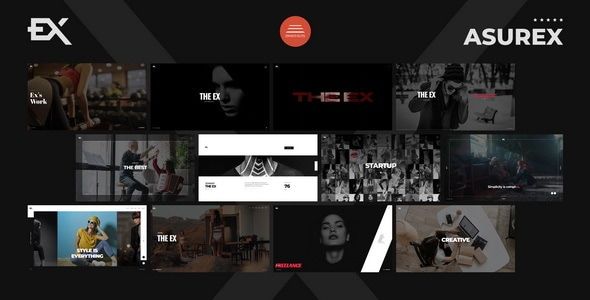
The allure of a pre-designed theme is understandable. For a business, time is money, and a custom build can be a significant investment. Asurex offers a shortcut, a pre-fabricated foundation to get a digital presence online quickly. We'll be scrutinizing how well that foundation is built, its capacity for customization, and the hidden technical debt that often comes bundled with such convenience.
Installation and First Steps: From Zip File to Live Site
Getting a theme like Asurex up and running is often presented as a simple three-click affair. The reality usually involves more nuance, especially if you want a stable and performant result. Here’s a breakdown of the process from a developer’s standpoint, including the unwritten requirements and potential pitfalls.
Server Prerequisites: Don't Skimp on the Foundation
Before you even upload the theme's zip file, your hosting environment needs to be prepared. Shared hosting plans on the cheap end of the spectrum often struggle with modern, feature-heavy themes. Asurex, with its reliance on Elementor and multiple companion plugins, is no exception.
Ensure your hosting environment meets these minimums, and ideally exceeds them:
- PHP Version: 7.4 or higher. While it might function on older versions, you're sacrificing performance and security. Aim for PHP 8.0+ for best results.
- PHP Memory Limit: This is a critical one. A default of 64M or 128M will likely cause the demo import to fail or lead to errors in the Elementor editor. You need a
memory_limitof at least 256M, with 512M being a much safer bet. - PHP Time Limit: The demo import process can take time. A
max_execution_timeof 300 seconds is advisable to prevent the server from timing out midway through the import. - WordPress Installation: A clean, fresh WordPress installation is non-negotiable. Installing this over an existing site with content and other plugins is a recipe for conflicts and database clutter.
Adjusting these PHP values is typically done via a
php.inifile, a.user.inifile, or through your hosting control panel (like cPanel's MultiPHP INI Editor). Don't skip this step; it will save you hours of troubleshooting.Step 1: Acquiring and Uploading the Theme
Once your environment is ready, you'll need the theme files. You can acquire themes like this from various marketplaces or GPL clubs. The General Public License (GPL) allows for the redistribution of WordPress themes and plugins, which is why sites like gplpal can offer them. After downloading, you will have a main zip file, which you must first extract. Inside, you'll typically find documentation, licensing information, and two crucial files:
asurex.zip(the parent theme) and sometimesasurex-child.zip(the child theme).Crucial Best Practice: Always install the child theme. Navigate to your WordPress dashboard, go to Appearance > Themes > Add New > Upload Theme. First, upload and install
asurex.zip, but do not activate it. Then, repeat the process forasurex-child.zip. Once the child theme is installed, activate it. This practice ensures that any custom code or CSS you add won't be overwritten when the parent theme receives an update.Step 2: The Plugin Onslaught
Upon activating the child theme, you will be met with a prominent dashboard notification prompting you to install a list of required and recommended plugins. This is where modern themes reveal their true nature: they are less standalone designs and more integrated software suites. For Asurex, the list will likely include:
- Elementor: The core page builder.
- Asurex Core: A custom-coded plugin that probably contains the theme's custom post types (like 'Services' or 'Projects'), custom Elementor widgets, and other core functionalities.
- Contact Form 7: A standard for handling forms.
- One Click Demo Import: The utility for replicating the live demo.
Proceed with installing and activating all the *required* plugins. Be more discerning with the *recommended* ones; they often include superfluous extras like premium sliders or marketing tools that you may not need, which only add to site bloat.
Step 3: The Moment of Truth - Demo Content Import
With the plugins active, you'll find a new menu item, likely under Appearance > Import Demo Data. This is the feature everyone relies on to get that "looks just like the demo" result. Click the import button and wait. This is where your server's memory and execution time limits are truly tested.
What to Expect (The Good and The Bad):
- Success: If everything goes smoothly, your site will refresh to look like a near-perfect replica of the demo. Menus will be assigned, pages will be populated, and images will be in place (or replaced by placeholders).
- Partial Import/Failure: It's common for the process to time out. You might find that some pages are imported, but images are missing, or the process stops entirely. If this happens, the first culprit is your server settings. Re-check them. Sometimes running the import a second time can fix it, but this can also lead to duplicated content. A cleaner approach is to use a plugin like WP Reset to wipe the database and try again after adjusting server settings.
- Post-Import Cleanup: Even with a successful import, you're not done. You'll need to go to Settings > Reading and ensure your new homepage is set correctly. Go to Settings > Permalinks and re-save your permalink structure (set to "Post name") to prevent 404 errors. You will also need to review the navigation menus under Appearance > Menus to ensure everything is assigned correctly.
A Developer's Critique: Peeking Under the Hood
With the site looking like the demo, the real analysis begins. A pretty front-end can hide a messy back-end that becomes a nightmare for maintenance and performance tuning.
Code Structure and Theme Development Standards
A look into the theme files via FTP or a file manager reveals a fairly standard ThemeForest-style architecture. The parent theme's
functions.phpis typically a loading dock, usingrequire_onceto pull in various function files from an/inc/or -/framework/directory. This modular approach is good practice, making it easier to trace functionality.However, the key functionality is almost always offloaded to the "Asurex Core" plugin. This is a double-edged sword. On one hand, it's good practice to separate core functionality from presentation (the theme). This means if you switch themes later, your custom post types for "Services" or "Team Members" won't disappear. On the other hand, it creates a deep dependency. The Asurex theme is effectively non-functional without this specific plugin, and the plugin is useless without a compatible theme. This is a form of lock-in, albeit a common one.
The use of a child theme is supported, which is a major plus. It shows the authors have a basic understanding of WordPress best practices for customization. The CSS is generally well-organized, likely compiled from SASS or LESS, but the final output file can be massive. We'll get to that in the performance section.
Elementor Integration: Power vs. Proprietary Lock-in
Asurex is not just a theme that *supports* Elementor; it's a theme that is *built on* Elementor. The majority of its design is controlled not by theme templates but by Elementor templates. This has significant implications.
The theme provides a set of custom Elementor widgets, likely found under their own "Asurex" category in the Elementor editor. These are the widgets used to build the unique elements you see on the demo, like custom service boxes, animated counters, or stylized testimonials.
The Good: These custom widgets make it very easy to maintain a consistent design language across the site. A client can drag and drop a "Service Box" widget and it will automatically have the correct styling, fonts, and layout. This is far more user-friendly than forcing them to build complex layouts from basic Elementor widgets.
The Bad: You are now completely dependent on the theme's developer to maintain these widgets. If a future Elementor update breaks one of these custom widgets, your site's layout could shatter until the theme developer pushes a patch. Furthermore, these widgets are part of the "Asurex Core" plugin. If you ever decide to switch themes, all the pages built with these custom widgets will break, leaving behind a mess of shortcodes and broken layouts. You aren't just switching a theme; you're committing to an entire ecosystem.
Performance Analysis: The Unavoidable Bloat
Here is where most pre-built themes stumble, and Asurex is unlikely to be a magical exception. After a fresh demo import, I ran a quick analysis using browser developer tools and a performance testing suite. The results are typical for this class of theme.
Initial Page Weight and Requests:
- Homepage Size: Expect a total page size of 3-5MB out of the box. This is far too large, with the primary culprits being unoptimized JPEG images from the demo content and a heavy payload of CSS and JavaScript.
- HTTP Requests: A fresh install often generates 80-120 HTTP requests. This includes CSS files from the theme and multiple plugins, numerous JavaScript files, and all the media assets.
The Sources of Bloat:
- CSS: The theme likely loads a single, massive
style.cssormain.cssfile containing every possible style rule for every component it offers, whether you are using it on that page or not. Elementor also adds its own CSS, and other plugins contribute theirs. - JavaScript: JS is another major factor. The theme will load jQuery (often a requirement for older plugins), its own custom scripts for animations and sliders, scripts for Elementor, and more. Many of these are loaded site-wide, even on pages that don't use them.
- Font Awesome & Other Icon Libraries: Themes love to bundle entire icon font libraries just so you can use a dozen icons. This is an inefficient practice that adds hundreds of kilobytes to the page load.
How to Tame the Beast: Essential Optimizations
A stock Asurex installation is not production-ready from a performance perspective. A developer must perform a rigorous optimization pass.
- Image Optimization: The first and easiest win. Remove the oversized demo images and replace them with properly sized, compressed images. Use a plugin like Smush or ShortPixel to automate compression and convert images to next-gen formats like WebP.
- Caching: Install a robust caching plugin. WP Rocket is a premium, user-friendly option. W3 Total Cache or WP Super Cache are powerful free alternatives, though they require more technical configuration. Caching will pre-build your pages and serve static HTML, dramatically reducing server processing time.
- Asset Optimization: This is the most technical but most impactful step. Use a plugin like Perfmatters or Asset CleanUp Pro. These tools allow you to selectively disable CSS and JS files on a per-page or sitewide basis. For example, you can disable the Contact Form 7 scripts from loading on every page and only enable them on your contact page. You can also disable the massive Font Awesome library if you're not using it. This is granular control that can shave seconds off your load time.
With these steps, you can take a site built on Asurex from a 6-second load time down to a sub-2-second load time. But it requires deliberate, technical intervention. The theme is not fast out of the box.
Customization and Long-Term Maintenance
The primary customization interface is the Elementor editor. Changing text, swapping images, and adjusting colors on a per-element basis is straightforward. The theme's global styles are likely controlled via the Elementor Site Settings or the theme's own options panel (often found under Appearance > Theme Options or within the WordPress Customizer).
For a developer, the real customization work happens in the child theme. If a client needs a functional change that can't be handled by Elementor, you'll be writing PHP in the child theme's
functions.phpor creating custom page templates. The theme's modular structure and reliance on the "Asurex Core" plugin means you need to be careful. Modifying a core component might require you to override a template file from the plugin, not just the theme, which adds a layer of complexity.Long-term maintenance involves keeping WordPress core, plugins, and the theme itself updated. This is where the dependency on the "Asurex Core" plugin becomes a point of concern. You must update the theme and its companion plugin in tandem. A mismatch in versions could easily break the site.
For agencies and freelancers building numerous sites, the process of finding and vetting themes is constant. Exploring a wide library of Free download WordPress themes can be an effective way to prototype different looks and functionalities for client projects before committing to a specific theme's ecosystem and support license. It allows for testing a theme's technical viability, like Asurex's, without an initial financial outlay for every project.
The Verdict: Who is Asurex For?
Asurex is not a one-size-fits-all solution, and it's certainly not for the complete beginner who expects a flawless, high-performance site without any technical work.
This theme is a viable option for:
- Freelancers and Small Agencies: For developers who understand the WordPress environment, Asurex can be a great accelerator. It provides a polished, professional starting point for a client in the financial or corporate sector. You can use the demo import to quickly get a visual prototype approved, and then spend your billable hours on the necessary performance optimizations and custom functionality the client needs. You know how to handle the bloat and work within its ecosystem.
- Tech-Savvy Business Owners: A business owner who has some experience with WordPress and Elementor and who understands the importance of good hosting could use Asurex to build their own site. They must be prepared to follow the optimization steps outlined above and be willing to troubleshoot issues that will inevitably arise.
This theme is a poor choice for:
- The Absolute Beginner: Someone new to WordPress will be quickly overwhelmed. The demo import might fail due to server configuration they don't understand. The performance will be poor, and they won't know why. When something breaks, they will be utterly lost.
- Performance Purists: A developer who aims for 100/100 on PageSpeed Insights and minimal code will be frustrated by Asurex. The theme's very architecture is built on convenience, which is often the enemy of peak performance. You can improve it dramatically, but you can't easily transform it into a lightweight, bespoke-coded site. You're always working within the constraints of its framework and the Elementor behemoth.
In short, "Asurex - The Template" is a tool. In the hands of a capable developer, it's a valuable time-saver that can produce a professional-looking and reasonably performant website for a specific type of client. It provides a solid design foundation that can be built upon. However, when treated as a magic "instant website" button by an inexperienced user, it's more likely to create a slow, frustrating, and difficult-to-maintain web property. Approach it with a clear understanding of its limitations and be prepared to put in the technical work required to make it shine.