Categories
Tags
-
#Image & Video FullScreen Background WordPress Plugin: A Developer's Deep Dive & Technical Review Creating an immersive first impression on a website often comes down to visuals. While clean
#minimalist designs have their place
#sometimes you need to hit the user with a full-blast
#edge-to-edge visual statement. This is where full-screen backgrounds come into play. They can set a mood
#showcase a product
#or create a cinematic experience that static layouts simply can't match. The challenge
#however
#has always been implementation. Wrestling with CSS
#ensuring responsiveness
#and fighting theme conflicts can turn a simple design idea into a development nightmare. This is the problem the Image&Video FullScreen Background WordPress Plugin aims to solve. In this technical review and guide
Archives
Oráiste Theme Review: A Developer's Deep Dive into this Creativ
-
Oráiste Theme Review: A Developer's Deep Dive into this Creative Portfolio Powerhouse
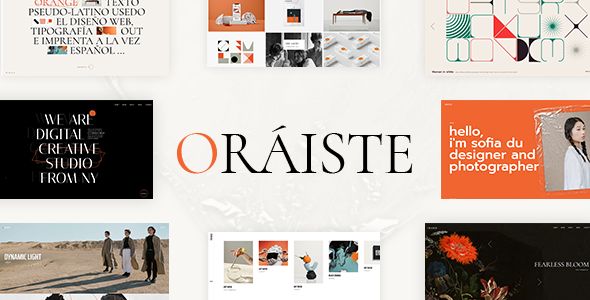
The search for the perfect WordPress portfolio theme is a familiar trench for any web developer or creative agency. The market is saturated with options, most of which fall into two unfortunate camps: the flimsy, feature-bare templates that buckle under the slightest customization, or the monstrous, "all-in-one" behemoths that load a dozen sliders and cripple a server before you’ve even uploaded a logo. It’s a constant battle between aesthetics and performance. Into this fray steps the Oráiste - Creative Portfolio Elementor WordPress Theme, a product that promises a refined, minimalist aesthetic backed by the power of the Elementor page builder. But promises on a sales page are cheap. The real test is in the deployment, the customization, and the long-term maintenance. This is not just a review; it’s a breakdown from a developer’s perspective, a technical guide to what lies beneath its stylish veneer.
The Premise: More Than Just a Pretty Face?
Oráiste, developed by the well-known Envato Power Elite Author Qode Interactive, positions itself squarely at the creative professional. Its demos are a masterclass in modern web design trends: ample white space, elegant typography, fluid AJAX transitions, and portfolio layouts that feel more like a curated gallery than a simple grid. The target is clear: designers, photographers, illustrators, and boutique agencies who value visual impact above all else.
The core promise is a combination of high-end design and user-friendly editing via Elementor. This is an appealing proposition. Clients love Elementor's visual interface, and developers can (in theory) use it to accelerate development, handing off a site that a non-technical user can manage. The theme boasts a collection of pre-designed homepages, inner pages, and portfolio layouts, all importable with a single click. It also includes its own suite of custom Elementor widgets, designed to extend the builder’s native functionality with portfolio-specific modules.
From a design standpoint, the aesthetics are strong. It avoids the garish, over-animated tropes of older "creative" themes. The motion effects are subtle, the layouts are grid-based and logical, and the typography choices are impeccable. It feels expensive. The question is, what is the technical cost of achieving this look? Does it rely on a clean, efficient codebase, or is it a tangled mess of heavy JavaScript libraries and inline styles? Let's find out by putting it through the wringer, starting with the installation process.
Part 1: The Installation and Setup Gauntlet
A theme’s true nature is often revealed within the first 30 minutes of interaction. A smooth, logical setup process inspires confidence. A clunky, error-prone one is a major red flag. Here’s a step-by-step breakdown of getting Oráiste off the ground.
Step 1: Acquisition and Prerequisites
Before you even think about uploading the theme, you need to ensure your hosting environment is up to snuff. This is a non-negotiable step that many beginners overlook. Oráiste, like many modern, media-rich themes, is not built for cheap, under-powered shared hosting. At a minimum, you should have:
- PHP Version: 7.4 or higher (8.0+ is recommended for performance and security).
- PHP Memory Limit: 256M or higher. The demo import process, in particular, can be memory-intensive. I’d recommend 512M to be safe.
- max_execution_time: 300 seconds. This prevents the server from timing out during the import of content and images.
Acquiring the theme files is your next step. While you can purchase a license from the official marketplace, many developers and agencies work with themes under the GPL (General Public License). This allows for modification and redistribution. Sites like gpldock are valuable resources for accessing a vast library of GPL-licensed themes and plugins for testing and development purposes. After downloading from your source, you'll have a zip file, which usually contains the installable theme zip, a child theme zip, documentation, and licensing information.
Step 2: Core Installation and Plugin Dependencies
The initial installation is standard WordPress procedure. You navigate to Appearance > Themes > Add New > Upload Theme and select the `oraiste.zip` file. Do not upload the main package zip; you must extract it first to find the correct installable file.
Upon activation, you’re immediately greeted by a prompt at the top of the dashboard. This is the theme’s administrative layer, powered by the "Qode Framework," kicking in. It alerts you that the theme requires a number of plugins to function correctly. This is the first critical juncture.
Oráiste requires the following plugins:
- Oráiste Core: This is the heart of the theme. It registers the custom post types (like Portfolio), shortcodes, widgets, and theme options. The theme is non-functional without it.
- Elementor: The required page builder. The theme is built around it.
- Contact Form 7: A standard choice for contact forms.
- Qi Addons for Elementor: A large, separate Elementor widget pack, also from Qode Interactive.
- Revolution Slider: A premium slider plugin, bundled with the theme.
This is a moderately heavy list. The inclusion of two separate, large Elementor addon packs (Oráiste Core and Qi Addons) is a slight concern for potential code redundancy and performance overhead. Revolution Slider is a powerful but notoriously heavy plugin, and its use should be carefully considered if page speed is a top priority. The theme provides a convenient interface to install and activate these plugins in bulk. In my test, this process was smooth and completed without errors.
Step 3: The Demo Import - Moment of Truth
With the plugins active, a new "Oráiste" menu appears in the WordPress dashboard. Inside, you'll find the "Import" section. This is what separates a good premium theme from a bad one. Oráiste offers a choice of its various pre-made demos. You can also choose what to import: All Content, Widgets, or Options. For a new build, you'll want "All."
I initiated the full import for the main demo. The process took about 4 minutes on a decent VPS. It provides real-time feedback on what it's importing (posts, pages, media, etc.), which is a nice touch.
Result: Success. Mostly. The import completed without any fatal errors or timeouts. The homepage, inner pages, and portfolio items were all present. The menus were assigned, and the widgets were in place. However, as is common with complex demo imports, a few things needed manual adjustment:
- Slider Import: The Revolution Slider used on the main demo needed to be imported separately. The slider's zip file is typically included in the theme package, and you have to import it via the Revolution Slider plugin's own interface. This is a common extra step that can trip up users.
- Image Placeholders: Some images were replaced with grey placeholders, likely due to stock photo licensing restrictions. This is standard practice, but it means you can't just launch the demo site; you have to go through and replace all the images.
- Minor Styling Glitches: On one or two pages, a heading's color was incorrect, requiring a quick trip into the Elementor editor to reset.
Overall, the import process is a solid B+. It’s not perfectly seamless, but it's far better than many competitors and provides a fantastic starting point, saving dozens of hours of manual page creation.
Part 2: A Developer's Dissection of the Architecture
With the site looking like the demo, it's time to dig deeper. How is this theme actually built? How easy is it to customize beyond the provided options?
The "Qode Framework" Theme Options Panel
Global settings like logos, typography, color palettes, and header layouts are managed in the Oráiste > Theme Options panel. This is a custom-built backend panel, not the native WordPress Customizer. This approach has pros and cons.
Pros:
- Comprehensive: The panel is exhaustive. You can control nearly every global aspect of the site, from the precise dimensions of the logo to the hover state colors of menu items.
- Well-Organized: Options are logically grouped into sections like General, Logo, Fonts, Header, Footer, and Portfolio.
Cons:
- No Live Preview: Unlike the WordPress Customizer, you don't get a real-time preview of your changes. You must save the options and then refresh your frontend to see the effect. This makes fine-tuning colors and fonts a slow, iterative process.
- Proprietary Lock-in: You are learning the Qode Framework's way of doing things. This knowledge doesn't transfer to other themes. It also means the theme is highly dependent on the Oráiste Core plugin. If that plugin is disabled, you lose all your settings.
The typography controls are particularly robust, allowing you to define global font families, weights, and size settings for H1-H6, paragraphs, and other elements. The color options are equally detailed. A developer can quickly establish a client's brand guidelines globally, which is a significant time-saver.
Elementor Integration and Custom Widgets
This is the core of the Oráiste experience. The theme doesn't just use Elementor; it's fundamentally built for it. The real power comes from the custom widgets provided by Oráiste Core and the bundled Qi Addons.
Some of the standout widgets include:
- Portfolio List: This is the most important one. It's highly configurable, allowing you to choose from numerous layouts (grid, masonry, scatter), control the number of columns, define hover effects, and filter by category. The controls are deep and let you replicate almost any of the layouts seen in the demos.
- Interactive Link Showcase: A neat widget for creating full-screen link lists where a corresponding image appears on hover.
- Vertical Split Slider: A visually striking two-column slider where each side scrolls in the opposite direction.
- Section Title: More advanced than Elementor's native heading widget, with options for subtitles, decorative elements, and different alignments.
The integration feels solid. The widgets appear in the Elementor panel alongside the native ones, and their styling options are comprehensive. However, this is also a double-edged sword. To achieve its unique look, Oráiste often relies on these custom widgets. If you try to build a complex layout using only native Elementor widgets, you might struggle to match the theme's aesthetic. You are encouraged, and sometimes forced, to use their tools.
Child Theme and Code Extensibility
Oráiste includes a starter child theme, which is a sign of good practice. I installed it and tested overriding a template part—specifically, a portfolio list template. The theme's file structure is reasonably logical, located in `wp-content/plugins/oraiste-core/post-types/portfolio/templates`. Yes, you read that right. Many of the critical view templates are located in the Oráiste Core plugin, not the theme folder itself.
This is a modern, modular approach. It means that the theme's functionality (the "how") is separate from its presentation (the "what"). While this is technically sound, it can be confusing for developers accustomed to finding everything in the theme folder. Overriding these plugin templates in a child theme is possible, but it requires a deeper understanding of the `add_filter` hooks that dictate the template paths. It's not as simple as just copying a file into your child theme folder with the same directory structure. For deep customizations, you'll need to be comfortable digging into the plugin's code and using WordPress hooks.
The GPL license is a significant advantage here. When faced with a complex theme, having the ability to explore and learn from a variety of Free download WordPress themes can rapidly accelerate your understanding of different architectural patterns, making you better equipped to tackle customizations in a theme like Oráiste.
Part 3: Performance Under the Microscope
A beautiful website is useless if it's too slow to load. I ran the fresh, out-of-the-box demo import through GTmetrix (from a North American server) to get a baseline. No caching. No optimization. Just a raw test.
The Initial Results (Homepage):
- Performance Score (GTmetrix): 78% (C Grade)
- Largest Contentful Paint (LCP): 3.1s
- Total Blocking Time (TBT): 450ms
- Cumulative Layout Shift (CLS): 0.12
- Fully Loaded Time: 5.8s
- Total Page Size: 3.8MB
- HTTP Requests: 95
These numbers are, frankly, average to poor for a modern theme. Let's break down why:
- Unoptimized Images: The demo import pulls in large, uncompressed JPEG and PNG files. The 3.8MB page size is almost entirely due to images. This is the single biggest and easiest problem to fix.
- Excessive DOM Size: Elementor and the complex widgets create a large number of nested `div` elements. This is a common issue with page builders and can slow down rendering.
- JS and CSS Load: With the theme, Elementor, two addon packs, and Revolution Slider, the browser has to download, parse, and execute a significant amount of code. There are 18 separate CSS files and 25 JS files being loaded.
However, this is a starting point, not a final verdict. A competent developer can dramatically improve these scores. Here’s the optimization plan I would implement:
- Image Optimization: Run all media through an optimizer like ShortPixel or Imagify. Convert images to WebP format. This alone would likely cut the page size by 50-70%.
- Caching: Install a robust caching plugin like WP Rocket. This will handle page caching, browser caching, and minify/combine the numerous CSS and JS files, drastically reducing the number of requests.
- Asset Cleanup: Use a plugin like Perfmatters or Asset CleanUp to conditionally disable scripts and styles on pages where they aren't needed. For example, the Contact Form 7 scripts should only load on the contact page, not the homepage. The Revolution Slider scripts should only load on pages that actually use a slider.
- Font Loading: Host fonts locally and preload key font files to improve perceived load time.
After implementing these standard optimizations, it's entirely feasible to get Oráiste to a 95%+ GTmetrix score and an LCP under 1.5 seconds. The key takeaway is that Oráiste is not fast out-of-the-box. It's a high-performance engine that requires professional tuning.
The Final Verdict: Is Oráiste the Right Tool for the Job?
Oráiste is a theme of beautiful contradictions. It offers a stunning, high-end design that can make a portfolio look like a million bucks, but it achieves this with a technical architecture that requires a firm, knowledgeable hand to guide it toward optimal performance.
So, who should use Oráiste?
It is an excellent choice for freelance developers and small agencies who build sites for creative clients. If you are comfortable with Elementor, understand the fundamentals of web performance optimization, and are being paid to deliver a visually impressive, custom-looking website, Oráiste is a massive head start. The demo importer provides a scaffold that can save you 20-30 hours of work, and the custom widgets are genuinely useful for creating the kinds of dynamic portfolio layouts that clients love. It allows you to deliver a premium aesthetic on a mid-range budget.
And who should avoid it?
Complete beginners or DIY business owners should approach with caution. If your technical expertise ends at installing a theme and you expect it to be lightning-fast with no further intervention, you will be disappointed. The reliance on a custom options framework and multiple plugins creates more potential points of failure and a steeper learning curve than a simpler, block-based theme. Likewise, performance purists who shudder at the thought of a page builder and demand a sub-500KB page size will find Oráiste's architecture philosophically offensive. It unapologetically chooses visual flexibility and power over minimalist efficiency.
Ultimately, Oráiste is a professional tool. In the hands of a skilled craftsperson, it can be used to build beautiful, functional, and fast websites. In the hands of a novice, it can easily become a slow, bloated mess. It respects the developer enough to provide a powerful but complex toolkit; it's up to you to use it wisely.