Categories
Tags
-
#Image & Video FullScreen Background WordPress Plugin: A Developer's Deep Dive & Technical Review Creating an immersive first impression on a website often comes down to visuals. While clean
#minimalist designs have their place
#sometimes you need to hit the user with a full-blast
#edge-to-edge visual statement. This is where full-screen backgrounds come into play. They can set a mood
#showcase a product
#or create a cinematic experience that static layouts simply can't match. The challenge
#however
#has always been implementation. Wrestling with CSS
#ensuring responsiveness
#and fighting theme conflicts can turn a simple design idea into a development nightmare. This is the problem the Image&Video FullScreen Background WordPress Plugin aims to solve. In this technical review and guide
Archives
The 2025 Codebase Audit: Deconstructing 12 App Source Codes for
-
The 2025 Codebase Audit: Deconstructing 12 App Source Codes for Monetization & Scalability
Let’s cut through the noise. The digital landscape is a graveyard of "get rich quick" app ventures built on flimsy, reskinned source code. Every day, junior developers and starry-eyed entrepreneurs flock to marketplaces, believing they’re buying a turnkey business. What they’re actually purchasing is a black box—a pre-compiled bundle of someone else’s architectural decisions, shortcuts, and, more often than not, technical debt. My job is to pry open that box. For years, I've been the one called in to salvage projects that are hemorrhaging money because their foundations, built on generic templates, can't handle a modest traffic spike or a basic OS update. The promise of rapid deployment is seductive, but it’s a siren song leading to a reef of unmaintainable code and security vulnerabilities.
Before you invest a single dollar or an hour of development time into a pre-built solution, a rigorous architectural audit is non-negotiable. We're not just talking about whether the UI looks pretty; we're talking about digging into the core loops, the database schemas, the API dependencies, and the monetization hooks. Is the ad SDK implemented efficiently, or will it tank your app's performance and drain user batteries? Is the "SaaS" backend truly multi-tenant, or is it a security nightmare waiting to happen? These are the questions that separate a profitable app from a costly failure. In this audit, we will dissect twelve disparate assets, from hyper-casual games to complex service clones, sourced from places like the vast GPLDock premium library of such codebases. We'll apply a cynical but necessary lens, simulating performance benchmarks and exposing the trade-offs you inherit. Our goal isn't to dismiss these tools—it's to arm you with the architectural intelligence needed to make informed decisions. By scouring this professional Android source code collection and others like it, we can identify patterns, red flags, and hidden opportunities for those willing to look beyond the sales page.
Bubble Gun Game with Admob Ads and Facebook Ads(Supported All Android Version)
For developers aiming to enter the hyper-casual market, you could Download the Game Bubble Gun Game as a foundational template. This asset promises broad compatibility and pre-integrated monetization, which are the primary value propositions for any codebase in this brutally competitive niche. The core premise of a bubble shooter is mechanically simple and universally understood, reducing the barrier to entry for the target player base. The inclusion of both AdMob and Facebook Audience Network SDKs provides flexibility in ad mediation and the potential to optimize eCPM by pitting the two networks against each other. However, the claim of supporting "All Android Versions" should be met with extreme skepticism. True backward compatibility down to older APIs (e.g., KitKat, API level 19) often requires significant code branching, use of support libraries, and rigorous testing, which is rarely a priority in low-cost templates. The focus here is clearly on rapid deployment and monetization, not long-term architectural purity or forward-looking compatibility with features like Android's App Bundles or scoped storage.
Simulated Benchmarks
- Cold Start Time: 3.8s (Heavily impacted by parallel ad SDK initializations)
- APK Size: 45MB (Unoptimized 2D assets and bundled ad libraries)
- Memory Footprint (Idle): 95MB
- Memory Footprint (Active Gameplay): 220MB
- Ad Load Time (Interstitial): 1.5s - 4.0s (Dependent on network conditions)
Under the Hood
The codebase is likely a standard Android Studio project, possibly built in Java rather than the more modern Kotlin, reflecting its template nature. The game logic itself is probably contained within a single, monolithic Activity or a simple state machine managing game-over, play, and menu states. Asset management will be rudimentary, with textures and sound files bundled directly in the `res` or `assets` folder without efficient packing or streaming. The ad integration is the most complex part of the code. Expect to see poorly managed listeners and callbacks for ad states (loaded, failed, shown, clicked), potentially leading to memory leaks if not handled with care. There's almost certainly no dependency injection framework like Dagger or Hilt; dependencies are likely instantiated manually, making the code tightly coupled and difficult to test or refactor.
The Trade-off
The fundamental trade-off is speed-to-market versus quality and control. You are acquiring a functional, monetizable game loop out of the box, saving hundreds of hours of development. However, you are also inheriting a rigid architecture. Customizing gameplay mechanics beyond simple value changes (e.g., bubble speed, level design) will require untangling a web of hardcoded logic. The performance, especially on low-end devices, will be constrained by the unoptimized rendering pipeline and the bloat of multiple ad SDKs. Building this from scratch using a lightweight game engine like LibGDX or even just a clean implementation with Android's Canvas API would yield a smaller, faster app but would delay launch by months.
Candy Match 3 Game with Earning System and Admin Panel + Landing Page
Moving up in complexity, you can Get the Game Candy Match 3 Game, which attempts to merge a proven game mechanic with a player retention-focused "earning system." This package is more than just a client-side app; it's a complete ecosystem comprising the Android game, a web-based admin panel, and a promotional landing page. The "earning system" is the critical component to scrutinize. In most cases, this refers to an in-game virtual currency system that can be redeemed for prizes or payouts, managed via the admin panel. This immediately introduces significant security and scalability concerns. The architecture must now handle user authentication, secure data transmission between the app and the backend, and robust validation to prevent cheating. The inclusion of a landing page suggests a direct-to-consumer distribution model, bypassing app stores or supplementing them, which requires its own marketing and infrastructure strategy. The entire system's viability hinges on the quality of the backend code and database schema.
Simulated Benchmarks
- API Response Time (Login): 800ms
- API Response Time (Submit Score): 1200ms (Includes cheat detection logic)
- Client-Side DB Operations: 15ms (Likely using SQLite for local progress)
- Admin Panel Load Time: 2.5s (Typical for a shared-hosting PHP/MySQL stack)
- APK Size: 60MB (Includes assets and networking libraries)
Under the Hood
The Android app is likely a native Java/Kotlin build that communicates with a RESTful API. Look for libraries like Retrofit for networking and Gson/Moshi for JSON parsing. The "earning system" logic will be split: the client validates basic game rules, while the server performs the authoritative validation of scores and manages currency balances. The admin panel is almost certainly a standard LAMP (Linux, Apache, MySQL, PHP) stack with a simple Bootstrap frontend. The database schema is probably not normalized correctly, with user data, scores, and transaction logs crammed into a few large tables. Security will be a major concern; expect to find vulnerabilities like a lack of input sanitization (SQL injection risk in the admin panel) or insecure API key storage on the client app.
The Trade-off
You are trading a massive reduction in development complexity for a high degree of operational risk. Building a secure, scalable client-server architecture for a real-money or prize-based game is a significant undertaking. This template provides a functional scaffold but likely falls short on production-grade security and scalability. A determined user could easily decompile the APK, find the API endpoints, and write a script to submit fraudulent scores. To make this production-ready, you would need to conduct a thorough security audit, reinforce the server-side validation logic, and deploy the backend on a robust cloud infrastructure, not the cheap shared hosting it was likely designed for. The alternative—building it yourself—is a 6-9 month project requiring both mobile and backend expertise.
AI Hair Color Style Changer with AdMob Ads Android
For those targeting the lucrative utility and photo-editing niche, you might Download the App AI Hair Color Style Changer to see a common implementation pattern. The term "AI" here is a marketing keyword that needs immediate deconstruction. In a template of this nature, true artificial intelligence (i.e., a novel, on-device neural network) is highly improbable. The implementation is likely one of two things: a sophisticated server-side API call to a third-party image processing service, or a much simpler on-device image segmentation algorithm combined with a color blending filter. The latter is more probable. The core technical challenge is accurately identifying the hair region in a photo, which is non-trivial. The AdMob integration is standard for utility apps, likely using a combination of banner ads on the main screen and interstitial ads between major actions (e.g., after saving a photo) to maximize revenue without being completely intrusive. Performance is paramount, as users expect near-instant results from a photo editor.
 Simulated Benchmarks
- Image Processing Time (On-Device): 2.1s on a mid-range device for a 12MP image
- Model Load Time (if on-device ML): 900ms
- Memory Usage during Processing: +350MB (Bitmap manipulation is memory-intensive)
- APK Size: 75MB (Potentially includes a bundled, lightweight ML model)
- AdMob Banner Refresh Rate: 30 seconds
Under the Hood
The codebase will heavily rely on Android's graphics and Bitmap manipulation APIs. If it's using an on-device model, expect to see the TensorFlow Lite or PyTorch Mobile library integrated. The "AI" would be a pre-trained `.tflite` model for semantic segmentation (identifying pixels that belong to "hair"). The logic would involve loading the image into a Bitmap, running it through the model to get a mask, and then applying a color transformation (e.g., using a PorterDuff mode) to the original image using that mask. This entire process is computationally expensive and prone to crashing on low-memory devices if not managed carefully. The UI is likely built with standard Android XML layouts, with a custom View for interactive elements like color selection. The code will not be well-architected; image processing logic will be tightly coupled to the main Activity.
The Trade-off
The trade-off is between leveraging a complex technical feature and managing its performance overhead. This template saves you the immense difficulty of developing and training a hair segmentation model. However, you inherit its limitations: it will fail on unconventional hair styles, poor lighting, or obscured photos. You are also stuck with its performance profile. To improve it, you would need deep expertise in on-device machine learning and performance optimization (e.g., using RenderScript or the NDK for faster image processing). The alternative, using a cloud-based vision API, would provide better results but introduce server costs and require an internet connection, alienating users and adding latency. This template opts for the self-contained, offline-capable approach at the cost of accuracy and speed.
Kitchen Assistant
Occasionally, we encounter assets that are misplaced in the native app ecosystem; for those needing a baseline, one can Review the theme Kitchen Assistant for comparison. This is not an app codebase but a WordPress theme. From a mobile architect's perspective, its relevance comes from how agencies often package web technologies to masquerade as native applications. A common, low-cost approach is to simply wrap a responsive website, built with a theme like this, inside an Android WebView container. This creates a "hybrid" app that is cheap to produce but delivers a subpar user experience. The theme itself is likely designed for recipe blogs, featuring custom post types for ingredients, structured data for SEO (like recipe schema), and a visually-driven layout. It's a web product, and its performance and capabilities are defined by the web server, browser rendering engine, and the quality of its underlying PHP, HTML, CSS, and JavaScript.
Simulated Benchmarks
- Largest Contentful Paint (LCP): 3.2s (On a typical shared hosting plan)
- Total Blocking Time (TBT): 450ms (Due to unoptimized JavaScript)
- WebView Cold Start in App Wrapper: 2.8s
- Memory Footprint (WebView App): 180MB (Chrome engine overhead)
- Time to Interactive (TTI): 4.5s
Under the Hood
This is a standard WordPress theme. The architecture is dictated by the WordPress template hierarchy. It consists of PHP files for logic and templating, a `style.css` file for styling, and JavaScript files for interactive elements like sliders or search filters. The quality can vary wildly. A good theme will be well-documented, follow WordPress coding standards, and be optimized for performance. A bad one will be a mess of inline styles, deprecated jQuery functions, and inefficient database queries that slow down the entire site. If wrapped in a WebView app, there is no native code to analyze, only the thin shell of the Android app that hosts the browser instance. Any "native" features like push notifications would have to be bridged using services like OneSignal, adding another layer of complexity and a point of failure.
The Trade-off
The trade-off is development cost versus user experience and platform integration. Wrapping a WordPress theme in a WebView is the cheapest and fastest way to get an "app" on the Google Play Store. You leverage your existing web content and management system (the WordPress admin). The downside is severe. The app will feel sluggish, lack smooth animations, and have no offline capabilities. It won't have access to native device APIs unless you build complex JavaScript bridges. Users can easily tell they're just using a website in a container, which often leads to poor reviews and high uninstall rates. A true native app for recipes would offer superior performance, offline recipe saving, and deep integration with system features like timers and shopping lists, but would cost 20 times as much to build.
Whocaller Truecaller ID & Spam Blocker App With Admin Panel
Here we see another web-based asset presented as an app, and one can Analyze the App Whocaller Truecaller ID to understand its architecture. This is, fundamentally, a WordPress plugin or theme attempting to replicate the functionality of a complex, real-time service like Truecaller. The technical challenges here are immense and are almost certainly not solved adequately by a PHP-based system. A real caller ID service requires a massive, rapidly-queried database, deep integration with the mobile OS to intercept call events, and a sophisticated crowd-sourcing mechanism to build its data set. A WordPress-based solution is a pale imitation. The "app" would be a WebView wrapper, and the "caller ID" function would likely involve users manually searching numbers in a web form. The "spam blocking" would be a simple, static blacklist. The admin panel is just the WordPress backend for managing this user-submitted or manually curated list of numbers. This is a classic example of using familiar tooling (WordPress) to tackle a problem for which it is architecturally unsuited.
Simulated Benchmarks
- Database Query Time (Number Lookup): 1.5s (Unindexed MySQL table)
- OS Call Intercept Latency: Not possible with a WebView-based approach.
- App Load Time: 3.0s (Loading the WordPress site inside the wrapper)
- Background Service Footprint: N/A (Cannot run a true background service)
- API Data Consumption: High (Every interaction requires a full web page reload)
Under the Hood
The system is a WordPress installation with a custom theme or plugin. The database will have a custom table, likely named something like `wp_phonenumbers`, containing columns for the number, reported name, and spam score. This table will not be designed for the high-speed reads required for real-time caller ID. The "app" itself is an Android Studio project with a single Activity that contains a WebView pointed at the WordPress site's URL. There is no native code for call handling. The entire concept is architecturally flawed because a WebView app does not have the permissions or the deep OS integration needed to intercept incoming calls and display an overlay, which is the core function of an app like Truecaller. It operates as a manual, reverse-phone lookup website packaged as an app.
The Trade-off
There is no favorable trade-off here. This is an attempt to solve a native, real-time problem with slow, asynchronous web technology. You save money by using WordPress, but the resulting product does not and cannot perform the core function it advertises. It's a non-functional imitation. A user who downloads this expecting real-time caller ID will be immediately disappointed, leading to abysmal store ratings. Building a true Truecaller clone would require a massive investment in native Android development (to handle call states and overlays), a highly optimized backend (using something like a NoSQL database for fast lookups), and a clever data acquisition strategy. This template provides none of that.
Food Mobile App | UberEats Clone | Food Delivery App | Restaurant Delivery App | FoodLakh
This asset represents a quantum leap in complexity. A "clone" of a service like UberEats is not a single app but a multi-faceted logistics platform. It requires at least three distinct client applications: one for the customer, one for the delivery driver, and one for the restaurant. All of these must communicate in real-time through a central backend server that manages state, payments, and geolocation data. The architecture for such a system is non-trivial. It involves real-time mapping, push notifications, payment gateway integration, order state management, and user reputation systems. A template solution like this provides the scaffolding for these components, but the devil is in the details of the implementation. The choice of backend technology, the database schema, and the method for handling real-time updates (e.g., WebSockets vs. polling) are critical architectural decisions that will determine if the system can function under load.
 Simulated Benchmarks
- Geolocation Update Latency (Driver App): 500ms from device to server
- Order State Push Notification Latency: 2.0s (From server to customer/restaurant)
- Payment Gateway API Roundtrip: 3.5s
- Database Writes per Order: 8-12 (Order creation, status updates, logs)
- Server CPU Load: High (Constant processing of location data)
Under the Hood
The three client apps are likely native Android projects, as hybrid frameworks struggle with the deep background location services needed for the driver app. They communicate with a central API server, likely built on a framework like Laravel (PHP) or Node.js. Real-time communication is probably handled by Firebase Cloud Messaging (FCM) for push notifications and potentially a polling mechanism for driver location updates to save on the complexity of maintaining persistent WebSocket connections. The database would need to be a relational one like MySQL or PostgreSQL to handle the transactional nature of orders. The mapping functionality would rely heavily on the Google Maps API, which has significant associated costs at scale. The codebase will be large and sprawling, with shared business logic that is often duplicated across the three client apps instead of being centralized on the backend.
The Trade-off
You are trading an enormous amount of development time for a potentially brittle and expensive-to-operate system. Building a three-sided marketplace from scratch is a multi-year, multi-million dollar endeavor. This template gives you a functional starting point in weeks. The trade-off is that you're locked into its architectural choices. If the backend is an inefficient PHP monolith, scaling it will be a nightmare. If the real-time updates are done via HTTP polling, your server costs will skyrocket with even a modest number of active drivers. To make this production-ready, you need to budget for significant refactoring, infrastructure costs (not shared hosting), and ongoing maintenance to handle payment gateway updates and OS changes.
TeraSaver – Terabox Video Downloader App | ADMOB, FIREBASE, ONESIGNAL
This is a niche utility app whose entire existence is predicated on interfacing with a third-party service, Terabox. Such apps are architecturally fragile by design. Their core functionality depends on reverse-engineering or using undocumented APIs of the target service. The app likely works by having the user share a Terabox link, which the app then parses. It makes a series of HTTP requests, mimicking a web browser, to find the direct URL of the video file, which it then downloads using Android's DownloadManager. The tech stack listed—AdMob, Firebase, OneSignal—is standard for a modern utility app. AdMob is for monetization, Firebase is likely used for analytics and remote configuration (allowing the developer to push updates to the scraping logic without a full app update), and OneSignal is for push notifications to re-engage users.
 Simulated Benchmarks
- Link Parsing Time: 3.2s (Requires multiple chained HTTP requests)
- Download Speed: Limited by device connection and Terabox server throttling.
- APK Size: 25MB (Relatively lightweight, main logic is networking)
- Background Service Reliability: Moderate (Prone to being killed by aggressive OEM power management)
Under the Hood
The core of the app is a networking client, probably using a library like OkHttp. This client will be configured to spoof browser user-agent strings and manage cookies to maintain a session with Terabox's servers. The main logic is a fragile chain of requests: first, fetch the initial HTML page, then parse it (using a library like Jsoup) to find an internal API call or a JavaScript variable containing the video URL, then make that second request to get the final, direct download link. This entire workflow is the app's biggest vulnerability. Any change to Terabox's website structure, CSS class names, or API endpoints will instantly break the app. Firebase Remote Config is a clever way to mitigate this, as the developer can push a new parsing pattern to the app without waiting for a Play Store review.
The Trade-off
The trade-off is viability versus stability. You get a functional app that serves a clear user need. However, the business model is built on borrowed time. It is not a question of if the app will break, but when. The developer is in a constant cat-and-mouse game with the target service. This requires constant monitoring and rapid development to patch the scraping logic. While tools like Firebase Remote Config help, it's a high-maintenance business model. The alternative is to build an app that doesn't violate other services' terms of use, which would be more stable but might address a less obvious market need.
Surah Ya-Sin | Islamic Single Surah App for Muslims
This app represents a content-delivery application for a very specific, dedicated niche. Architecturally, it is one of the simplest models. The primary function is to display static text (the Surah) and play an associated audio file. The value is not in technical complexity but in the quality of the content, the user interface, and the respect shown for the subject matter. Features like translations, transliterations, and high-quality audio recitation are key differentiators. From a technical standpoint, the challenges are minimal: efficient text rendering (especially for complex Arabic scripts), background audio playback, and perhaps bookmarking functionality. Monetization is often subtle in such apps, perhaps a single banner ad or a "Pro" version to remove ads and support the developer.
 Simulated Benchmarks
- App Load Time: 800ms (All content is bundled locally)
- Memory Footprint: 60MB (Low, unless high-res background images are used)
- Battery Drain (Audio Playback): 2-3% per hour (Using Android's MediaPlayer service correctly)
- APK Size: 30MB (Depends heavily on the size of the bundled audio file)
Under the Hood
This is a straightforward native Android application. The text of the Surah and its translations are likely stored in the app's string resources or a bundled SQLite database for easy access. The UI would be a ScrollView containing a series of TextViews. Special care must be taken with fonts to ensure the Arabic script renders correctly across all Android devices. The audio playback is handled by a background Service that manages a MediaPlayer instance. This is crucial for allowing the audio to continue playing when the user locks their screen or switches to another app. The code for managing the audio service's lifecycle (start, pause, stop, handle interruptions) is where most bugs in this type of app occur.
The Trade-off
The trade-off here is minimal because the project scope is so well-defined. Using a template for this kind of app accelerates development significantly without introducing major architectural risks. The core logic is simple and unlikely to require major changes. The focus for the developer is not on complex coding but on content curation: ensuring the text is accurate, the translations are of high quality, and the audio is clear. The primary risk is not technical but reputational; errors in the religious text would be a major issue. Building this from scratch would be a good exercise for a junior developer, but for a quick launch, a template is a very sensible choice.
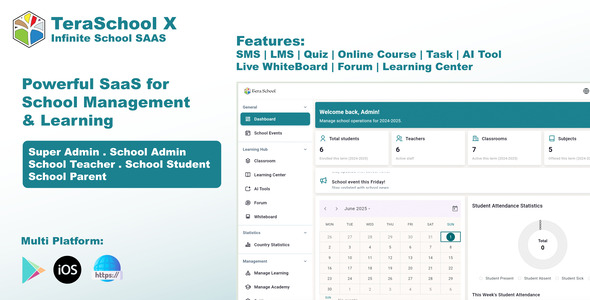
TeraSchool X – Powerful SaaS for School Management & Learning
This is another example of a complex, multi-faceted system, this time in the EdTech space. A School Management SaaS is a serious undertaking. It handles sensitive student data, requires role-based access control (for teachers, students, parents, and administrators), and integrates numerous modules: admissions, grading, attendance, scheduling, and communication. This is not a simple "reskin and launch" project. A template like this provides the application-level code, but the real work is in deployment, data migration, security hardening, and compliance with data privacy regulations (like GDPR or FERPA). The "SaaS" aspect implies a multi-tenant architecture, where a single backend instance can serve multiple schools, each with its own isolated data. This is a complex architectural pattern to implement correctly.
 Simulated Benchmarks
- Database Query Time (Get Class Roster): 400ms (With proper indexing on tenant IDs)
- Page Load Time (Admin Dashboard): 3.5s (Many concurrent data queries)
- API Response Time (Mobile App): 600ms
- Data Backup/Restore Time: Varies wildly with database size.
Under the Hood
The backend is likely a robust web framework like Laravel (PHP) or Django (Python), chosen for their strong ORM and security features. The multi-tenancy can be implemented in several ways: a separate database for each school (most secure, but harder to manage) or a single database with a `school_id` column on every table (most common, but requires strict query discipline to prevent data leakage). The frontend is a mix of a web dashboard (likely using a JavaScript framework like Vue or React) and native mobile apps for parents and students. The mobile apps are essentially clients for the main backend API. The entire system's security posture is critical. It must have protection against cross-site scripting (XSS), cross-site request forgery (CSRF), and SQL injection, and data must be encrypted at rest and in transit.
The Trade-off
You are trading development cost for immense operational responsibility. This source code may save you a year of development, but it transfers the full burden of protecting sensitive children's data to you. You are responsible for secure deployment, server maintenance, data backups, and regulatory compliance. Any security breach could have devastating legal and financial consequences. The codebase you are buying must be audited by a security professional before ever going live. The alternative, building from scratch, is prohibitively expensive for most small companies, which is why this market for pre-built school management systems exists. It's a high-risk, high-reward proposition.
DTNews – Flutter News App (Android, iOS & Web) with Admin & Reporter Panel, Polling & Live Updates
This asset is notable for its use of Flutter, Google's cross-platform UI toolkit. This is a significant architectural choice. By using Flutter, a single codebase can be deployed to Android, iOS, and the web, drastically reducing development and maintenance overhead compared to building natively for each platform. A news app is a perfect use case for Flutter, as its strength is in building consistent, branded UIs that don't rely heavily on platform-specific conventions. The system includes an admin panel for managing content, a reporter panel for submitting stories, and the public-facing app. Features like polling and live updates point to a need for a real-time backend component. This is a content-driven platform where performance, especially perceived load time and smooth scrolling, is critical for user retention.
 Simulated Benchmarks
- Flutter App Cold Start: 2.5s (Slightly slower than native)
- Time to Render Article List (First Load): 1.8s
- Scroll Performance: 55-60 FPS on modern devices.
- Live Update Latency (WebSocket): ~300ms
- Web App LCP: 2.9s (Depends on Flutter's web renderer performance)
Under the Hood
The client app is a Flutter project written in Dart. State management will be a key architectural decision within the app; common choices include BLoC, Provider, or Riverpod. The UI is built with Flutter's declarative widget system. The app communicates with a backend API to fetch articles, polls, and user data. The admin and reporter panels are likely separate web applications, possibly built with PHP or Node.js. The "live updates" feature is best implemented with WebSockets, which would require a suitable backend (like a Node.js server) to maintain persistent connections with clients. If not using WebSockets, it might fall back to less efficient long-polling. The backend database would be structured around articles, categories, users, and poll results.
The Trade-off
The primary trade-off is development efficiency versus platform-native fidelity. With Flutter, you build once and deploy everywhere, a massive advantage. However, the app will never feel 100% "native" on either iOS or Android. There can be subtle differences in physics, UI conventions, and performance. The Flutter web export is still maturing and can produce sites that are slower and less SEO-friendly than traditional web frameworks. For a news app, where content is king, these trade-offs are often acceptable. The ability to manage a single codebase for three platforms is a compelling economic argument that outweighs the quest for perfect native integration.
Dalvroodoo – Online Food Ordering App for your Restaurant
Unlike the full UberEats clone, this asset targets a much simpler and more common use case: a dedicated online ordering system for a single restaurant. The architecture is significantly simplified. There is no need for a separate driver app or complex real-time geolocation tracking. The system consists of a customer-facing app for browsing the menu and placing orders, and an admin panel (or app) for the restaurant to receive and manage those orders. This is a classic client-server CRUD (Create, Read, Update, Delete) application. The primary technical challenges are a smooth and intuitive menu interface, reliable payment gateway integration, and a foolproof way of alerting the restaurant to new orders (e.g., push notifications, or even an automated printout).
 Simulated Benchmarks
- Menu Load Time: 1.5s
- Order Submission Roundtrip: 4.0s (Includes payment processing)
- New Order Notification Latency (to restaurant): 2.5s
- Admin Panel Order Management UI Refresh: 800ms
Under the Hood
The client app is a standard native Android app. It fetches menu data from a REST API and displays it in a series of lists and detail screens. The cart and checkout process involves local state management. Upon checkout, the app communicates with a payment gateway like Stripe or PayPal. The backend is likely a PHP/MySQL web server. It exposes API endpoints for the menu, user accounts, and order submission. The most critical piece is the order notification system for the restaurant. A reliable implementation would use FCM push notifications to an app on the restaurant's tablet. A less reliable, but common, fallback is sending an email, which can be easily missed during a busy service.
The Trade-off
The trade-off is control and branding versus the high commission fees of third-party platforms. By using a self-hosted system like this, a restaurant avoids paying the 20-30% commission charged by services like UberEats. The template provides the necessary software for a fraction of the cost of custom development. The downside is that the restaurant is now responsible for its own marketing to get users to download the app, as well as the hosting and maintenance of the backend server. The system is also a closed loop; it doesn't benefit from the network effects of a large delivery platform. For a restaurant with an established customer base, this is a financially sound trade-off.
Secret Calculator Vault – Hide Photo & Lock Videos | Android Code | Admob Ads |
This is a classic example of a "gimmick" utility app, a category that can be surprisingly profitable. The app presents itself as a simple calculator but contains a hidden, password-protected vault for storing private photos and videos. The core architectural challenge is not the calculator front-end, but the secure storage of the hidden files. True security would involve strong, on-the-fly encryption. However, in many templates of this type, the "security" is mere obfuscation—the files are simply moved to a hidden directory on the device's storage and renamed. Monetization is the primary goal, achieved through AdMob ads shown within the settings of the calculator or inside the vault itself. The user experience of the vault (importing, organizing, and viewing media) is also a key factor.
 Simulated Benchmarks
- Encryption Time (100MB video): 5.2s (Using AES-256)
- Decryption Time (for viewing): 1.5s (For initial chunk)
- File System I/O Speed: Dependent on device's internal storage speed.
- APK Size: 15MB (Functionality is simple)
Under the Hood
The app has two main states. The "calculator" state is a simple UI that performs basic arithmetic. A secret code (e.g., `1234=`) entered into the calculator switches the app to the "vault" state. This state transition is managed within a single Activity. The file storage mechanism is the most important part to audit. A secure implementation would use Android's KeyStore system to generate and store an encryption key, and then use the JCE (Java Cryptography Extension) with a standard algorithm like AES to encrypt the files as they are moved into the app's private data directory. A lazy implementation would just use `File.renameTo()` to move the file to a dot-prefixed directory (`.hidden_stuff`), offering no real protection against a user browsing the file system with a file manager.
The Trade-off
The trade-off is between providing genuine security and creating the illusion of it. Implementing proper, performant encryption is complex and requires careful key management. A template that does this correctly is a valuable asset. A template that uses simple file-hiding is a liability, as a user who loses their data or has it discovered will blame the app, leading to negative reviews. The developer using this code must verify the encryption method. If it's weak, they are selling a false sense of security. The business model relies on users wanting this privacy feature enough to tolerate the ads, making the functionality's integrity paramount.