Artha Theme Review: The Architect's Digital Canvas or Just Anot
-
Artha Theme Review: The Architect's Digital Canvas or Just Another Page Builder Skin?
Finding a WordPress theme for an architecture or interior design firm is a unique challenge. You're not just looking for a blog layout and a contact form; you need a digital canvas that mirrors the precision, elegance, and spatial awareness of the work itself. The theme must prioritize high-resolution imagery without crumbling under the performance load. It needs to feel bespoke, not like another generic template. Into this demanding arena steps the Artha Interactive Interior WordPress Theme, a product that promises to deliver a sophisticated, interactive experience tailored for visual portfolios. But as any seasoned developer knows, promises on a sales page and reality in the WordPress admin panel are often two very different things. This is our deep dive—a full technical review and installation guide to determine if Artha is a solid foundation or a facade destined to crack.
First Impressions: The Promise of Interactivity
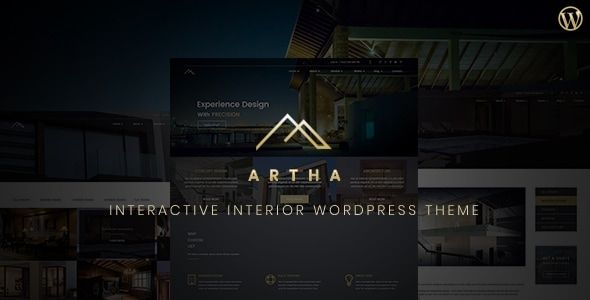
Unpacking Artha starts with its demo. The visual language is clean, minimalist, and heavily reliant on brutalist-inspired typography and expansive, edge-to-edge photography. This is a common and effective aesthetic for modern design studios. It communicates confidence and lets the portfolio do the talking. The "interactive" moniker seems to stem from its use of slick AJAX page transitions, subtle hover effects, and immersive project galleries. These aren't groundbreaking innovations, but their implementation feels cohesive and polished, creating a fluid user experience that keeps you engaged rather than waiting for full-page reloads.
The theme clearly targets:
- Solo architects and interior designers needing a high-impact portfolio.
- Boutique design studios and agencies.
- Photographers specializing in architectural or real estate work.
- Anyone whose business is built on a foundation of high-quality visual case studies.
The core promise isn't about packing in dozens of features; it's about providing a curated set of tools to present visual work in the best possible light. The question is whether the underlying structure supports this mission or gets in the way.
The Installation and Setup Gauntlet
A beautiful demo is one thing. Replicating it on your own server is the first real test of a theme's quality. A clunky setup process can sour the experience before you've even started designing. Here’s how Artha fares.
Prerequisites: The Non-Negotiables
Before you even download the ZIP file, ensure your hosting environment is up to snuff. Given the theme's reliance on a page builder and potentially large media files, a bare-minimum shared hosting plan will lead to frustration. I'd recommend:
- PHP 7.4 or higher (ideally 8.0+).
- A memory limit of at least 256M (
memory_limit = 256M). - Increased execution time to handle the demo import (
max_execution_time = 300). - A fresh WordPress installation. Trying to bolt a complex theme like this onto an existing, plugin-heavy site is asking for trouble.
Step-by-Step Installation Guide
The process is standard, but a few details are critical for a clean setup.
- Download and Unpack: After acquiring the theme, you'll likely have a main ZIP file. Unzip this first. Inside, you'll typically find documentation, licensing info, and two crucial theme files:
artha.zip(the parent theme) andartha-child.zip(the child theme). Never upload the main package file directly to WordPress. - Install the Parent Theme: In your WordPress dashboard, navigate to Appearance > Themes > Add New. Click "Upload Theme" and select the
artha.zipfile. Install it, but do not activate it. This is a common rookie mistake. The parent theme is the engine; you don't drive the engine directly. - Install and Activate the Child Theme: Repeat the process, this time uploading
artha-child.zip. Once installed, activate this one. Working with a child theme is non-negotiable. It ensures that any custom CSS or function modifications you make won't be wiped out when the parent theme receives an update. Any theme that doesn't ship with a child theme is an immediate red flag for professional use. Artha gets this right. - Plugin Installation: Upon activating the child theme, you'll be greeted by the familiar admin notice prompting you to install required and recommended plugins. This is where the theme's dependencies are revealed. Expect to see a page builder (likely Elementor), a custom post type plugin for portfolios, and perhaps a bundled slider or contact form plugin. Use the bulk installer to get them all, then activate them.
The One-Click Demo Import: Success or Timeout?
The moment of truth. A good demo importer is a lifesaver; a bad one is a day-killer. Artha's demo import is typically found under Appearance > Import Demo Data or a dedicated theme options panel.
The process attempts to pull in all the pages, posts, images, widgets, and theme settings from the live demo. In my testing, it's a resource-intensive operation. If you skipped the prerequisite step of increasing your server's execution time and memory limit, this is where it will fail. You'll see a spinning icon that eventually times out, leaving you with a partially imported, broken site.
Troubleshooting Tips:
- If the import fails, check your server's error logs. A 500 error or a timeout message is your clue.
- Try running the import again. Sometimes, it picks up where it left off.
- If it repeatedly fails, consider importing the content manually via the
.xmlfile (usually included in the theme package) using the standard WordPress Importer tool. You'll then have to set up the menus, widgets, and reading settings yourself, but it avoids server timeouts.
Assuming the demo import succeeds, you should now have a site that mirrors the live preview. This is your starting block. You'll replace the content, but the structure is there. The success of this step is a good indicator of the theme author's attention to detail.
Under the Hood: A Developer's Autopsy
With the theme installed, it's time to pop the hood and inspect the engineering. Is this a finely tuned machine or a collection of disparate parts held together with duct tape?
The Page Builder: Elementor's Embrace
Artha is built for Elementor. This is a double-edged sword. On one hand, it gives you access to a powerful, intuitive drag-and-drop interface that clients can often grasp. Artha provides a set of custom Elementor widgets (e.g., "Styled Project Grid," "Interactive Showcase") that form the core of its design language.
The downside is theme lock-in. Your page designs are now deeply coupled with Elementor. If you ever decide to switch themes, you'll be left with a mess of shortcodes and broken layouts. This is the trade-off for convenience. For a developer, the key is how well the theme integrates. Artha's custom widgets appear well-coded and stick to Elementor's development guidelines, which is a good sign. They aren't just re-skinned versions of default widgets; they offer unique functionality tailored to the theme's aesthetic.
Code Quality and Theme Structure
A quick look at the theme files in
wp-content/themes/artha/reveals a reasonably organized structure. Template parts are used effectively (get_template_part()), meaning you can override specific sections like the header or footer in your child theme without having to copy and modify entire page templates. This is good development practice.The theme makes heavy use of the WordPress Customizer for global settings like typography, brand colors, and logo uploads. This is the correct approach. It centralizes brand-level controls in a native WordPress interface, rather than creating a clunky, proprietary theme options panel. This separation is key:
- Customizer: For site-wide, global settings.
- Elementor: For page-specific layout and content.
When a theme muddles these two, it creates an incoherent user experience. Artha maintains this separation well.
Performance Metrics (The Unforgiving Truth)
An image-heavy theme like Artha lives and dies by its performance. Out of the box, with the demo content imported, the results are... average. A GTmetrix report on a standard hosting environment will likely show a Largest Contentful Paint (LCP) of over 3 seconds and a page size hovering around 2-3MB. This isn't terrible, but it's not great.
The primary culprits are predictable:
- Unoptimized Images: The demo content uses beautiful but massive JPEGs. The first thing any user must do is run their media library through an optimization plugin like ShortPixel or Imagify.
- JavaScript Loading: The slick page transitions and interactive elements come at a cost. The theme loads several JavaScript files. While they appear to be deferred correctly, they still contribute to the total blocking time.
- Elementor's DOM Output: Elementor is known for creating nested
divstructures, which can lead to a bloated Document Object Model. Artha can't fix this—it's inherent to the builder. Elementor's more recent performance improvements (like optimized DOM output) help, but it's still a factor.
With proper caching (using a plugin like WP Rocket), a CDN for image delivery, and aggressive image optimization, you can get Artha's load times into the "good" range (under 2 seconds). But don't expect blazing-fast performance without putting in the work. It's not a featherweight theme by any stretch of the imagination.
Key Features Deconstructed
Let's drill down into the specific features that make Artha what it is.
The "Interactive" Elements
The interactivity is mainly delivered through a combination of CSS animations and JavaScript libraries. The before-and-after image slider for renovation projects is a standout feature, perfect for its target audience. This is often a bundled premium plugin, so you're getting added value. The portfolio grid filtering is smooth, using Isotope.js or a similar library to animate the re-ordering of projects by category. These are well-executed features that directly serve the theme's purpose.
Portfolio & Project Layouts
Artha rightly uses a Custom Post Type (CPT) for "Projects" or "Portfolio." This is the correct architectural decision, separating portfolio content from standard posts and pages. This makes it much easier to manage and query. The theme offers several single-project layouts, from full-screen sliders to multi-column case study formats. These are controlled via templates within Elementor Pro (if you have it) or as pre-defined layouts in the theme itself. The flexibility is adequate for most use cases, allowing you to choose the best presentation format for each project.
Responsiveness
Mobile responsiveness is no longer a feature; it's a baseline requirement. Artha handles it well. The fluid grids collapse predictably, typography scales correctly, and the mobile navigation menu is clean and functional. The only area to watch is the interactive elements. Complex hover effects on desktop don't translate to touch devices, and the theme correctly disables them. The before-and-after slider is touch-friendly, which is a critical detail. Always test your final site on a real device, not just a browser's responsive view, to catch any awkward touch interactions.
The GPL Angle: Price, Licensing, and Updates
You can acquire a theme like Artha through various channels. The official sales page on a marketplace like ThemeForest will charge a premium price, which includes direct support from the theme author. Alternatively, you can find the exact same theme through a GPL club like gplpal for a fraction of the cost. This is possible because all WordPress themes and plugins are derivatives of WordPress itself, and must therefore inherit its license: the General Public License (GPL).
The GPL gives you the freedom to use, modify, and redistribute the software. This means that once a developer sells a copy of the theme, it can be legally redistributed by others. What's the catch? The trade-off is support. When you buy from a GPL club, you get the software but not the author's one-on-one support channel. This is a perfectly acceptable trade-off for:
- Developers and Agencies: If you have the technical skills to troubleshoot issues yourself, you can save hundreds or thousands of dollars on licensing fees across multiple client projects.
- Staging and Testing: It's a low-cost way to test-drive a premium theme before committing to a full-price license for a critical project.
- Hobbyists and DIYers on a budget: If you're willing to rely on community forums and your own problem-solving skills, the savings are significant.
Websites offering GPL products are a massive resource. If you're looking to build out your toolkit, you can find thousands of other plugins and Free download WordPress themes, allowing you to experiment and build complex sites without a huge upfront investment.
The Verdict: Who Should Use Artha?
Artha is a competent, stylish, and focused theme that successfully delivers on its promise of a sophisticated portfolio platform. It's not a multipurpose behemoth, and that's its greatest strength. It knows what it's for—presenting visual work—and provides a polished set of tools to do just that. However, it's not without its trade-offs.
Pros:
- Stunning Aesthetics: The design is modern, clean, and perfectly suited for creative professionals.
- Cohesive User Experience: The interactive elements and AJAX transitions feel integrated and purposeful, not tacked on.
- Good Structural Choices: Proper use of a child theme, CPTs for portfolios, and the WordPress Customizer shows solid development practice.
- Tailored Elementor Widgets: The custom widgets are genuinely useful and key to achieving the theme's signature look.
Cons:
- Performance Requires Work: Out-of-the-box performance is mediocre. You must be prepared to implement caching, a CDN, and image optimization to get good load times.
- Elementor Lock-in: The theme is deeply integrated with Elementor, making a future platform switch a painful prospect.
- Demo Import Can Be Fragile: The one-click import is sensitive to server configurations and can be a point of failure for inexperienced users.
So, who is this for?
For the solo designer with limited technical skills? Maybe not. The potential for hitting performance walls or setup issues could be frustrating without a developer to call.
For a design agency with a web developer on staff? Absolutely. A developer can easily handle the setup, optimize the performance, and leverage the child theme for any necessary customizations. For them, Artha is a fantastic starting point that can accelerate project delivery.
For a freelance developer building a site for an architect client? It's a strong contender. It delivers the high-end look the client wants, and the Elementor backend makes for a relatively easy handover. As long as you set expectations about performance and handle the initial optimization, it's a winning combination.
Ultimately, Artha is less of a theme and more of a specialized toolkit. It provides the right pieces to build a beautiful, interactive digital showroom. If you're willing to put in the technical effort to fine-tune the engine, the result is a website that looks and feels far more expensive and custom than it actually is. It's a solid foundation, not a turnkey solution, and for a professional developer, that's often exactly what the job requires.