Bocil Elementor Kit: A Developer's Deep Dive into Building a Ki
-
Bocil Elementor Kit: A Developer's Deep Dive into Building a Kindergarten Website
The market for school and kindergarten websites presents a unique challenge. You're building for two distinct audiences: the parents, who demand professionalism, clear information, and trust signals; and the children, whose spirit must be reflected in a vibrant, engaging, and friendly design. Striking this balance is non-trivial. It’s easy to end up with a design that's either too corporate and sterile or too chaotic and unprofessional. This is the tightrope that the Bocil - Children Kindergarten Elementor Template Kit attempts to walk. As developers, we're not just looking for a pretty face. We're dissecting the underlying structure, the ease of implementation, and the potential performance bottlenecks. This review isn't about the marketing copy; it's a technical teardown to determine if Bocil is a solid foundation for a professional project or just a collection of nice-looking JPEGs that will crumble under customization.
Part 1: First Impressions and What's in the Box
Upon unzipping the Bocil package, the contents are exactly what you'd expect from a standard Elementor template kit. You get a collection of JSON files, each representing a specific page or section template (Homepage, About, Classes, Contact, etc.), a `manifest.json` file that instructs the importer plugin how to assemble everything, and a `kit-settings.json` which contains the global site settings—colors, fonts, layout defaults. There are no extraneous files, no bloated documentation, just the core assets needed for the import process. This is clean and appreciated.
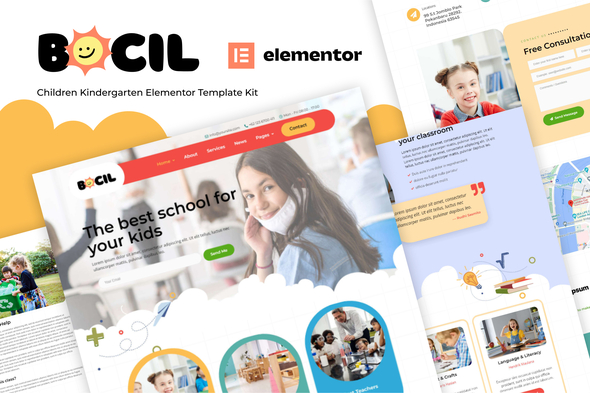
Aesthetically, the design language is on point for the niche. It employs a palette of soft, friendly pastels punctuated by a bold primary color for calls-to-action. The typography pairs a rounded, friendly sans-serif for headings with a clean, highly-legible sans-serif for body copy, which is a smart choice for readability. Iconography and graphical elements are playful without being childish, using organic shapes and simple illustrations. From a pure design perspective, it successfully communicates "safe, fun, and educational." It looks professional enough to earn a parent's trust while still feeling appropriate for a children's learning center.
The critical part for any developer is the list of dependencies. Bocil requires both the free version of Elementor and Elementor Pro. This is a significant factor. The reliance on Pro means you're leveraging its more powerful features like the Theme Builder for headers and footers, custom form styling, and potentially dynamic content widgets. While this adds to the project cost if the client doesn't already have a license, it's generally a positive sign. It suggests the kit is built using a more robust and scalable framework rather than relying on a dozen third-party add-ons to achieve its layout, which can quickly become a maintenance nightmare. The fewer plugins, the better.
Part 2: The Installation Gauntlet - A Step-by-Step Developer's Guide
A template kit's value is directly proportional to how smoothly it can be deployed. A messy, error-prone import process can negate any time saved by the pre-designed templates. I put Bocil through its paces on a clean WordPress installation to document the real-world process, including the inevitable manual cleanup that follows any automated import.
Prerequisites: Staging the Environment
Before you even think about uploading the kit, get your environment right. This will save you headaches.
- Clean WordPress Install: Start with a fresh, updated WordPress installation. Don't try to import this over an existing, content-heavy site. That's asking for trouble.
- Core Plugins: Install and activate Elementor and Elementor Pro. Ensure they are updated to their latest versions to avoid compatibility issues with the kit's JSON files.
- A Lightweight Theme: The "Hello Elementor" theme is the standard recommendation for a reason. It's a blank canvas with minimal styling, designed to let Elementor and your imported kit control 100% of the design. Using a heavy, feature-rich theme alongside an Elementor kit will likely lead to CSS conflicts and performance issues.
- Increase Memory Limits: A common point of failure during imports is PHP memory exhaustion. It's good practice to preemptively increase your `WP_MEMORY_LIMIT` in `wp-config.php` to at least 256M. I'd recommend `define( 'WP_MEMORY_LIMIT', '512M' );` for good measure during the setup phase.
Step 1: The Import Utility
Elementor doesn't have a native "full kit" import function in its free version. You need a tool. Go to Plugins > Add New and search for "Template Kit - Import". The one by Envato is the industry standard and works perfectly for this. Install and activate it.
Step 2: Uploading and Importing the Bocil Kit
With the importer installed, navigate to Tools > Template Kit. You'll see an upload area. Drag and drop the main zip file of the Bocil kit you downloaded. The importer will read the `manifest.json` and display all the templates included in the kit, along with any required plugins.
This is a critical juncture. The importer will show you a list of templates: Global Kit Styles, Header, Footer, Homepage, About Us, etc. You have the option to import individual templates, but for the initial setup, you want the whole package. Click the "Import Kit" button.
The first thing you should import is the Global Kit Styles. This sets up your default colors, fonts, and theme style configurations. Importing this first ensures that subsequent page templates inherit the correct styling. After the global styles are in, proceed to import the other templates, such as the header, footer, and individual pages.
Step 3: The Post-Import Cleanup and Configuration
No import is ever truly one-click. This is where a developer's attention to detail is required to take the raw import from 80% to 100% complete.
- Header & Footer Setup: The header and footer templates will be imported into your Elementor Templates library, but they won't be active on the site yet. You need to go to Templates > Theme Builder. Here, you'll likely see no active header or footer. Create a new Header, choose the imported Bocil Header template, and set its display conditions to "Entire Site". Repeat the process for the footer. This is a step beginners often miss, leaving them with the default theme's header and footer.
- Menu Navigation: The imported header will have a Nav Menu widget, but it won't be linked to a WordPress menu. Go to Appearance > Menus. Create a new menu (e.g., "Main Menu"), add the pages you've created (Home, About, Classes, Contact), and save it. Then, edit the Header template in Elementor and select your newly created "Main Menu" in the Nav Menu widget's settings.
- Form Configuration: The Contact Us page will have a beautiful form, but it won't do anything out of the box. Edit the page with Elementor, click on the Form widget, and look for the "Actions After Submit" section. By default, it might be set to "Collect Submissions" and "Email". You MUST configure the "Email" action by setting the "To" address to the client's email. You can also integrate it with services like Mailchimp if needed. This is a non-negotiable step.
- Homepage Assignment: WordPress, by default, shows your latest blog posts on the front page. Go to Settings > Reading. Change "Your homepage displays" to "A static page". For "Homepage", select the "Home" page that was created by the import process.
Developer's Troubleshooting Log
- Issue: Images are missing or appear as grey placeholders. This can happen if the import times out or fails to fetch the demo images. The solution is to manually edit the pages in Elementor and re-upload the images into the corresponding Image widgets and section backgrounds.
- Issue: Styles look broken, fonts are wrong. This is almost always one of two things: a caching issue (aggressively clear your browser and server cache) or the Global Kit Styles were not imported or applied correctly. Try re-importing just the Global Kit Styles from the importer tool.
- Issue: Links in buttons or navigation point to placeholder URLs. The import process does its best, but you must manually review every button and link. Edit each page, click on the buttons and links, and ensure they point to the correct pages on your new site, not a demo URL.
Part 3: A Technical Teardown of the Templates
A kit's true quality lies in its construction. Are the templates built efficiently, or are they a tangled mess of nested sections and hard-coded values? I inspected the core templates of the Bocil kit to evaluate their structural integrity and flexibility.
The Homepage
The homepage is the flagship of any template kit. Bocil's homepage is complex, featuring a hero section, an "about" summary, a class grid, a testimonial slider, and a call-to-action block.
- Structure: The build quality here is decent. It predominantly uses the older section/column-based structure rather than Elementor's newer, more performant Flexbox Containers. This isn't a deal-breaker, but for developers focused on lean code, it means there's an opportunity to refactor for a flatter DOM structure. There's a moderate use of inner sections, which adds some `div` bloat, but it's not the worst I've seen.
- Responsiveness: The responsive handling is well-executed. On tablet and mobile, columns stack cleanly, font sizes adjust appropriately, and padding is modified to prevent elements from feeling cramped. They've clearly put effort into making the mobile experience solid out of the box, which is a huge plus. I noticed some sections use responsive ordering to improve the content flow on smaller screens, a sign of thoughtful design.
- Asset Usage: The animations are subtle, using Elementor's entrance animations sparingly on key elements. This adds a touch of life without being distracting or causing significant performance overhead. Images are used as section backgrounds and in image widgets, as expected. Optimization will, of course, be up to the developer implementing the site.
Classes / Programs Page
This is a crucial page for parents. The template presents a clean grid of available classes. Critically, it uses the "Posts" widget, not a series of static, hand-built promo boxes. This is the correct way to build this page. By using the Posts widget, it's set up to dynamically pull in content from a specific post type (e.g., "Posts" or a custom post type you could create called "Classes"). This means the client can easily add, remove, or update classes from the WordPress backend without ever needing to touch the Elementor editor. This is a major win for scalability and client usability.
Single Class / Post Template
Diving into the Theme Builder, the single post template provided is functional and well-organized. It uses Elementor Pro's dynamic tags to pull in the Post Title, Featured Image, and Post Content. This is standard practice, but it's executed cleanly. There's a sidebar area for metadata like "Age Group," "Class Size," and "Teacher," which would likely need to be implemented using a custom fields plugin like ACF and then piped into the template using Elementor's dynamic content features. The template provides the layout; the developer needs to wire up the data, which is a reasonable expectation.
The Contact Page
The contact page is straightforward. It features the aforementioned Elementor Pro Form, a Google Maps widget, and text blocks for address and phone number. The form is a simple one-column layout, which is great for usability. There are no overly complex stylings. It's a functional, no-frills implementation that gets the job done. The key takeaway here, as mentioned in the installation section, is that the form's backend logic (email notifications, etc.) requires manual configuration.
Part 4: Code Quality, Performance, and Customization
This is where we look past the visuals and into the code. How clean is the output? How much of a performance hit are we taking? And how easily can we bend this kit to our will?
DOM Bloat: As it's built on the section/column model, there is an expected level of `div` nesting. For a complex layout like the homepage, the DOM tree is deep. A quick inspection shows multiple nested `elementor-container` and `elementor-widget-wrap` divs. This is a characteristic of Elementor itself, not necessarily a fault of Bocil, but it's something performance-minded developers should be aware of. A future version built with Flexbox Containers would be a significant improvement.
CSS and JS: The kit doesn't appear to add any of its own external stylesheets or JavaScript files, which is excellent news. All styling is handled through Elementor's widget settings and the global styles. This keeps things centralized and avoids the need to hunt down rogue CSS files. Any custom CSS you might want to add can be placed in the Elementor Site Settings CSS area, keeping it organized.
Performance Impact: Out of the box, a site built with Bocil and Elementor Pro on a decent host will have average performance. It won't be a speed demon without optimization. The primary culprits will be the number of DOM elements, unoptimized images (which is the developer's responsibility), and the CSS/JS footprint of Elementor Pro itself. A good caching plugin (like LiteSpeed Cache or WP Rocket) and image optimization (like ShortPixel or Imagify) will be absolutely essential to get this kit to a production-ready, high-performing state. Sites like gplpal offer a cost-effective way to get premium tools, but the technical skill to optimize the final product remains paramount.
Customization Headroom: This is where Bocil scores highly. The kit is built almost entirely on Elementor's Global Colors and Global Fonts. The primary blue, the pastel accents, the heading font, the body font—they are all linked to the Site Settings. This is a developer's dream. To rebrand the entire site, you simply need to go to Elementor's Site Settings and change a handful of color and font values. The changes will cascade throughout every page and template. This is a sign of a professionally constructed kit. You aren't stuck hunting down individual widgets with hard-coded hex values. This structure makes the kit an excellent starting point for custom projects. It provides a solid architectural base that can be easily skinned to fit a client's specific branding. For developers looking to explore various design architectures, browsing through a large repository like the one for Free download WordPress themes can be a great way to see different approaches to building with Elementor.
Final Verdict and Developer's Scorecard
The Bocil - Children Kindergarten Elementor Template Kit is a well-thought-out and professionally constructed product. It successfully navigates the tricky design requirements of its niche, presenting a look that is both trustworthy for parents and appealing to the theme of early education. Its real strength, however, lies in its adherence to Elementor best practices, particularly the extensive use of Global Styles and the dynamic setup of its archive pages.
It's not perfect. The reliance on the older section/column structure means it carries some of Elementor's inherent code bloat, but this is a minor critique given its high degree of customizability and the thoughtful responsive design. The installation process is as smooth as can be expected, with the predictable manual cleanup steps that any experienced developer would anticipate.
Developer's Scorecard:
- Design & Aesthetics: 9/10 - The design is perfectly targeted for the niche, balancing professionalism with a friendly and engaging vibe.
- Ease of Installation: 8/10 - The process is straightforward using the standard importer, with only the expected and necessary manual configuration steps post-import.
- Technical Structure: 7/10 - Solid and logical, but loses points for not using the more modern and performant Flexbox Containers. Its use of dynamic widgets for posts is a major plus.
- Performance Potential: 7/10 - It's an Elementor kit, so it will never be the fastest thing on the web out of the box. However, it's clean enough that with standard optimization practices, it can achieve good Core Web Vitals scores.
- Customizability: 10/10 - This is its strongest attribute. The meticulous use of Global Colors and Fonts makes rebranding and customization incredibly efficient.
Who is this for?
This kit is an ideal accelerator for freelance developers and small agencies building websites for kindergartens, daycare centers, or preschools. It provides a 75% solution that is structurally sound, allowing developers to focus on client-specific customizations, content integration, and performance optimization rather than building common layouts from scratch. For a DIY user with some Elementor experience, it's also a viable option, provided they have the patience to work through the post-import cleanup checklist. Bocil is more than just a pretty design; it's a solid, flexible, and professional starting point for any web project in the early education space.