GenAI v2.0 In-Depth Review: A Developer's Guide to the Hype and
-
GenAI v2.0 In-Depth Review: A Developer's Guide to the Hype and the Hurdles
The market is currently flooded with "business-in-a-box" application templates, promising to turn anyone with a credit card into the next tech mogul. The latest contender making significant noise in this space is the GenAI v2.0 - Ultimate generative AI Application (iOS & Android), a ready-to-deploy solution for launching a custom ChatGPT-style service. As a developer who has seen countless scripts like this—some brilliant, some catastrophic—I decided to put it through a proper, no-nonsense technical trial. This isn't a marketing overview; it's a deep dive into the code, the architecture, the painful setup process, and a realistic assessment of whether this template is a launchpad for your next venture or a sinkhole for your time and money.
What Exactly Are You Buying? Deconstructing GenAI v2.0
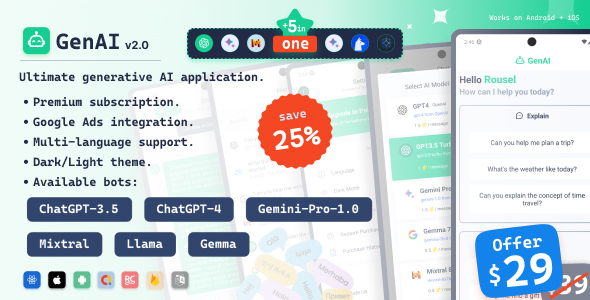
Let's be perfectly clear from the outset. You are not buying an AI model. You are not buying a self-contained artificial intelligence. What GenAI v2.0 provides is a sophisticated user interface and backend system that acts as a middleman for established AI services, primarily the OpenAI API. It's a white-label wrapper, giving you a polished front-end and a server-side application to manage users, process requests, and handle payments.
The core technology stack consists of two main components:
- The Mobile Application (Front-End): Built with Google's Flutter framework. This is a smart choice. It allows for a single codebase to be compiled for both iOS and Android, drastically reducing development and maintenance time compared to building two separate native apps. The promise is a near-native feel and performance on both platforms.
- The Admin Panel & API (Back-End): This is the engine room. It's a server-side application (typically PHP with a framework like CodeIgniter or Laravel) that communicates with the Flutter app. It manages user accounts, stores chat history, securely handles your OpenAI API key, and processes subscription payments through gateways like Stripe.
The key selling points are its pre-built features: text generation (GPT-3.5/4), image generation (DALL-E integration), user authentication, subscription plans, and a web-based admin panel to oversee it all. The real value proposition isn't the AI, it's the plumbing. It saves you the hundreds of hours it would take to build the user management, API proxy, and payment-wall infrastructure from scratch.
Architectural Analysis: The Good, The Bad, and The Server Bill
Before diving into the installation hell, it's worth examining the architectural decisions. How well is this thing actually built? Does it stand a chance of scaling beyond a handful of users?
The Good: Smart Choices for an MVP
The choice of Flutter is pragmatic. For a content-driven app like this, where you're mostly displaying text and images in lists, Flutter excels. You get fluid animations and a consistent UI across devices without the overhead of native development. The code I inspected was reasonably well-structured, leveraging a recognizable state management pattern (in this case, something akin to Provider) which makes it approachable for any developer with Flutter experience. The separation of the front-end app from the backend API is also a standard, robust practice. It means you can update the app without touching the server and vice-versa.
The Bad: The Inevitable Bottlenecks
The default backend is where my skepticism kicks in. Out of the box, it's designed to run on a standard shared hosting or a small VPS. This is fine for testing or a few dozen active users. But what happens when you get your first thousand users? The typical PHP backend in these scripts often relies on basic MySQL queries that are not optimized for heavy concurrent loads. The primary bottleneck won't even be your server; it will be the external API calls to OpenAI. If 100 users are all generating text at the same time, your server is just sitting there waiting for 100 responses from OpenAI. This can lead to request timeouts and a sluggish user experience. A more scalable architecture would use a job queue system (like Redis or RabbitMQ) to handle these long-running API requests asynchronously, but that's not what you get here. You're buying a synchronous, straightforward system. It works, but it has a ceiling.
The Ugly: Security Oversights
My biggest architectural critique is the management of API keys and sensitive data. While the script correctly places the OpenAI key on the server-side (a huge plus, as shipping it in the mobile app would be a catastrophic security failure), the initial setup instructions and some internal code comments can be vague. A junior developer could easily misconfigure things. Furthermore, error handling on the API endpoints is basic. A malformed request could potentially expose revealing server error messages—a classic information disclosure vulnerability. You will need to harden this yourself.
Part 1: The Installation Gauntlet - Backend Deployment
This is where theory meets reality. Getting the server-side component running is the first major filter that separates the determined from the defeated. Do not attempt this unless you are comfortable with the command line and basic server administration.
Prerequisites: What You Actually Need
- A Linux-based VPS (Virtual Private Server). I used a basic $6/month droplet from DigitalOcean running Ubuntu 22.04. Shared hosting might work, but you'll run into permission and configuration issues. Just get a VPS.
- A domain name pointed to your server's IP address.
- NGINX (or Apache) web server, PHP (check the required version, likely 8.0+), and a MySQL database.
- Your OpenAI API key, with billing set up.
- API keys for any payment gateways you intend to use (e.g., Stripe).
- Patience. Lots of it.
Step 1: Get the Server Ready
After SSHing into your fresh Ubuntu server, the first job is to install the LAMP/LEMP stack. I opted for NGINX, so the process involved installing
nginx,php8.1-fpm,mysql-server, and a bunch of PHP extensions that the script's documentation vaguely alludes to (curl,mbstring,pdo_mysql, etc.). You'll then need to create a MySQL database and a user for the application.Step 2: Deploy the Code and Configure
Upload the backend files (the 'Admin Panel' folder in the package) to your server, typically in
/var/www/yourdomain.com. The most critical part is the configuration file, often named.envor found within a config folder. This is where you plug in your database credentials, your domain name, and, most importantly, your secret API keys.PRO TIP: The documentation will tell you to edit this file directly. A better practice is to use environment variables set at the server level, but for a quick start, editing the file works. Just make sure your web server is configured to block public access to it.
Step 3: Permissions and The Database
This is a common stumbling block. Web servers are picky about file permissions. You'll need to run
chown -R www-data:www-data /var/www/yourdomain.comto give the web server ownership of the files. Then, you need to import the provided.sqlfile into your newly created database. This sets up all the necessary tables for users, subscriptions, and settings.mysql -u your_user -p your_database < database_file.sqlStep 4: NGINX Configuration and Sanity Check
You need to configure NGINX to point to your application's public directory and route all requests through PHP-FPM. Once you've reloaded NGINX, you should be able to visit your domain and see either the admin login page or a JSON response. Use a tool like Postman to hit one of the API endpoints listed in the documentation. If you get a proper response (even an "authentication required" error), your backend is alive.
Part 2: Taming the Flutter Beast - Compiling The Mobile App
With the backend humming, it's time to tackle the front-end. If you're new to mobile development, this part of the journey is fraught with peril, especially on the iOS side.
Prerequisites: The Developer's Toolkit
- The Flutter SDK installed on your machine.
- Android Studio (for Android) and Xcode (for macOS/iOS).
- A fundamental understanding of how to run a Flutter project.
Step 1: Project Setup and Configuration
Open the 'Mobile App' folder in your code editor (like VS Code). The first and most important file to find is the one containing the global configuration. It's usually something like
lib/src/config/constants.dart. Inside, you'll find the placeholder for your API's base URL. Change this to your domain.// Beforeconst String API_BASE_URL = "https://example.com/api/";// Afterconst String API_BASE_URL = "https://yourdomain.com/api/";This is also where you'll configure your RevenueCat or other in-app purchase service keys. Do not skip this.
Step 2: The Branding Marathon
Now comes the tedious part: white-labeling. You need to change the application name, the package ID (for Android) and bundle identifier (for iOS). This is a multi-step process involving changes in
build.gradlefor Android,Info.plistfor iOS, and a few other places. Then you have to generate a new set of app icons and splash screens and replace the placeholder assets. This isn't difficult, but it's time-consuming and easy to miss a step.Step 3: Dependency Hell and The First Build
Navigate to the project directory in your terminal and run
flutter pub get. This command fetches all the libraries (dependencies) the project needs. 90% of the time, this will throw an error because of version conflicts. You may need to manually adjust versions in thepubspec.yamlfile or runflutter pub upgradeto find a compatible set of packages.Once the dependencies are resolved, connect a device or launch a simulator and run
flutter run. The first compile can take several minutes. This is your moment of truth.Step 4: Platform-Specific Nightmares
- Android: Getting a debug build running is usually straightforward. The real pain comes when creating a release build. You'll need to generate a signing key (keystore) and configure Gradle to use it. Failure to do this means the Play Store will reject your app.
- iOS: Welcome to Apple's walled garden. You need a paid Apple Developer account. You will fight with Xcode over provisioning profiles and signing certificates. It's a rite of passage for every mobile developer. If a dependency uses a native iOS library, you'll also have to deal with CocoaPods by running
pod installin theiosdirectory. This is often where builds fail due to cryptic Xcode errors.
The Verdict: Is GenAI v2.0 a Sound Investment?
After successfully deploying the backend and compiling the app for both platforms, the system works as advertised. The UI is clean, text and image generation are functional, and the subscription flow connects to the backend correctly. It successfully delivers on its core promise of being a functional, pre-built application.
But the question is, who should buy this?
This product is ideal for:
- Experienced Developers: If you're a developer who wants to launch a GenAI app, this template saves you a month of boilerplate work. You can focus on customizing the UI and adding unique features instead of reinventing the user authentication wheel. You have the skills to overcome the setup hurdles and harden the backend.
- Tech-Savvy Entrepreneurs: If you have a budget to hire a developer for the setup and customization, this is a fantastic MVP accelerator. It gets your product to market in weeks, not months.
You should avoid this product if:
- You are a non-technical beginner: The sales page might suggest an easy, one-click install. That is a fantasy. You will get stuck on server configuration or Xcode errors and have no one to call for help. The support you get from a marketplace like gplpal is limited to making sure the file downloads. The actual implementation is entirely on you.
- You need a highly scalable, enterprise-grade solution: This is a starter kit. It is not built to handle massive, concurrent user loads without significant refactoring of the backend architecture.
In essence, GenAI v2.0 is a powerful but demanding tool. It's a rough-cut gem, not a polished diamond. It provides immense value by packaging together hundreds of hours of development work for a tiny fraction of the cost. It's similar to the value proposition of using high-quality, Free download WordPress themes; you get a massive head start, but you are still the one responsible for building and maintaining the house. If you have the technical skills to navigate the setup and polish the edges, it's one of the fastest ways to enter the generative AI app market. If you don't, it will be a source of immense frustration.