A Technical Review and Installation Guide: Launder - Laundry Se
-
A Technical Review and Installation Guide: Launder - Laundry Service & Dry Cleaning Elementor Template Kit
In the evolving landscape of digital storefronts, specialized template kits designed for specific niches aim to accelerate development and streamline deployment. Our focus today is on the Launder - Laundry Service & Dry Cleaning Elementor Template Kit, a product positioning itself as a comprehensive solution for businesses in the laundry and dry cleaning sector. From a senior web developer's perspective, the immediate questions revolve around its architectural integrity, actual utility in a real-world business context, and the nuances of its implementation. This isn't merely a surface-level aesthetic appraisal; we're dissecting its underpinnings, scrutinizing its design choices, and guiding you through a practical installation that goes beyond the typical one-click import.
Architectural Design and Core Component Analysis
A template kit built for Elementor lives or dies by its intelligent leveraging of the page builder's capabilities, its adherence to modern web standards, and its intrinsic flexibility. The Launder kit, at first glance, presents a clean, contemporary aesthetic, aligning with what one would expect from a service-oriented business. However, the true measure lies in the structure and maintainability it offers.
Elementor Integration and Widget Utilization
The kit extensively uses Elementor's native widgets, which is a significant advantage. Over-reliance on custom, proprietary widgets can lead to vendor lock-in and potential compatibility issues down the line. Launder sticks to a sensible mix: standard Elementor sections, columns, headings, text editors, image widgets, and icon boxes form the backbone of its layouts. This approach facilitates easier customization for anyone familiar with Elementor's core interface, reducing the learning curve for subsequent modifications.
A critical point here is the assumed dependency on Elementor Pro. While not explicitly stated for every kit, most high-quality Elementor template kits, including this one, frequently utilize Pro features such as the Theme Builder for headers and footers, custom CSS, global settings, and potentially advanced form widgets. Attempting to run this kit with Elementor Free only would likely result in broken layouts and missing functionalities. This is not a flaw of the kit itself, but a necessary clarification for prospective users regarding the full stack required for optimal operation.
Design Language and User Experience (UX/UI)
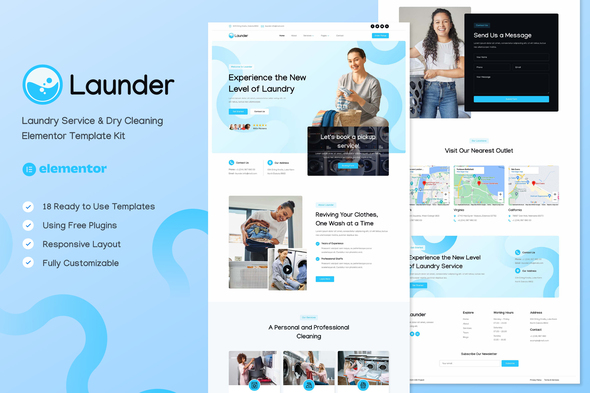
The visual design is undoubtedly one of Launder's stronger aspects. It employs a palette of clean blues, whites, and subtle greys, which universally connote cleanliness and professionalism—ideal for a laundry service. Typography is legible, and spacing is generally well-managed, contributing to a pleasant reading experience. The kit offers several homepage variations, each with slightly different emphasis, allowing businesses to choose a layout that best highlights their unique selling propositions, be it express services, eco-friendly practices, or competitive pricing.
Responsiveness across devices is a fundamental expectation in 2024. The Launder kit generally delivers on this front, with layouts adapting reasonably well to mobile and tablet breakpoints. However, as with any template, real-world content can stress these adaptive designs. Custom text lengths or image aspect ratios could introduce minor alignment issues that would require manual adjustments within Elementor's responsive editing modes. We noted some areas where padding or margin adjustments could further optimize content flow on smaller screens, particularly around pricing tables or multi-column service descriptions. These are not deal-breakers but point to the necessity of thorough testing after content population.
Module Breakdown: A Practical Assessment
- Homepages: The various homepage designs are robust, offering clear call-to-actions (CTAs) for booking or getting a quote. Sections for testimonials, service highlights, and "why choose us" are standard and effectively laid out. The key is how easily these can be populated with specific business data without distorting the design.
- Services Pages: Detailed service pages are crucial for clarity. Launder provides templates that allow for thorough descriptions of services like wash & fold, dry cleaning, ironing, and repairs. The visual presentation is consistent, using icon boxes and images to break up text, which enhances readability.
- Pricing Tables: These are often pain points in templates. Launder’s pricing tables are clean, using Elementor's native pricing table widget or structured columns. They are generally flexible enough for tiered pricing, though complex, dynamic pricing models (e.g., price per item type, volume discounts) would likely require custom Elementor Pro forms or a dedicated booking plugin, exceeding the scope of a pure template kit.
- About Us/Contact Us: Standard and professional. The "About Us" sections provide ample space for company history, mission, and team profiles. Contact pages typically integrate a map and a contact form, ready for connection to a form plugin.
- Booking/Appointment Functionality: This is where template kits inherently reach their limit. Launder provides the *visual framework* for booking, usually a form or a button linking to a booking page. It does *not* provide an integrated, backend booking system. Users will need to integrate a third-party booking plugin (e.g., Amelia, Bookly, or even Elementor Pro forms paired with automation) to handle appointment scheduling, payment processing, and calendar management. This is a common and reasonable expectation for a template kit but must be clearly understood.
- Header/Footer Templates: Designed via Elementor Pro's Theme Builder, these are highly customizable. The header includes typical navigation, logo, and often a prominent "Get a Quote" or "Book Now" button. Footers generally feature contact details, social media links, and additional navigation. Customizing these is straightforward for any Elementor Pro user.
Underlying Code Quality and Performance Considerations
As a template kit, Launder primarily delivers JSON files for Elementor, not raw HTML/CSS/JS. Therefore, "code quality" largely refers to how well Elementor renders these structures into performant, semantically sound web pages. Elementor itself generates a fair amount of HTML markup and inline CSS, which can contribute to page bloat if not managed. Launder’s structure, being relatively straightforward, doesn’t add excessive layers of nested divs or overly complex CSS. However, without proper image optimization, caching, and minification post-installation, even a well-designed Elementor site can suffer performance penalties.
For optimal performance, users should anticipate implementing a robust image compression strategy, leveraging browser caching, and potentially a CDN. Lazy loading for images and videos (which Elementor handles natively to some extent) should be enabled. The semantic structure (H1s, H2s, P tags) appears generally logical for SEO purposes, but the actual content remains the user's responsibility.
The User Experience for Developers and End-Users
For the Developer: Customization and Extendibility
From a developer's standpoint, Launder is a mixed bag. It excels in offering a visual starting point that significantly cuts down design time. The Elementor-native approach means customization is intuitive for anyone familiar with the builder. Global fonts, colors, and theme styles, when correctly configured via Elementor Pro, ensure consistent branding throughout the site.
However, the kit provides a *template*, not a *framework*. True extendibility for complex, bespoke functionalities (e.g., a custom customer portal, advanced loyalty programs, real-time order tracking) would require custom development beyond the kit's scope. Developers will find it easy to *modify* existing sections and *add* new standard Elementor content. Integrating advanced plugins or custom code snippets is also feasible, thanks to Elementor's hooks and custom HTML widget, but this isn't a feature of the kit itself.
A minor point of criticism, common across many kits, is the often-generic placeholder content. While expected, the sheer volume of text and images to replace can still be substantial. A kit offering more diverse dummy content variations, or perhaps even a few industry-specific stock images, could subtly improve the developer's experience.
For the End-User (Laundry Service Owner): Intuition and Effectiveness
For the laundry service owner who might eventually manage the site, the Elementor backend, once set up, is generally user-friendly for basic content updates. Changing text, swapping images, or updating service descriptions can be done visually. The front-end experience for their customers is clean and directs attention to services and booking. Clear CTAs are present, and the mobile experience appears solid.
The main challenge for an end-user will be the initial setup of any integrated booking system and maintaining consistency when adding new content. While the kit provides a beautiful interface, the business logic behind booking, payment, and customer management needs separate, dedicated solutions, which the business owner must select, configure, and integrate. The kit itself provides the attractive shop window, not the entire operation.
Installation & Configuration Guide: Bringing Launder to Life
Implementing a template kit effectively goes beyond merely importing files. It involves a systematic approach to ensure optimal performance, maintainability, and functionality. Here's a professional's guide to setting up the Launder kit.
Prerequisites: The Essential Stack
Before you even touch the kit files, ensure you have the following:
- WordPress Installation: A clean, up-to-date WordPress instance.
- Elementor Plugin: Install and activate the free Elementor plugin from the WordPress plugin repository.
- Elementor Pro Plugin: Crucial for advanced features like Theme Builder (headers/footers), global styles, and dynamic content. Without Elementor Pro, many elements of this kit will not function correctly or appear as intended.
- Hello Elementor Theme (Recommended): While not strictly mandatory, the lightweight "Hello Elementor" theme is the recommended base theme when working with Elementor and its Theme Builder, as it avoids theme-level conflicts and unnecessary bloat.
- Essential Plugins (Anticipated):
- Contact Form 7 or WPForms: For contact forms (the kit will have placeholders for these).
- SEO Plugin (e.g., Yoast SEO, Rank Math): For search engine optimization.
- Caching Plugin (e.g., WP Rocket, LiteSpeed Cache, W3 Total Cache): Absolutely critical for performance.
- Image Optimization Plugin (e.g., Smush, Imagify): To compress and serve optimized images.
- Booking Plugin (e.g., Amelia, Bookly): If you require integrated booking functionality beyond simple forms.
Step 1: Acquiring and Preparing the Kit
You'll typically acquire the Launder kit from a platform like gplpal. Once downloaded, you'll have a ZIP file. Do not unzip this file directly onto your server. Instead, you'll work with its contents through Elementor's import functions.
Method for non-Envato kits: Elementor kits often consist of a collection of JSON files, each representing a page, section, or global style. You'll typically import these directly into Elementor.
- Navigate to
Elementor > Tools > Import/Export > Import Kit. This feature streamlines the process. - Alternatively, you might import individual JSON files via
Templates > Saved Templates > Import Templatesor directly within the Elementor editor (folder icon > My Templates > Import Template). For global styles, this is handled through the Kit Import process.
Step 2: Initial Elementor Configuration & Global Styles
Before importing individual page templates, set up Elementor's global styles:
- Import Global Styles: If the kit package includes a `site-settings.json` or similar, use the "Import Kit" feature in Elementor Tools. This will automatically set global colors, fonts, and theme styles (buttons, forms, images). If not, you'll have to manually set these up or import the relevant JSON for global styles.
- Verify Global Settings: Go to
Elementor > Settings > Generaland ensure "Disable Default Colors" and "Disable Default Fonts" are checked (assuming the kit overrides these). - Theme Style: Access
Elementor > Site Settings > Theme Style. Review and adjust typography, buttons, form fields, and image settings to your preference. These settings dictate the kit's appearance site-wide. - Site Identity: Set your site title, tagline, and upload your logo and favicon via
Appearance > Customize > Site IdentityorElementor > Site Settings > Site Identity.
Step 3: Importing and Assigning Templates
- Import Page Templates: Navigate to
Templates > Saved Templates. Import all the provided page JSON files (e.g., `home.json`, `about-us.json`, `services.json`, `contact.json`). - Create New Pages: Go to
Pages > Add New. Title your page (e.g., "Home", "About Us"). Edit with Elementor. - Insert Template: Inside the Elementor editor, click the folder icon (Add Template), go to "My Templates," and insert the corresponding imported page template. Update the page. Repeat for all essential pages.
- Set Homepage: Go to
Settings > Reading. Set your newly created "Home" page as the static homepage. - Import Header & Footer: Import the `header.json` and `footer.json` (if provided) into your Elementor Templates.
- Assign Header & Footer (Elementor Pro Theme Builder):
- Go to
Elementor > Theme Builder. - Click "Add New" for Header. Select "Header" as the type. Give it a name.
- In the Elementor editor, insert your imported header template.
- Click "Publish" and set the "Condition" to "Entire Site."
- Repeat the process for the Footer.
- Go to
Step 4: Content Customization
This is where the real work begins. Go through each page and replace the placeholder content with your actual business information.
- Text: Update all headings, paragraphs, and descriptions. Ensure your brand voice is consistent.
- Images: Replace all stock images with your high-quality, branded imagery. Crucially, optimize images for the web before uploading (compress them, use appropriate formats like WebP where possible).
- Videos: If your kit includes video sections, embed your own video content (preferably hosted on YouTube or Vimeo for performance).
- Service Details: Elaborate on each of your laundry and dry cleaning services. Be specific about processes, benefits, and pricing.
- Pricing Tables: Adjust prices, feature lists, and any disclaimers.
- Testimonials: Replace dummy testimonials with genuine customer feedback, including names and photos where available.
Step 5: Form Configuration
The kit will likely provide Elementor Pro form widgets or placeholders for popular form plugins.
- Elementor Pro Forms: If using Elementor Pro forms, click on the form widget. In the left panel, configure the form fields, set up "Actions After Submit" (e.g., Email, Redirect, MailChimp), and customize the email content.
- Third-Party Forms (e.g., Contact Form 7): If the kit uses shortcodes or dedicated areas for third-party forms, ensure you have the respective plugin installed. Create your forms within that plugin, then copy and paste the generated shortcode into an Elementor Shortcode widget on your contact page or wherever a form is needed.
- Booking Forms: If you've integrated a dedicated booking plugin, ensure its forms or shortcodes are correctly placed and configured.
Step 6: Menu Navigation Setup
- Go to
Appearance > Menus. Create a new menu (e.g., "Main Menu"). - Add all your newly created pages (Home, About Us, Services, Contact, etc.) to this menu.
- Save the menu.
- In your Elementor header template, select the "Nav Menu" widget and ensure it's assigned to your "Main Menu."
Step 7: Responsiveness Check
This step is non-negotiable.
- Elementor's Responsive Mode: Use Elementor's responsive modes (desktop, tablet, mobile) to check how each page and section renders.
- Adjust as Needed: Where layouts break or appear awkward, use Elementor's responsive controls for padding, margin, column order, and element visibility to fine-tune the design for each breakpoint.
- Real Device Testing: Ideally, test on actual physical devices or use browser developer tools to simulate various screen sizes.
Step 8: Performance Optimization (Post-Installation)
Once the site is functional, focus on speed and efficiency.
- Image Optimization: Re-iterate on image compression using a plugin like Smush or Imagify. Ensure lazy loading is active.
- Caching: Configure your caching plugin (WP Rocket, LiteSpeed Cache, etc.) thoroughly. Enable page caching, browser caching, and GZIP compression.
- Minification: Minify CSS and JavaScript files (often handled by caching plugins).
- Database Optimization: Regularly clean your WordPress database using a plugin like WP-Optimize.
- CDN (Optional but Recommended): For global reach and faster content delivery, consider integrating a Content Delivery Network like Cloudflare or KeyCDN.
By following these steps, you'll not only install the Launder kit but also lay a solid foundation for a performant, maintainable, and effective website for your laundry and dry cleaning business. Remember that a template kit provides the canvas; your content and diligent setup paint the masterpiece.
Strengths and Weaknesses: A Balanced Perspective
Strengths:
- Visual Appeal and Modernity: The kit offers a clean, contemporary design that is highly appropriate for a modern service business, conveying professionalism and trust.
- Elementor Flexibility: Extensive use of Elementor's native widgets and capabilities ensures that customization is intuitive and relatively straightforward for anyone with Elementor experience. No heavy reliance on obscure custom widgets.
- Comprehensive Page Layouts: Provides a robust set of essential pages (Home, About, Services, Contact, Pricing) with variations, significantly reducing initial design and layout time.
- Responsive Design: Generally well-adapted for various devices, which is critical for today's mobile-first user base.
- Theme Builder Integration: Leverages Elementor Pro's Theme Builder for headers and footers, making site-wide element management efficient.
- Accessibility from gplpal: For those seeking cost-effective solutions for premium templates, platforms offering GPL-licensed products provide an accessible entry point to professional designs like Launder.
Weaknesses:
- Elementor Pro Dependency: The full functionality and polished look are heavily reliant on Elementor Pro. This is an additional cost and dependency that needs to be factored in.
- Lack of Integrated Booking System: As a template kit, it only provides the *front-end* design for booking. Businesses require a separate, robust booking plugin for backend logic, calendar management, and payment processing. This is a common and understandable limitation but crucial for users to acknowledge.
- Generic Content Bloat: While necessary, the placeholder content is generic. Replacing it with genuine, optimized content for an actual business can be a time-consuming task, potentially leading to performance issues if not handled carefully (e.g., unoptimized images).
- Limited Unique Functionality: Beyond layout and styling, the kit doesn't introduce truly unique, industry-specific functionalities. It's a visual wrapper for standard Elementor elements. Businesses requiring highly specialized features will need custom development or deeper plugin integrations.
- Optimization Still Required: While visually sound, a fresh install will still require significant post-setup optimization (image compression, caching, minification) to achieve optimal page load speeds, a common aspect of Elementor-built sites.
- No Dedicated User Onboarding/Documentation (Implied): For kits acquired outside official marketplaces, the quality and presence of specific documentation or video tutorials can vary. Users might need to rely on general Elementor knowledge.
Conclusion and Recommendation
The Launder - Laundry Service & Dry Cleaning Elementor Template Kit positions itself as a competent, visually appealing solution for businesses in its niche. It provides a solid foundation for a professional online presence, primarily by leveraging the strengths of Elementor Pro. Its clean design, comprehensive page layouts, and good responsiveness make it an attractive starting point.
However, it is vital to approach this kit with realistic expectations. It is a powerful *visual template*, not an all-encompassing business solution. Businesses requiring integrated booking, advanced customer management, or dynamic pricing will need to invest in additional plugins and integrate them seamlessly. For developers, this means the kit accelerates the design phase, but the deeper business logic and performance tuning remain their responsibility.
This kit is best suited for small to medium-sized laundry and dry cleaning businesses that:
- Are comfortable working with Elementor and Elementor Pro.
- Need to establish a professional online presence quickly.
- Are prepared to integrate a separate booking system and populate the site with their specific, optimized content.
- Value the accessibility of quality designs often found via platforms providing free download WordPress themes and templates.
For those seeking to build a robust, visually engaging website without starting from scratch, Launder offers significant value. Just be prepared to put in the necessary work post-import to truly make it your own and ensure it performs optimally for your specific business needs.