Categories
Tags
Archives
Dissecting Website Review: An Expert's Assessment and Practical
-
Dissecting Website Review: An Expert's Assessment and Practical Implementation Guide
In the often-convoluted world of WordPress site management, tools promising comprehensive insights are frequently met with a mix of anticipation and skepticism. Today, we're putting a magnifying glass to Website Review, a plugin that aims to deliver a detailed audit of your site's health directly from your dashboard. As a senior web developer, my interest lies not just in what a tool claims to do, but how it stands up to real-world demands, its operational overhead, and its practical utility for professionals and serious site owners. We'll examine its features, walk through a full installation, scrutinize its output, and ultimately determine if it earns a permanent spot in a developer’s toolkit or merely adds to plugin bloat.
Initial Impressions: What Does "Website Review" Offer?
The premise of Website Review is compelling: provide a single source for analyzing critical aspects of a website, including SEO, performance, security, and content quality. This kind of consolidated feedback loop is invaluable, theoretically reducing the need for multiple external services and streamlining the optimization process. Upon first glance, the plugin interface typically presents a dashboard-like overview, promising quick insights. However, the true test begins when we move beyond marketing blurbs and into the nuts and bolts of its operation. Does it merely skim the surface with generic advice, or does it delve into actionable, context-specific recommendations that genuinely improve a site?
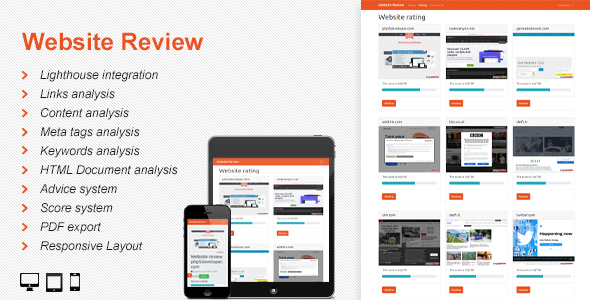
My initial assessment always focuses on the scope. A "website review" can encompass anything from a simple broken link checker to a full-blown SEO, security, and performance diagnostic suite. Website Review appears to position itself at the more comprehensive end of this spectrum. It purports to analyze various facets, including meta descriptions, headings, image alt tags, page speed metrics, security headers, and more. This broad scope, if executed correctly, could make it a powerful ally. If poorly implemented, it risks becoming a jack-of-all-trades, master of none, providing superficial reports that offer little tangible value to someone already familiar with web best practices or using dedicated tools.
Installation: Getting "Website Review" Up and Running
Installing Website Review follows the standard WordPress plugin procedure, which is generally straightforward, but a professional deployment involves more than just clicking "Activate."
Prerequisites and Environment Considerations
- WordPress Version: Always ensure your WordPress installation meets the minimum version requirement specified by the plugin developer. Running an outdated WordPress core can lead to compatibility issues, security vulnerabilities, and unexpected behavior.
- PHP Version: Similarly, check the recommended PHP version. Modern plugins often leverage newer PHP features for performance and security. Running on an older PHP version (e.g., anything below 7.4) is a non-starter for any serious project and will likely cause issues with Website Review or any other contemporary plugin.
- Server Resources: A comprehensive website review tool, especially one performing extensive scans, can be resource-intensive. Ensure your hosting environment has sufficient memory (PHP memory limit), execution time, and CPU cycles. Shared hosting environments with strict resource limits might struggle with large site scans, potentially leading to timeouts or incomplete reports.
- Database: The plugin will likely store its scan results and configuration in your WordPress database. Verify you have adequate database space and that your database server is performing optimally.
The Installation Process (Step-by-Step)
- Download the Plugin: Obtain the Website Review plugin package, typically a ZIP file, from its source.
- Access Your WordPress Dashboard: Log in to your WordPress admin panel.
- Navigate to Plugins: Go to 'Plugins' > 'Add New'.
- Upload Plugin: Click the 'Upload Plugin' button at the top of the page.
- Choose File: Click 'Choose File', locate the downloaded ZIP file for Website Review, and select it.
- Install Now: Click 'Install Now'. WordPress will upload and unpack the plugin files.
- Activate Plugin: Once the installation is complete, click 'Activate Plugin'.
Upon activation, the plugin typically adds a new menu item to your WordPress dashboard, usually under 'Tools' or its own dedicated top-level menu. This is where the configuration and review process begins.
Post-Installation Checks and Initial Configuration
After activation, a quick check of your server error logs (
error_logfile) is prudent to catch any immediate conflicts or errors. Assuming a clean activation, the next step involves navigating to the plugin's settings page. Here, you'll likely encounter:- General Settings: Options for enabling/disabling specific review modules (SEO, Performance, Security, etc.). This is crucial for tailoring the review to your specific needs and potentially reducing scan times.
- Scan Scope: Configuration for which pages or post types to include/exclude from the review. For large sites, excluding irrelevant post types (like draft posts or specific custom post types not meant for public consumption) is essential.
- Scheduling: The ability to schedule automated reviews. For dynamic sites, regular reviews are far more useful than one-off scans.
- Reporting Preferences: Options for how reports are generated, displayed, or exported.
It's vital to spend time configuring these settings correctly. A poorly configured scan can yield irrelevant results or, worse, miss critical issues.
Feature Deep Dive and Performance Analysis
Now that Website Review is installed, it's time to put it through its paces. We'll evaluate its core modules and how they translate into actionable insights.
SEO Audit Capabilities
The SEO module is often the most anticipated feature of such plugins. Website Review typically scrutinizes:
- Meta Tags: Checks for missing or duplicate title tags and meta descriptions, their length, and keyword usage. While rudimentary, this is a good baseline.
- Headings Structure (H1-H6): Verifies proper hierarchical use of headings, ensuring an H1 exists and that headings are used semantically.
- Image Optimization: Looks for missing alt attributes, large file sizes (though direct compression is usually external), and proper naming conventions.
- Internal/External Links: Identifies broken links, excessive external links, or insufficient internal linking.
- Readability & Content Analysis: Some tools attempt to gauge content readability or keyword density, though this is often a superficial analysis compared to dedicated SEO tools.
- Robots.txt & Sitemap.xml: Basic checks for their existence and accessibility.
Critical Take: While these checks are foundational, they often lack the depth of dedicated SEO analysis tools. For instance, the keyword analysis might not understand search intent or competitive difficulty. It's a good starting point for beginners or for quick spot checks, but advanced SEO practitioners will still rely on tools like Google Search Console, Ahrefs, or SEMrush for a truly comprehensive strategy.
Performance Review
Website performance is critical for user experience and SEO. This module usually examines aspects like:
- Page Load Speed: Often integrates with external services like Google PageSpeed Insights API or runs internal checks on render-blocking resources, server response time, and overall load time.
- Caching: Checks if caching mechanisms are active and configured correctly.
- Image & Asset Optimization: Flags unoptimized images, unminified CSS/JS, and excessive HTTP requests.
- Server Response Time: Basic measurement of how quickly the server responds to requests.
Critical Take: Performance metrics can be notoriously tricky to measure accurately from within WordPress. External tools often have the advantage of diverse geographical testing locations and more sophisticated analysis algorithms. Website Review's performance module should be seen as a diagnostic assistant rather than a definitive benchmark. It can highlight obvious issues, but for deep dives into Core Web Vitals or server-side bottlenecks, external, specialized tools are usually superior.
Security Audit
Security is paramount. The plugin's security module typically checks for:
- Security Headers: Detects common missing headers like X-XSS-Protection, HSTS, Content-Security-Policy.
- SSL/HTTPS: Verifies proper SSL certificate installation and enforcement.
- WordPress Version: Flags outdated WordPress core versions.
- User Accounts: Checks for weak admin usernames (e.g., 'admin') or easily guessable passwords (though it usually won't test password strength directly for security reasons).
- File Permissions: Basic checks on critical file and folder permissions.
Critical Take: This is a basic security hygiene scanner. It will catch common, low-hanging fruit vulnerabilities. It is NOT a substitute for a dedicated security plugin (like Wordfence or Sucuri) or regular manual security audits. It won't detect advanced malware, zero-day exploits, or complex configuration flaws. Developers should consider this a first line of defense, not the complete security solution.
Usability and Accessibility Checks
Some advanced review tools attempt to analyze usability and basic accessibility. This might include:
- Mobile Responsiveness: While it can't emulate all devices, it might check for viewport meta tags or flag layouts that seem problematic.
- Contrast Ratios: Basic checks on text and background color contrast.
- Font Sizes: Identifying excessively small or large font sizes.
Critical Take: These are often the weakest modules in general-purpose review plugins. True accessibility auditing requires specialized tools, manual testing, and an understanding of WCAG guidelines. Website Review can only offer superficial guidance here. It might identify clear failures but won't guide you towards achieving full compliance.
Content Quality and Broken Link Detection
Beyond SEO, content quality focuses on user experience:
- Broken Links: An essential feature, scanning for internal and external broken links that hurt UX and SEO.
- Readability Metrics: Some plugins attempt to calculate Flesch-Kincaid or similar scores.
- Duplicate Content: Within the site, flagging similar pages.
Critical Take: The broken link checker is usually robust and highly valuable. Readability metrics are a good general guide but can be overly simplistic. Duplicate content detection is complex; within the confines of a single site, it's feasible, but true duplicate content (across the web) requires search engine-level intelligence.
Developer's Perspective: Under the Hood and Beyond
As a senior web developer, I'm concerned not just with the features, but with the plugin's architectural integrity and its impact on the WordPress ecosystem.
Code Quality and Best Practices (Inferred)
Without direct code access, we can infer a lot from behavior. A well-coded plugin:
- Adheres to WordPress API: Uses WordPress's built-in functions and hooks correctly, rather than reinventing the wheel or directly manipulating core files.
- Escaping & Sanitization: Input should be properly sanitized, and output escaped to prevent XSS and other injection vulnerabilities.
- Database Efficiency: Queries should be optimized, and transient caching used for repetitive data fetches to minimize database load.
- Modularity: Code should be well-organized into logical files and functions, making it easier to maintain and extend.
Observation: Plugins that attempt such broad scanning often face challenges with resource management. If Website Review performs its scans synchronously or without proper background processing, it can easily lead to server timeouts or significant slowdowns, especially on shared hosting. An ideal implementation would leverage WP-Cron or dedicated background job processors for large-scale analysis.
Database Impact
Review plugins typically store scan results, settings, and historical data in the WordPress database. This means:
- New Tables: The plugin will likely create several custom tables for its data.
- Option/Metadata Storage: Settings will be stored in
wp_optionsor relevant metadata tables.
Consideration: Over time, the database can grow significantly with historical scan data. A good plugin provides options to clear old data or limit the number of stored reports. Without such features, the database can become bloated, impacting overall site performance.
Conflict Potential
Any plugin that extensively probes a website's structure and performance runs a higher risk of conflicts:
- Caching Plugins: Review tools need to see the "live" site, not a cached version. Conflicts can arise if the plugin doesn't correctly bypass or interact with caching layers.
- Security Plugins: Some security plugins might flag the scanning behavior of Website Review as malicious, leading to blocks or false positives.
- Performance Optimization Plugins: Tools that modify HTML, CSS, or JS (minification, concatenation) might interfere with how Website Review parses the page.
Recommendation: Always test Website Review in a staging environment first. If deploying to production, monitor your error logs and site performance closely after activation.
Strengths and Weaknesses: A Balanced Verdict
Having explored its features and operational aspects, we can now formulate a balanced assessment.
Strengths
- Consolidated Dashboard: The primary advantage is bringing multiple types of reviews into one place within the WordPress admin. This is convenient for site owners who prefer a single point of control.
- User-Friendly Interface: Most WordPress review plugins strive for an intuitive UI, making complex data accessible. This can be beneficial for non-technical users.
- Identification of Low-Hanging Fruit: It's effective at catching basic, easily correctable errors in SEO, security, and performance. For example, missing alt tags, broken links, or outdated WordPress versions.
- Scheduled Scans: The ability to automate scans ensures continuous monitoring, which is crucial for dynamic websites.
Weaknesses
- Lack of Depth: The comprehensive nature often comes at the cost of depth. For any specific domain (SEO, security, performance), dedicated external tools or specialized plugins generally offer far more granular analysis and actionable insights.
- Resource Intensive: Running broad scans, especially on larger sites or less robust hosting, can consume significant server resources, potentially slowing down the site during the scan or even causing timeouts.
- Potential for False Positives/Irrelevant Data: Without highly sophisticated parsing and contextual awareness, some recommendations might be generic or not fully applicable to a specific site's setup.
- Limited Actionability: While it identifies problems, the plugin itself rarely provides direct tools to fix them. Users must still manually implement changes based on the reports.
- Comparison to External Tools: Professional developers and agencies often integrate with advanced SaaS solutions (like Google Lighthouse, GTmetrix, Moz, Sucuri SiteCheck) that offer superior accuracy, detail, and sometimes even automated fixes. Website Review cannot realistically compete with the full suite of these services.
Who Is "Website Review" For?
Given its strengths and weaknesses, Website Review seems best suited for:
- Small Business Owners/Bloggers: Individuals managing their own sites who need an overview of common issues without investing in multiple specialized tools or extensive technical knowledge. It provides a good starting point for basic site optimization.
- Beginner Web Developers: New developers who are learning the ropes of website optimization can use it to understand fundamental best practices and identify common mistakes.
- Quick Health Checks: For established developers, it could serve as a quick, dashboard-based "health monitor" to catch obvious issues before they become critical, acting as a preliminary screening tool.
It is likely not the primary tool for professional web development agencies, large-scale e-commerce sites, or enterprise-level platforms that require forensic-level detail, advanced security auditing, or highly nuanced SEO strategies.
Final Thoughts and Recommendations
Website Review presents a convenient, single-point solution for basic website auditing within the WordPress environment. It excels at identifying the readily apparent issues that often plague poorly maintained sites: broken links, missing SEO fundamentals, or basic security misconfigurations. For these tasks, it serves a valuable purpose, particularly for those who aren't diving deep into the technical weeds every day.
However, it's crucial to approach Website Review with realistic expectations. It is not a replacement for a comprehensive suite of professional SEO, performance, and security tools. Think of it as a helpful general practitioner, capable of diagnosing common ailments and recommending basic lifestyle changes. For specialized conditions, you'll still need to consult specialists.
If you're managing a straightforward site and seek an accessible way to keep tabs on its general health, or if you're looking for an efficient way to spot obvious problems, Website Review can be a beneficial addition to your WordPress toolkit. Just remember that true site optimization and robust security demand a multi-pronged approach, often integrating external services and specialized expertise.
For those looking for similar utility or expanding their toolkit, resources like gplpal often provide a wide array of plugins and themes. Exploring categories like Free download WordPress themes can help you discover other valuable components to enhance your website's functionality and aesthetics.