EverGreen WordPress Theme Review: A Developer's Deep Dive for L
-
EverGreen WordPress Theme Review: A Developer's Deep Dive for Landscaping Businesses
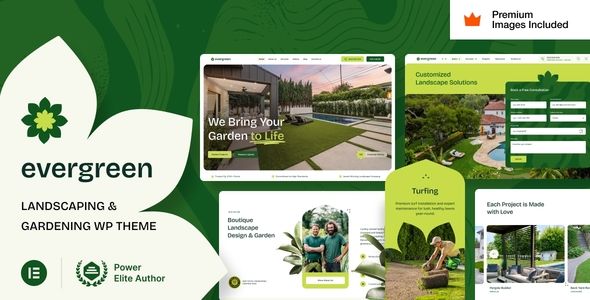
In the world of service-based businesses, a professional online presence isn't just an asset; it's a necessity. For landscapers, gardeners, and lawn care professionals, a website acts as a digital portfolio, a lead generation engine, and a primary point of contact. The challenge is often finding a foundation that balances niche-specific aesthetics with technical performance. This brings us to the subject of today's review, the EverGreen - Landscaping Garden Lawn Care WordPress Theme. We're going to bypass the marketing copy and put this theme through a real-world developer's gauntlet. We'll cover the installation process, dissect its dependencies, analyze its performance potential, and ultimately determine if it’s a solid choice for building a client site or your own business portal.
Part 1: The Setup - Installation and First Impressions
Any project begins with the setup. This phase often reveals the developer's attention to detail and can be a strong indicator of the theme's overall quality. A clunky, error-prone setup process is a major red flag. Let's see how EverGreen fares.
Step-by-Step Installation Guide
Getting EverGreen up and running follows a standard, if somewhat plugin-heavy, procedure. Here is the exact process I followed on a clean WordPress installation.
- Acquisition and Upload: First, you acquire the theme package. The downloaded zip file, `evergreen.zip`, is the installable theme file. Navigate to your WordPress dashboard, go to Appearance > Themes > Add New > Upload Theme. Select the `evergreen.zip` file and click "Install Now".
- Activation: Once the upload is complete, activate the theme. Immediately upon activation, you'll be greeted by a prominent notice at the top of your dashboard, prompting you to install a list of required and recommended plugins. This is where the theme's ecosystem truly begins to take shape.
- Plugin Installation: Clicking the "Begin installing plugins" link takes you to the plugin installer screen. EverGreen's list is substantial. The required plugins are typically EverGreen Core (the theme's functionality plugin) and WPBakery Page Builder. Recommended plugins include Slider Revolution, Contact Form 7, and a few others. For a full test, it's best to install all of them. You can bulk-select and install them in one go. After installation, you must return to the same screen to bulk-activate them.
- Demo Content Import: With the plugins active, a new "EverGreen" menu item appears in your WordPress dashboard. Inside, you'll find the "Demo Import" option. This is the crucial step for recreating the look you see in the theme's sales preview. EverGreen offers a one-click import process, which is a welcome feature. I initiated the import, and it took about three to five minutes to complete. It pulls in all the pages, posts, widgets, sliders, and theme options settings.
The process was smooth, with no critical errors. The one-click demo import worked as advertised, which is not always a given with complex themes. However, the sheer number of plugins required immediately sets off some performance alarms, which we'll address later.
The Plugin Dependency Problem
EverGreen is not a standalone theme; it's a framework heavily reliant on bundled plugins. Let's break down the key players:
- WPBakery Page Builder (formerly Visual Composer): This is the backbone of the theme's page layout system. WPBakery is a familiar tool for many WordPress developers, but it's also a contentious one. It uses a shortcode-based system that can leave a mess in your content if you ever decide to switch themes. Its performance overhead is also well-documented. While the theme integrates it well with custom elements for services and portfolios, you are essentially locked into this builder.
- Slider Revolution: Another powerful but heavy plugin. It's the go-to for creating the impressive hero sliders seen in the demos. While capable of amazing effects, it can be a significant drag on your site's load time if not configured meticulously. For most small business sites, a simpler, lightweight hero image or a Gutenberg-native block would be far more performant.
- EverGreen Core: This is a smart architectural choice. By putting core functionality like custom post types (for Projects, Services, etc.) into a separate plugin, the theme follows modern WordPress standards. This means if you change your theme down the line, you won't lose your portfolio or service listings.
- Contact Form 7: A solid, no-frills choice for contact forms. It's free and widely supported, though it lacks the user-friendly interface of builders like WPForms or Fluent Forms.
The reliance on WPBakery and Slider Revolution is a double-edged sword. For a non-technical user, it provides immense power and flexibility through a visual interface. For a developer focused on long-term maintainability and performance, it introduces significant bloat and potential lock-in. You're not just buying a theme; you're buying into an ecosystem of third-party plugins.
Part 2: A Technical Teardown - Customization and Code
With the demo content in place, the site looks just like the preview. Now, the real work begins: customization. How easy is it to bend EverGreen to a client's specific branding and requirements without writing a line of code? And what happens when you need to dig deeper?
The Theme Options Panel
EverGreen uses a robust theme options panel, accessible via Appearance > Theme Options. It appears to be built on a custom framework or a heavily skinned version of a popular one like Redux. It's comprehensive, which is a good thing. You have granular control over:
- General Settings: Site layout (full-width vs. boxed), back-to-top button, and preloader settings.
- Colors: A full color palette allows you to set primary, secondary, and accent colors that will propagate throughout the site. This is a critical feature for matching a client's brand guide.
- Header & Footer: Multiple header layouts, sticky header options, and extensive control over the footer widgets and copyright text.
- Typography: Full control over Google Fonts for body text, headings, and menus. You can specify font families, weights, sizes, and line heights.
- Blog and Portfolio: Settings for archive layouts, single post styles, and portfolio configurations.
The panel is logically organized and works well. For most standard branding changes—logos, colors, fonts—you will not need to write any custom CSS. This makes it efficient for developers aiming for a quick turnaround on client projects with standard requirements.
Page Building and Content Management
Editing pages is done exclusively through WPBakery. When you edit a page, you're presented with the builder's front-end or back-end editor. EverGreen's developers have included a suite of custom elements, such as "Services Grid," "Projects Carousel," "Team Members," and "Testimonials." These are essential, as they tie directly into the custom post types and give you an easy way to display dynamic content.
However, the WPBakery experience in 2023 and beyond feels dated compared to the native Block Editor (Gutenberg) or more modern builders like Elementor or Bricks. The interface can be clunky, and the reliance on shortcodes feels like a step backward. A developer accustomed to the clean, reusable block patterns of Gutenberg will find WPBakery's workflow to be slower and more restrictive.
A major concern is content portability. If the client decides to rebrand in three years and wants a new theme, migrating content created with WPBakery will be a painful process of cleaning up dead shortcodes. This is a conversation every developer should have with their client when using a shortcode-based page builder.
Code Quality and Child Theming
A cursory look at the theme files shows a reasonably well-organized structure. The code is commented, and the file separation follows general WordPress conventions. Crucially, the theme package includes a pre-built child theme, `evergreen-child.zip`. The developers explicitly encourage its use, which is a sign of good practice.
Always use the child theme. Any custom CSS, PHP functions, or template modifications must be done in the child theme. This ensures that when an update for the parent EverGreen theme is released, you can apply it without overwriting all of your custom work. Failing to do this is one of the most common and costly mistakes a novice developer can make.
The theme appears to be translation-ready, including a `.pot` file, which is essential for any business needing a multilingual site.
Part 3: Performance Analysis - The Speed Test
A beautiful website is useless if it's too slow to load. This is especially true for local service businesses where potential customers are often browsing on mobile devices with less-than-ideal connections. We put a fresh install of EverGreen with its full demo content through a performance test.
The Out-of-the-Box Score
Using GTmetrix with a server based in North America, the results for the homepage were predictable for a theme of this complexity:
- Performance Score (Lighthouse): 65-75%
- Largest Contentful Paint (LCP): 3.5s - 4.5s
- Total Page Size: ~3.2 MB
- Total Requests: ~95
These numbers are not great, but they are sadly typical for a feature-rich premium theme before any optimization. A page size over 3 MB and nearly 100 requests is a clear indicator of bloat. The LCP of over 4 seconds is well above the Google-recommended sub-2.5-second threshold and will negatively impact user experience and potentially SEO rankings.
Identifying the Bottlenecks
Where is this bloat coming from?
- Unoptimized Images: The demo content includes large, high-resolution images that are not properly compressed or served in next-gen formats like WebP.
- Slider Revolution: The homepage slider is a major culprit, loading its own complex JavaScript and CSS files, plus the large image assets it uses for slides.
- WPBakery Overhead: The page builder loads its own set of scripts and styles on every page, whether the elements are used or not.
- Excessive CSS/JS: The theme and its suite of plugins load numerous separate stylesheets and JavaScript files, leading to a high number of server requests.
A Practical Optimization Strategy
The out-of-the-box scores are poor, but they are salvageable. A developer can and should implement a robust optimization strategy. Here's a viable plan:
- Caching: Install a high-quality caching plugin. WP Rocket (premium) is my top recommendation for its ease of use and effectiveness. W3 Total Cache or WP Super Cache are solid free alternatives. This will handle page caching, browser caching, and GZIP compression.
- Image Optimization: Use a plugin like ShortPixel or Smush to automatically compress all images in the media library and serve them in WebP format. This alone could cut the page size in half.
- Asset Management: This is a power-user move. Install a plugin like Asset CleanUp or Perfmatters. These tools allow you to conditionally disable CSS and JavaScript files on pages where they are not needed. For example, you can prevent the Contact Form 7 scripts from loading on every single page, restricting them only to the contact page. This is invaluable for reducing requests.
- Re-evaluate the Slider: Have an honest conversation with the client. Does the fancy slider actually convert? Or would a well-designed static hero section with a clear call-to-action be more effective and dramatically faster? Often, the latter is true. Ditching Slider Revolution can provide the single biggest performance boost.
With these optimizations, it's entirely possible to get EverGreen's scores into the 90s and achieve an LCP of under 2 seconds. But be aware: this work is not optional. It is a mandatory part of developing a professional site with this theme.
Part 4: The Final Verdict - Is EverGreen a Good Investment?
So, where does that leave us? EverGreen is a theme with a clear identity and a specific target audience. It succeeds in providing a visually appealing, feature-complete package for landscaping and gardening businesses right out of the box.
Strengths:
- Niche-Specific Design: The aesthetics are spot-on for the industry. The layouts for services, galleries, and team members are well-thought-out.
- Rapid Development: For a developer working on a tight deadline and budget, the one-click demo import and comprehensive theme options allow for incredibly fast site builds.
- Feature-Rich: It includes almost everything a landscaping business would need, from project portfolios to service request forms.
Weaknesses and Watchouts:
- Performance Overhead: The theme is undeniably heavy. Achieving good performance requires a dedicated optimization effort that goes beyond just installing a caching plugin.
- Page Builder Lock-in: The deep integration with WPBakery means you are committed to that builder. Future migrations will be difficult.
- Maintenance Burden: More plugins mean more potential points of failure and more updates to manage. Keeping the theme, WordPress core, and all bundled plugins up-to-date is critical for security.
This theme is best suited for a developer who is comfortable with its ecosystem. You need to know your way around WPBakery and be prepared to spend time on performance optimization. It is less suitable for a complete beginner who might be overwhelmed by the options and unaware of the performance pitfalls.
For developers building multiple client sites, a key consideration is cost and licensing. This is where services like gpldock become invaluable. They operate under the General Public License (GPL), which allows you to download and use themes like EverGreen on unlimited websites. This is a perfectly legal and cost-effective way to test themes on development servers or even use them for client projects without purchasing a new license for every single site. It gives you the freedom to experiment and find the perfect fit from a vast library of Free download WordPress themes and plugins. For a professional developer, this model provides immense value and flexibility, allowing you to deliver high-quality sites while managing costs effectively.
Ultimately, EverGreen is a capable but demanding tool. In the hands of a competent developer who understands its limitations and is prepared to optimize it properly, it can be used to build a beautiful and effective website for a landscaping business. Just don't expect to activate it and walk away. The real work begins after the demo content is imported.