Landi ReactJS Template: A Developer's Deep Dive Review and Guid
-
Landi ReactJS Template: A Developer's Deep Dive Review and Guide
Finding a solid starting point for a client project can be the difference between a profitable engagement and a frantic, budget-burning scramble. The modern web template market is saturated, but the niche for high-quality ReactJS templates is still less crowded than its WordPress counterpart. Today, we're putting the Landi - Landscape Gardening ReactJS Template under the microscope. This isn't a surface-level overview. We're going to tear it down from a senior developer's perspective—installing it, dissecting its architecture, evaluating its code quality, and determining if it's a tool that accelerates development or one that creates technical debt from day one.
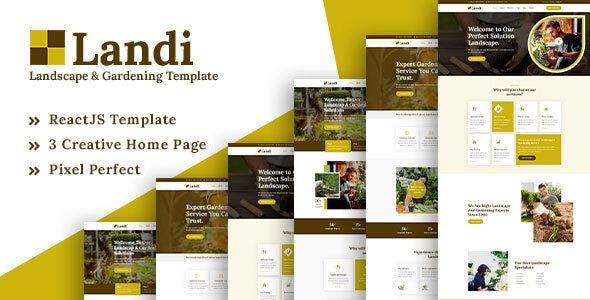
The promise of Landi is straightforward: a visually appealing, responsive, single-page application (SPA) template tailored for landscaping, gardening, or similar home service businesses. The live demo showcases modern design cues—bold typography, clean sections, subtle animations, and dedicated components for services, projects, testimonials, and a team showcase. It looks the part. But as any seasoned developer knows, a beautiful facade can often hide a tangled mess of code. Our job is to look behind the curtain.
Unboxing Landi: Installation and Initial Setup
A template's first test is its setup process. A convoluted or error-prone installation is an immediate red flag, signaling a lack of care from the author. Let's see how Landi fares.
Prerequisites
Before you begin, you need a standard React development environment. This isn't for absolute beginners to web development, but a junior React developer should feel right at home. Ensure you have:
- Node.js (v16.x or newer is recommended)
- npm (usually comes with Node.js) or Yarn
- A code editor like Visual Studio Code
Step 1: Download and Inspect the Package
Upon purchasing and downloading the template, you get a zip file. Extracting it reveals a well-organized root directory containing the template files and documentation. The core of our interest is the folder containing the React application itself. The structure is immediately familiar, looking very much like a standard Create React App (CRA) project. You'll see the `public` folder for static assets like `index.html` and favicons, and the `src` folder, where all the React magic happens. A `package.json` file sits at the root, which is our next stop.
Step 2: Installing Dependencies
Navigating into the project's root directory in your terminal, the first command to run is for installing the required node modules. I'll use npm for this walkthrough.
    cd path/to/landi-template

    npm install
The installation process was smooth and completed without any peer dependency warnings or errors, which is a positive sign. It suggests the authors have kept their dependency tree relatively clean. However, a quick scan of the `package.json` file reveals a few points of interest. The template is built on React v18 and uses `react-scripts` v5.0.1, the standard for Create React App. This is good—it's modern. We also see dependencies like `react-router-dom` for routing, `swiper` for the sliders/carousels, and `react-countup` for animated number counters. These are all reputable and well-maintained libraries. There are no obscure or questionable packages, which builds confidence.
Step 3: Firing Up the Development Server
With dependencies installed, the next step is to start the local development server.
npm startThe script executes, the Webpack dev server spins up, and the browser opens to `http://localhost:3000`. The process was quick, and the application loaded without any compilation errors or console warnings. The locally running version perfectly mirrored the live demo site. This seamless setup experience is exactly what a developer hopes for. It means you can get from download to development in minutes, not hours spent debugging someone else's environment issues.
Diving into the Code: An Architectural Review
With the template running locally, it's time to open the `src` folder and evaluate the code quality and architectural decisions. This is where a template proves its worth beyond the visual design.
Project Structure and Organization
The organization within the `src` folder is logical and follows common React conventions. It's broken down into several key directories:
- `assets`: Contains global CSS, images, and fonts. It’s a standard place to keep static resources.
- `components`: This is the heart of the application. It's further subdivided into `common` (for reusable elements like headers, footers, and buttons) and `home` (for components specific to the main landing page sections). This separation is a smart choice, promoting reusability.
- `data`: A small but critical detail. The template authors have abstracted much of the site's content—like service descriptions, team member details, and testimonial text—into JavaScript files within this folder. This is a huge win for maintainability. Instead of hunting through JSX to change a headline, a developer (or even a less technical user) can go to a single, clearly-named file to make updates.
- `pages`: Contains the top-level page components. For this single-page template, it primarily houses the `Home` component that assembles all the sections.
Overall, the structure is clean and intuitive. A developer new to the project could find their way around without needing extensive documentation. It's a professional setup that doesn't try to reinvent the wheel.
Component Analysis
Drilling down into the `components` directory, the quality remains fairly high. Components are functional and utilize React hooks (`useState`, `useEffect`). For example, the `Header` component uses a `useState` hook to manage the "sticky" state when the user scrolls, which is a clean and standard implementation.
However, there's a notable omission: prop type validation. The components don't use `PropTypes` or TypeScript. This means if you pass an incorrect data type to a component (e.g., a number where a string is expected), React won't warn you during development. For a small project like this, it's a minor issue. For a larger, more complex application or a team environment, the lack of type safety can lead to bugs that are difficult to track down. Adding `PropTypes` would be one of the first refactoring tasks I'd undertake.
The JSX is generally clean and semantic. Sections are wrapped in `
` tags, and heading levels are used appropriately, which is good for both SEO and accessibility. There isn't an excessive amount of `div` nesting, avoiding the dreaded "div soup." State Management
Landi doesn't employ a global state management library like Redux or MobX. This is absolutely the correct decision for a template of this scope. All state is managed locally within components using `useState` and `useEffect`. For instance, the mobile menu's open/closed state is handled within the `Header` component. The active tab in a "Why Choose Us" section is managed within that section's component.
Bringing in a global state manager would be massive overkill and would needlessly complicate the codebase. The authors have wisely stuck to React's built-in state management capabilities, keeping the template lightweight and easy to understand.
The Styling Approach: A Critical Look
Styling is often the most contentious part of a React template's architecture. Landi uses a straightforward approach: global CSS files. Inside the `assets/css` directory, you'll find `style.css`, `responsive.css`, and a few others for specific libraries. This is a double-edged sword.
The Good: It's simple and familiar. Anyone who knows CSS can immediately jump in and make changes. There's no new syntax to learn, unlike CSS-in-JS solutions. The authors have also used CSS variables for key theme elements like colors and font families, which is a massive plus.
The Bad: Global CSS in a component-based framework like React is an anti-pattern for large applications because it lacks scoping. A style defined for a button can unintentionally affect other elements across the entire site. While Landi's CSS is well-organized with BEM-like naming conventions (`.hero-section__title`) that mitigate this risk, it's not as robust as CSS Modules or styled-components, which scope styles directly to the component.
For a small business website, this approach is perfectly adequate. For a developer looking to integrate these components into a larger, more complex system, the global styling could become a headache. You'd likely want to refactor the CSS into a more modern, scoped solution.
Putting Landi to Work: Customization and Deployment
A template's true value is measured by how easily it can be adapted to a real client's needs. Let's walk through some common customization tasks.
Changing Content and Branding
Thanks to the `data` directory, changing text and images is remarkably simple. For example, to edit the services offered, you would open `src/data/serviceData.js`. Inside, you'll find an array of JavaScript objects:
export const serviceData = [
  {
    id: 1,
    title: 'Lawn & Garden Care',
    description: 'We provide expert lawn and garden care services...',
    icon: '/img/icon/services1.png'
  },
  // ... more services
];
To change the title or description of a service, you just edit the string. To change the icon, you replace the image path. This is a far superior workflow to digging through a massive `Services.jsx` component and editing hard-coded text.
Changing the branding is almost as easy. The primary colors are defined as CSS variables at the top of `assets/css/style.css`:
:root {
  --heading-color: #242424;
  --primary-color: #65B32E;
  --white-color: #ffffff;
  /* ... etc. */
}
To change the site's main accent color from the default green, you only need to modify the `--primary-color` variable. All components that use this color will update automatically. This is a thoughtful implementation that saves a huge amount of time compared to templates where colors are hard-coded in hundreds of different places.
Integrating a Backend and Contact Form
Out of the box, the contact form is not functional. It's a static HTML form. This is standard for a frontend template. To make it work, you need to wire it up to a backend service. A common approach would be to use an `onSubmit` handler in the `ContactForm` component to prevent the default browser submission, gather the form data from the state, and send it to an API endpoint using `fetch` or `axios`.
const handleSubmit = async (e) => {
  e.preventDefault();
  // ... get form data from state ...
  try {
    const response = await fetch('https://api.yourdomain.com/send-email', {
      method: 'POST',
      headers: { 'Content-Type': 'application/json' },
      body: JSON.stringify(formData),
    });
    // ... handle success or error ...
  } catch (error) {
    console.error('Form submission failed:', error);
  }
};
This is a standard developer task and the template provides a clean component to work with. The same logic applies to fetching dynamic content, for example, from a headless CMS like Strapi or Contentful. You would replace the static data imports from the `/data` folder with API calls inside `useEffect` hooks.
Building for Production
When you're ready to go live, creating an optimized production build is a single command:
npm run buildThis command invokes `react-scripts` to bundle, transpile, and minify all your code and assets into a `build` directory. The output is a set of static files that can be deployed to any static web host like Netlify, Vercel, or AWS S3. The build process completed without issue. Inspecting the final bundle, the size was reasonable for a feature-rich landing page. The code splitting implemented by Create React App ensures that users only download the code they need for the initial view, which is great for performance.
The Final Scorecard: Strengths and Weaknesses
No template is perfect. Let's break down where Landi shines and where it has room for improvement.
What Landi Does Well
- Excellent Setup Experience: You can be up and running in under five minutes. This is a huge plus.
- Clean and Logical Code Structure: The project is easy to navigate, and the separation of concerns is well-handled.
- Content Abstraction: Placing site content into a `data` directory is a professional touch that dramatically simplifies content updates.
- Smart Styling Choices: The use of CSS variables for theming makes rebranding quick and painless.
- Modern React Foundation: Built on React 18 with no outdated or insecure dependencies found during a cursory `npm audit`.
Where Landi Falls Short
- Lack of Type Safety: The absence of TypeScript or even JavaScript's `PropTypes` is the template's biggest technical weakness. It makes the components more brittle and harder to maintain as a project grows.
- Global CSS: While well-organized, the reliance on global CSS is not ideal for component-based architecture. A migration to CSS Modules or a CSS-in-JS library would be a valuable improvement for developers wanting to reuse these components in larger apps.
- Limited Reusability of Section Components: The components in the `components/home` folder are designed specifically for the homepage layout. Adapting them for use on other pages or in different layouts would require some refactoring.
It's important to frame these "weaknesses" correctly. For the intended purpose—a quick, beautiful website for a small business—they are minor trade-offs. The time saved by the excellent setup and content abstraction far outweighs the time a developer might spend adding PropTypes if they so choose. While platforms like gplpal offer a vast library of digital assets, from intricate themes to simple plugins, the real value of a product like Landi is its focus on a specific developer workflow. Many developers might be tempted to look for Free download WordPress themes, but the shift towards performant JavaScript frontends for brochure sites is undeniable, and that's the market Landi serves.
So, Who Should Buy the Landi Template?
After a thorough review, we can provide a clear recommendation based on different user profiles.
For the Freelance Developer
Verdict: Highly Recommended. This template is an ideal starting point for a client project in the home services niche. It will save you dozens of hours of initial setup and styling. The clean structure and abstracted data mean you can quickly brand it for a client and hand over a system where they can even make minor text changes themselves by editing the data files. You'll want to be comfortable enough with React to wire up the contact form and potentially add `PropTypes` for your own sanity, but the return on investment is clear.
For the Development Agency
Verdict: A Qualified Recommendation. An agency likely has its own internal boilerplate that's already aligned with its preferred tech stack (e.g., Next.js, TypeScript, styled-components). Landi might not fit that stack perfectly. However, for a rush job or a lower-budget project where speed is the primary concern, Landi could be a valuable tool to have in the arsenal. It's solid enough that it can be adapted, but be prepared to allocate time for refactoring the styling and adding type safety to meet your agency's internal standards.
For the Beginner React Developer
Verdict: A Good Learning Tool. If you've completed a few React tutorials and want to see how a complete, "real-world" (albeit simple) application is put together, Landi is a great educational resource. You can study how routing is implemented, how components are structured, and how hooks are used for interactivity. The lack of complex state management makes it very approachable. Trying to customize it, add a new section, or wire up the contact form would be an excellent learning exercise.
In the end, Landi is more than just a pretty design. It's a well-constructed and thoughtful React template that respects a developer's time. It delivers on its visual promise with a codebase that is clean, modern, and—most importantly—easy to work with. While it makes some pragmatic trade-offs, like forgoing type safety for simplicity, these are understandable choices for its target audience. Landi successfully bridges the gap between a static design and a functional application, providing a robust foundation that can be confidently built upon.