Bodyzone Elementor Kit: A Developer's Deep Dive—From Install to
-
Bodyzone Elementor Kit: A Developer's Deep Dive—From Install to Launch
In the world of web development, time is the one resource we never have enough of. When a client—say, a local gym or fitness studio—needs a sharp, modern website on a tight budget and an even tighter deadline, building from scratch isn't always feasible. This is the exact scenario where Elementor Template Kits promise to be a silver bullet. Today, we're putting one such product under the microscope: the Bodyzone - Gym and Fitness Center Elementor Template Kit. We're going to dissect it not just as a user, but as a developer, moving from the initial setup to a critical analysis of its structure, performance, and real-world customizability.
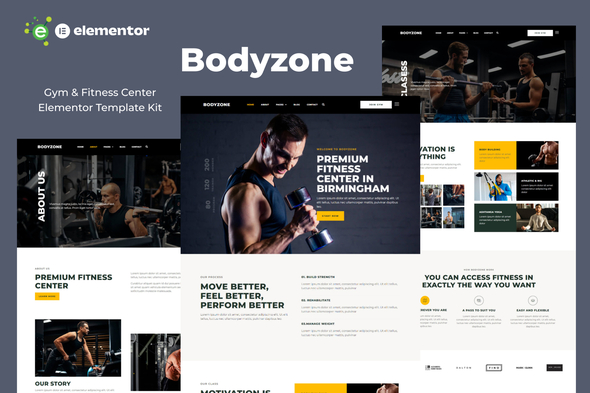
This isn't your average surface-level review. We'll be looking at the code it generates, its reliance on plugins, and whether it’s a solid foundation for a professional project or a house of cards waiting to collapse under the weight of a client's change requests. We'll run through a complete installation and configuration process, highlighting the common "gotchas" that can derail a project. Let's see if Bodyzone is truly a workout partner or just dead weight.
Part 1: The Initial Assessment - What's in the Box?
Upon acquiring the kit, you get a single ZIP file. Inside, you don't find a theme, but a collection of JSON files and a manifest. This is standard for Elementor kits. The premise is simple: you bring the theme (ideally a lightweight one like Hello Elementor), and the kit provides the design and layout DNA.
The Bodyzone kit includes a comprehensive set of templates designed to cover the essentials for a fitness business:
- Core Pages: Home, About Us, Our Classes, Our Trainers, Pricing.
- Utility Pages: FAQ, Contact Us, a 404 Error page.
- Theme Builder Parts: Header, Footer, Single Post, Archive/Blog.
- Pop-ups and Sections: The kit also includes some global components that get imported.
First Impressions: The Aesthetic
The design is exactly what you'd expect for this niche, and that's not a bad thing. It's bold, energetic, and uses a high-contrast palette of black, white, and a vibrant red. Typography is strong, with large, impactful headlines that grab attention. The layouts lean heavily on full-width sections, large background images, and clear calls-to-action (CTAs). It looks modern and professional enough to give a new gym instant credibility. The placeholder imagery is well-chosen and effectively communicates the fitness theme, though any serious project will require swapping these out immediately.
Critical Prerequisite: Plugin Dependencies
Here’s our first major checkpoint. The kit explicitly requires Elementor Pro. This is a non-negotiable point of consideration. If you or your client are trying to build a site on a shoestring budget using only the free version of Elementor, this kit is a non-starter. The dependency is due to its use of Pro widgets (like the Posts widget for the blog, the Forms widget for contact forms) and, most importantly, the Theme Builder functionality for the header, footer, and post templates. While many kits from sources like gplpal offer incredible value under GPL licensing, the underlying requirement for premium plugins like Elementor Pro must be factored into the total project cost.
Part 2: The Installation Gauntlet - A Professional's Workflow
Let's move from theory to practice. I’m starting with a clean WordPress installation running the latest version, with the Hello Elementor theme activated. This theme is essentially a blank canvas, perfect for template kits as it adds no stylistic bloat of its own.
Step 1: Install the Engines (Elementor & Elementor Pro)
First things first. Install and activate the free Elementor plugin from the WordPress repository. Next, upload, install, and activate your licensed copy of Elementor Pro. Attempting to import the kit before both are active will lead to errors or, worse, a partial import that's a nightmare to debug.
Step 2: The Kit Import Process
Navigating to Templates > Kit Library in the WordPress dashboard reveals the "Import Kit" button. Upload the Bodyzone ZIP file here. Elementor then reads the manifest file and shows you which components it's about to import. This is your chance to deselect anything you might not need, though for a first run, it's best to import everything to ensure all dependencies are met.
Developer's Note: The import process can sometimes time-out on shared hosting with low memory limits or strict execution time settings. If the import fails, the first things to check are your server's `memory_limit` and `max_execution_time` values. A partially imported kit is messy; it's often faster to use a reset plugin and start over than to try and fix it.
Once you proceed, Elementor will prompt you about how to handle existing site settings. Since we're on a clean install, we'll let the kit overwrite everything. It will import templates, content, and, crucially, the Site Settings—this includes global colors, fonts, and theme style settings.
Step 3: Post-Import Triage
The import is done, but the website isn't. This is where many users get lost. The templates are in the library, but they aren't live pages yet.
- Check Global Settings: Go to the Elementor editor for any page and click the hamburger menu in the top-left. Select Site Settings. Verify that the Global Colors and Global Fonts have been populated with Bodyzone's palette and typography. This is the core of the kit's design system. If these are empty, the import failed.
- Verify Theme Builder Templates: Navigate to Templates > Theme Builder. You should see the Header, Footer, and post templates from the kit. The most important step here is to check their "Display Conditions." The importer is supposed to set these automatically (e.g., the Header should be set to "Entire Site"), but it's not always perfect. I've had to manually set these on more than one occasion. Without these conditions, WordPress will just use the theme's default header and footer, and your site will look broken.
Step 4: Building the Pages
Now, we create the actual pages for the site.
- Go to Pages > Add New. Title your first page "Home."
- Click "Edit with Elementor."
- On the blank canvas, click the grey folder icon to open the template library.
- Go to the "My Templates" tab. You'll see the list of imported page templates.
- Find the "Home" template and click "Insert."
- Don't apply the page's settings; we want to use the global settings the kit has already established.
- The page layout will load. Publish it.
Repeat this process for all the other core pages: About Us, Classes, Pricing, etc. This is a repetitive but necessary step. It's the process of taking the blueprints (templates) and constructing the actual rooms (pages) of your house.
Step 5: Finalizing the Structure
With the pages created, the last structural step is to build the navigation menu. Go to Appearance > Menus, create a new menu, and add all the pages you just created. Assign this menu to the "Primary" location (or whatever location the Elementor Header template is configured to use). Finally, go to Settings > Reading and set your "Homepage" to the "Home" page you created. Your site should now be fully assembled and navigable, looking just like the demo.
Part 3: A Developer's Critique - Under the Hood
The site is built. Now, the real analysis begins. How is it constructed from a technical standpoint?
The Good: What Bodyzone Gets Right
- Strong Use of Global Styles: This is the kit's biggest win. The designer clearly understood how to use Elementor's Site Settings. Colors are not hard-coded into individual widgets; they are linked to the global color palette. This is a massive time-saver. When a client says, "Can we change the red to our brand's blue?" you can make the change in one place (Site Settings > Global Colors), and it will cascade across the entire website. This is how professional page building should be done.
- Logical Layout Structure: Peeking into the Navigator panel, the section and column structure is mostly clean. There isn't an excessive amount of nesting (the "div-ception" that plagues many amateur Elementor builds). This makes the layouts easier to understand, modify, and debug. It also has a positive, if minor, impact on performance by keeping the DOM from becoming absurdly complex.
- Decent Responsive Implementation: The designer has clearly spent time on the tablet and mobile views. Elements stack cleanly, font sizes are adjusted appropriately, and navigation collapses into a functional mobile menu. It’s not groundbreaking, but it’s a solid B+. It works out of the box without major layout breaks, which is a huge head start. I only found a few minor text alignment issues on mobile that were easily fixable with a few tweaks to margin/padding values.
The Bad: The Potential Headaches
- Image Optimization is Non-Existent: This is my biggest gripe, and it’s common to almost all template kits. The placeholder images are large, uncompressed JPEGs. The homepage, out of the box, weighed in at over 5MB, which is completely unacceptable. Before this site could ever go live, you would need to replace every single image with a properly sized, compressed, and ideally, WebP-formatted version. This isn't a flaw in the kit's design, but a critical workflow step that must not be skipped. A performance optimization plugin like Perfmatters or WP Rocket becomes essential.
- Over-reliance on Motion Effects: The kit uses a number of "fade in on scroll" animations. While they add a bit of dynamism, they can contribute to layout shift and feel a bit dated. On a content-heavy page, these can also tax the browser's rendering engine. My first step in optimizing a site built with this kit would be to disable most of these effects globally via Elementor's settings. Functionality and speed trump flashy animations every time.
- Form Styling: The contact form is built with the Elementor Pro Forms widget, which is great for functionality. However, its styling is heavily customized within the widget itself. If you decide to use a different forms plugin (like Gravity Forms or Fluent Forms), you will have to write custom CSS to make its forms match the site's aesthetic. The kit doesn't provide a global, class-based styling for form fields that could be easily applied to other plugins.
The Ugly: The Potential Deal-Breakers
- Accessibility Concerns: This is a near-universal failure of visual page builders, and Bodyzone is no exception. A quick audit reveals some low-hanging fruit. For example, some of the red text on dark backgrounds has a contrast ratio that is borderline, potentially failing WCAG AA standards. The button-like links are `divs` with click handlers, not proper `` tags or `
Part 4: Real-World Scenario - Customizing for "Urban Strength Co."
Let's put the kit to a final test. A hypothetical client, "Urban Strength Co.," loves the layout but has their own branding: a dark teal, light grey, and orange accent color. They also want a simple blog to post gym news.
1. Rebranding (5 Minutes): Thanks to the excellent use of Global Styles, this is incredibly easy. I navigate to Site Settings > Global Colors and replace the primary red with the client's teal, the dark background with a slightly different shade, and the accent color. I hit "Update," and 95% of the site is instantly rebranded. This is the kit's biggest selling point in action.
2. Content Population: Swapping out text and images is straightforward Elementor work. The clean layouts make it easy to identify which text and image widgets need updating. The main task here is ensuring the client's new images are all optimized before uploading.
3. Building the Blog (20 Minutes): The kit already provides a handsome "Single Post" template and an "Archive" template. I create a few dummy posts in WordPress. When I visit the main blog page, the Archive template automatically kicks in, displaying my posts in a styled grid. When I click on a post, the Single Post template provides a well-designed reading experience with a sidebar. The system works flawlessly because of the Elementor Pro Theme Builder integration. I just had to create a "Blog" link in the main menu.
Final Verdict: A Powerful Head Start, Not a Finished Product
So, is the Bodyzone Elementor Template Kit worth it? The answer is a resounding "yes, but with caveats."
For a freelance developer or small agency under pressure, this kit is an exceptional accelerator. It provides a professional, niche-specific design and a well-organized Elementor structure that can save dozens of hours in initial design and layout work. Its masterful use of Global Styles makes rebranding a breeze, which is a massive win for any client project.
However, it is not a one-click solution. It is a starting point—a powerful one, but a starting point nonetheless. A professional developer will still need to:
- Perform rigorous performance optimization, especially on images.
- Rebuild static sections like "Trainers" into dynamic CPTs for long-term manageability.
- Conduct an accessibility audit and remediate issues with color contrast and semantic HTML.
- Potentially write custom CSS to integrate third-party plugins like event calendars or booking systems.
The kit handles about 70% of the work. The remaining 30% is the technical expertise that separates a simple "website assembler" from a professional web developer. For those looking for a solid foundation to build upon, Bodyzone is a top-tier choice. For those looking for a wide variety of other options, you can always Free download WordPress themes and kits to find the perfect fit for your next project.
Technical Scorecard:
Design & Aesthetics: 9/10 - Modern, professional, and perfectly targeted for the fitness niche.
Ease of Installation & Setup: 8/10 - Standard Elementor Kit process. Can be tricky for beginners, but straightforward for experienced users. Docked a point for potential server timeout issues during import.
Flexibility & Customization: 7/10 - Excellent for branding and color changes via Global Styles. However, a significant amount of work is required to convert static sections to a dynamic, client-friendly CMS.
Performance & Code Quality: 6/10 - The Elementor structure is clean, but the lack of image optimization and use of motion effects creates a slow site out of the box. The underlying DOM is as bloated as any Elementor site, and accessibility is an afterthought.
Overall: 7.5/10 - A high-quality asset for developers who understand its limitations and are prepared to do the necessary work to transform it from a template into a robust, performant, and maintainable client website.