Tula Nature Cottages Kit: A Developer's Hands-On Review and Ins
-
Tula Nature Cottages Kit: A Developer's Hands-On Review and Installation Guide
Building a website for a boutique hospitality business—be it a rustic cottage rental, a glamping site, or a tranquil bed and breakfast—presents a unique challenge. The design can't just be functional; it has to sell an experience. It needs to evoke a feeling of escape, serenity, and comfort before the user even thinks about clicking "Book Now." This is where most off-the-shelf themes fail, often feeling too corporate or generic. For developers and savvy business owners in the WordPress ecosystem, Elementor Template Kits have emerged as a powerful middle ground. They promise a professionally designed, cohesive website structure without the rigidity of a traditional theme. Today, we're putting one such kit under the microscope: the Tula - Nature Cottages Elementor Template Kit. We'll go beyond the polished demo, run a full installation, and determine if it's a solid foundation for a real-world project or just a pretty facade.
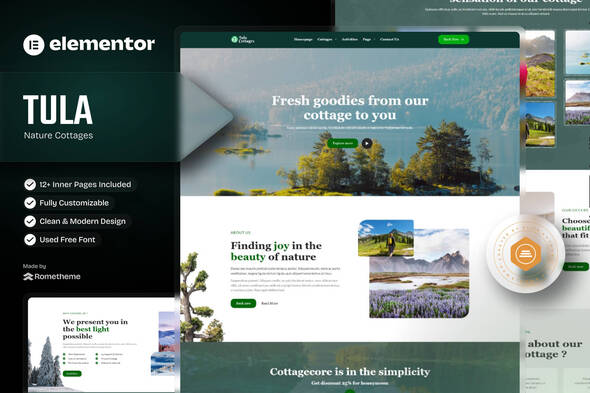
Part 1: The Review - Deconstructing the Tula Aesthetic and Architecture
Before we get our hands dirty with the installation, let's critically evaluate what Tula brings to the table. A template kit is more than just a collection of pre-designed pages; it's a system of design choices, structural decisions, and dependencies. How well that system is executed determines its value.
First Impressions: Design, Typography, and Vibe
Opening the demo for the first time, Tula immediately communicates its intent. The aesthetic is clean, earthy, and modern, without feeling cold or sterile. The color palette is a muted collection of off-whites, warm beiges, and deep forest greens, which grounds the design in its "nature cottages" theme. It successfully avoids the common pitfall of becoming a cliché "eco" design with overused leaf motifs and rough textures.
The typography is a standout feature. The choice of a refined serif for headings (likely a font like Playfair Display or a close relative) paired with a clean, highly legible sans-serif for body copy (like Montserrat or Lato) strikes a perfect balance between elegance and readability. This pairing is a classic for a reason, and its implementation here feels intentional and professional. Spacing is generous, with plenty of negative space that allows the high-quality imagery to breathe and do the heavy lifting of selling the location.
The layout relies on a clean grid structure, but it’s broken up with subtle asymmetric elements, overlapping images, and gentle parallax-style background effects. These touches add a dynamic, custom-built feel that elevates it above a basic template. It feels less like a rigid WordPress theme and more like a bespoke design from a high-end agency.
Kit Components: What’s in the Box?
A template kit's usefulness is directly proportional to its completeness. A project can be derailed if you discover a key page template, like a blog archive or a 404 page, is missing. Tula appears to be comprehensive. The kit typically includes the following templates:
- Two Homepage Variations: Offering a couple of distinct layouts for the most important page is a smart move. It provides flexibility right out of the gate.
- About Us: A standard but essential page to tell the story behind the business.
- Cottages / Services: This is the core "listing" page, designed to showcase the available accommodations or services in a grid or list format.
- Cottage Detail Page: Crucially, it includes a template for a *single* cottage. This is where you'll detail amenities, show off a dedicated gallery, and place your call-to-action for booking.
- Gallery: A dedicated page for visual storytelling. Essential for any hospitality business.
- Blog Archive & Single Post: A well-designed blog is key for SEO and content marketing. Providing templates for both the main blog feed and individual posts is a sign of a complete kit.
- Contact Us: Includes a contact form and often a map section.
- Header & Footer: These global parts are vital. Their inclusion means you can control the top and bottom of your entire site from one place using the Elementor Theme Builder.
- 404 Page: A small detail, but a branded 404 page is a professional touch that many kits overlook.
This list covers all the essential components for a complete brochure and marketing website for a cottage rental business. The only missing piece would be direct integration with a booking system, but that's expected. Template kits are design-focused; the booking functionality would need to be added via a dedicated plugin (like Amelia, Crocoblock's JetBooking, or another third-party system), which you would then integrate into the "Cottage Detail" page.
Under the Hood: Responsiveness and Potential Performance
A pretty design is useless if it falls apart on a smartphone or takes ten seconds to load. This is where a developer's eye becomes critical.
Responsiveness: Inspecting the demo on various viewport sizes reveals a thoughtful approach to mobile design. The layouts don't just "stack" columns clumsily. Font sizes are scaled down appropriately, margins and paddings are adjusted to conserve precious screen real estate, and complex grid layouts simplify into clean, single-column flows. The mobile menu is a clean, standard flyout or dropdown. This is a good sign. It suggests the creator built the templates with a mobile-first or, at the very least, a mobile-aware mindset. However, the real test will come after installation with our own content.
Performance: This is the elephant in the room with any Elementor-based project. Elementor's flexibility can come at a cost if not used efficiently. Based on the demo, here are the potential performance concerns:
- Image Weight: Tula's design is heavily reliant on large, beautiful background images and gallery photos. The demo images are likely well-optimized, but a client or DIY user could easily upload a 5MB photo, grinding the page to a halt. The end-user will bear the responsibility for proper image compression (using a plugin like ShortPixel or Imagify is non-negotiable).
- DOM Size: I'm looking for signs of excessive "div-itis"—nesting sections inside columns inside inner sections. This bloats the HTML Document Object Model (DOM) and can slow down rendering. The Tula layouts seem reasonably clean, but some of the more complex overlapping designs might use a few extra containers. This is something to keep an eye on post-installation.
- Animations: The kit uses subtle fade-in and slide-in animations on scroll. These are well-executed and not overdone, but they do add a small amount of processing overhead. They can be easily disabled from the Elementor controls if performance is the absolute top priority.
Dependencies: The Hidden Cost
This is arguably the most important section of the review for anyone on a budget. This kit requires Elementor Pro. Let's be clear: this is not a negative. Elementor Pro is what enables features like the Theme Builder for creating custom headers/footers, the Form widget for contact forms, and other advanced design elements used in Tula. It's a professional tool for a professional result. However, anyone thinking they can use this kit with the free version of Elementor will be disappointed. The cost of an Elementor Pro license must be factored into the project budget.
The kit may also require other free add-ons, but the core functionality is tied to the Pro version. This dependency is a good thing from a stability standpoint—it's better to rely on the official Pro version than a dozen different third-party plugins that might have compatibility issues down the line.
Part 2: The Installation Guide - A Real-World Walkthrough
Enough theory. Let's install the Tula kit on a fresh WordPress environment and document the process, including the inevitable hiccups that demos never show you. This is the practical guide to getting from a `.zip` file to a functioning website.
Prerequisites: Your Pre-Flight Checklist
Before you even think about uploading the kit, ensure you have the following in place:
- A Clean WordPress Installation: Do not try to install a template kit on top of an existing website full of content and other themes. Start with a fresh, clean slate. Use a staging environment if you're working on a live domain.
- Elementor (Free): Install the latest version of the free Elementor plugin from the WordPress repository.
- Elementor Pro: Install and activate your licensed version of Elementor Pro. This is a hard requirement.
- The Tula Kit File: Download the `Tula-nature-cottages-elementor-template-kit.zip` file from your source, like the popular GPL resource site gplpal. Do NOT unzip this file. WordPress and Elementor need the zipped archive.
Step-by-Step Installation Process
Follow these steps precisely. Skipping one can lead to a broken or incomplete import.
Step 1: Access the Kit Library
In your WordPress dashboard, navigate toTemplates > Kit Library. This is the central hub for managing Elementor Template Kits.Step 2: Import the Tula Kit
In the top-right corner of the Kit Library screen, you'll see a button that says "Import Template Kit." Click it. A file upload window will appear. Select the `Tula-nature-cottages-elementor-template-kit.zip` file you downloaded earlier.Step 3: The Import Wizard
Elementor will process the file and then present you with an import wizard. This is the most crucial part of the process. The wizard will show you all the components it's about to import: templates, site settings, and content. It might also prompt you to install any additional required plugins (if any). For the Tula kit, it will primarily be using Elementor and Elementor Pro's features.You will be presented with a list of items to import. It will include:
- Templates: All the individual page and section designs (e.g., Homepage, About, Header, Footer).
- Site Settings: This is the magic. It imports the global colors, fonts, theme style settings, and layout configurations.
- Content: This includes the demo pages, posts, and images shown in the preview.
IMPORTANT: For your first import on a clean site, you should check all the boxes and import everything. Click the "Import" button. The process can take a few minutes as it downloads demo media and sets up the database. Do not navigate away from this page.
Post-Import Configuration: The Job's Not Done Yet
Once the importer finishes, you might visit your homepage and see... nothing. Or a mess. This is normal and expected. The kit has been imported, but WordPress doesn't yet know how to use the new pieces. This is where most beginners get stuck. Here's how to finish the job.
1. Configure the Header and Footer
The header and footer templates are imported but not active.- Go to
Templates > Theme Builder. - You will see your new Tula Header and Footer listed, likely with no "Display Conditions" set.
- Click "Edit Conditions" for the header template.
- Click "Add Condition," ensure it's set to "Include," and choose "Entire Site." Save & Close.
- Repeat the exact same process for the footer template. Now, your custom header and footer will appear on every page of your site.
2. Set Your Static Homepage
WordPress, by default, shows your latest blog posts on the front page. We need to tell it to use one of the beautiful homepages Tula just created.- Go to
Settings > Readingin the WordPress dashboard. - Under "Your homepage displays," select "A static page."
- From the "Homepage" dropdown, select the "Home" or "Homepage 1" page that the kit imported.
- From the "Posts page" dropdown, select the "Blog" page.
- Save your changes. Now, when you visit your domain, you'll see the correct Tula homepage.
3. Re-create the Navigation Menu
The demo menu links are imported, but they are not assigned to a menu location.- Go to
Appearance > Menus. - You may see an imported menu, or you may need to create a new one. Let's create a new one to be safe. Name it "Main Menu."
- On the left side, you'll see a list of your pages (About, Contact, Cottages, etc.). Check the ones you want in your menu and click "Add to Menu."
- Drag and drop them into your desired order.
- Under "Menu Settings" at the bottom, check the box for "Header" or "Primary" (the name can vary slightly).
- Save the menu. Your header should now be populated with the correct navigation links.
4. Configure the Contact Form
The contact page will have a form, but it won't send emails to you by default.- Navigate to your "Contact Us" page and click "Edit with Elementor."
- Click on the form widget to open its settings in the left-hand panel.
- Go to the "Actions After Submit" section. It should already have "Email" and "Collect Submissions" listed.
- Now, click on the "Email" tab that appears just below.
- In the "To" field, enter your email address where you want to receive notifications.
- Customize the "Subject" and "From Email" fields as needed.
- Click the "Update" button to save the page. Your form is now live and functional.
Final Verdict and Real-World Value
After a full installation and configuration, does the Tula kit hold up? Yes, absolutely—with a few important caveats.
The Good
- Aesthetic Excellence: The design is top-tier. It's clean, professional, and perfectly targeted to its niche. For a developer, this provides immense value, saving dozens of hours on design and layout.
- Speed of Deployment: Going from a blank WordPress install to a fully built, beautifully designed website structure in under an hour is a game-changer for client projects with tight deadlines.
- Cohesive System: The global styles (colors, fonts) work flawlessly. Changing a global color in the Site Settings correctly updates it across all pages, which is a testament to a well-built kit.
- Solid Foundation: It's not a rigid final product. It's a fantastic starting point. You can easily modify layouts, swap out sections, and inject your own branding while retaining the core design language.
The Not-So-Good
- Dependency on Elementor Pro: This isn't a flaw, but it's a financial and technical barrier for absolute beginners. You need to be comfortable with the Pro ecosystem.
- Post-Import Legwork: It's not a one-click solution. As our guide shows, you must manually configure the header, footer, homepage, and menus. This is a potential point of frustration for users who expect an instant mirror of the demo.
- Content Replacement: The demo content and images must be completely replaced. This sounds obvious, but it's a significant amount of work that clients often underestimate. The design's success hinges on having high-quality, professional photography. Bad photos will ruin this template.
Who Is This Kit For?
The Tula - Nature Cottages Elementor Template Kit is an ideal tool for two specific groups:
- Freelance Web Developers & Small Agencies: This is the sweet spot. Tula provides a high-end design foundation that can be sold to clients in the hospitality niche. It dramatically cuts down on development time, allowing developers to focus on customization, functionality (like booking systems), and client needs.
- Tech-Savvy DIY Business Owners: For the owner of a cottage rental business who is comfortable with WordPress and willing to invest in Elementor Pro, Tula is a fantastic way to achieve a custom-looking site on a budget. They must be prepared to follow the post-install steps and have excellent photography ready to go.
It is *not* for someone with zero WordPress experience who is looking for a push-button solution. The need for post-import configuration places it a step above the most basic website builders. But for those willing to engage with the tools, the result is far superior. Many developers and hobbyists find great value in collections that offer things like Free download WordPress themes and plugins, but a premium, focused kit like Tula often provides a more streamlined and professional outcome for a specific business goal.
In the end, the Tula kit delivers on its promise. It's a beautifully designed, well-structured, and technically sound foundation for building a premium-feeling website for nature-focused accommodations. It saves time, enforces design consistency, and produces a result that punches well above its price point, provided you understand what a template kit is—and what it isn't.