Royalea Elementor Template Kit: A Developer's Deep-Dive Review
-
Royalea Elementor Template Kit: A Developer's Deep-Dive Review and Guide
Building a website for a luxury hotel or resort is a high-stakes game. The digital front door must exude the same opulence, attention to detail, and seamless experience as the physical property. A clunky user interface or a generic design can kill a booking faster than a bad review. This is the challenge that products like the Royalea - Luxury Hotel & Resort Elementor Template Kit aim to solve. It promises a fast track to a premium, visually stunning website by leveraging the power of Elementor. But as any seasoned developer knows, promises and reality are often two very different things. We're going to tear down this template kit, piece by piece, to see if it’s a solid foundation for a professional project or just a pretty facade with a shaky structure. This isn't a marketing overview; it's a technical audit and a real-world installation guide.
Deconstructing the "Luxury" Aesthetic: First Impressions
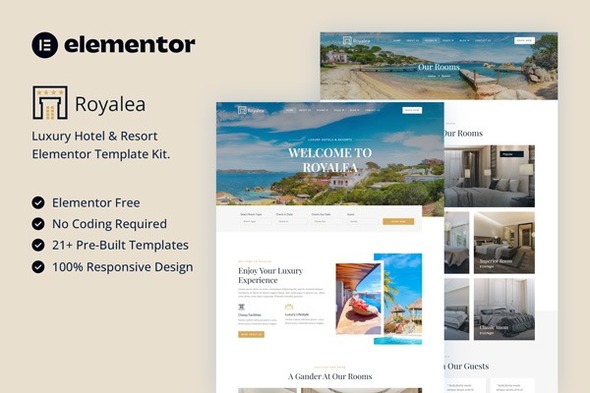
Upon unboxing the Royalea kit and previewing its demo pages, the initial impression is one of competent, modern design. The creators clearly understand the visual language of the high-end hospitality industry. It’s all about expansive, high-resolution imagery, elegant typography, and a generous use of negative space. This isn't some cluttered, early-2010s design; it’s clean and aspirational.
Typography: The font pairing leans towards a classic serif for headings and a clean, highly legible sans-serif for body copy. This is a timeless choice that works. The headings have a sense of gravitas and elegance, while the body text is functional and doesn't fatigue the eye. The typographic scale is well-considered, creating a clear hierarchy that guides the user through the content. However, a critical eye will notice that the default letter spacing (tracking) in some of the headline widgets is a bit tight for my taste. This is a minor, five-second fix in the Elementor style panel, but it’s something a discerning designer would tweak immediately to give the text more room to breathe.
Color Palette: The default palette is a sophisticated mix of muted earth tones, deep charcoals, and creamy off-whites, accented by a subtle gold or bronze. It’s a safe, effective choice that screams "luxury spa" or "boutique hotel." The colors are implemented using Elementor's Global Colors, which is a massive plus. It means you can re-skin the entire site to match a client's specific branding in minutes by changing just a handful of color values. This is a fundamental sign of a well-built kit.
Layout and Imagery: The layouts rely heavily on full-width sections and stunning, professional photography. This is both the kit's greatest strength and its most significant dependency. If your client provides you with poorly lit, low-resolution photos taken on a smartphone, this template will fall apart. Its success is fundamentally tied to the quality of the visual assets you feed it. The use of overlapping elements and subtle parallax effects adds a dynamic, premium feel without being overly distracting. The responsive design, on first inspection in the browser's developer tools, appears solid. The columns stack logically, and font sizes adjust appropriately for mobile viewports. We'll stress-test this more later.
The Technical Lowdown: What's Really in the Box?
It's crucial to understand what an Elementor Template Kit is and what it isn't. It is not a WordPress theme. It's a collection of pre-designed page layouts, sections, and popups that you import into a blank-slate WordPress installation. Think of it as a set of professional blueprints, not a prefabricated house.
The Royalea kit includes a comprehensive set of templates to build a full-featured hotel site:
- Homepage Templates: Multiple variations to choose from.
- About Us: A standard but well-designed page to tell the brand's story.
- Rooms & Suites: A crucial list-style page and a detail page template for individual rooms.
- Services/Amenities: Templates for showcasing things like a spa, restaurant, or pool.
- Gallery: A necessary page to showcase the property's visual appeal.
- Contact Us: Includes a contact form and map integration.
- Header & Footer: These are Theme Builder templates, which means they require Elementor Pro.
- Other Assets: Pop-ups, 404 page, and blog archive/single post templates.
Dependencies and Costs
This is where we need to be direct. To use this kit as intended, you need two core plugins:
- Elementor (Free): The core page builder plugin.
- Elementor Pro (Paid): This is non-negotiable. The kit relies heavily on Pro features like the Theme Builder for headers/footers, the Posts widget for blog archives, and the Form widget for contact forms. If you try to use this kit without Elementor Pro, you will have a broken, incomplete website.
The kit itself doesn't appear to require any other third-party add-ons, which is excellent. Bloating a site with a dozen Elementor add-on packs is a recipe for performance nightmares and maintenance headaches. By sticking to the core Elementor Pro ecosystem, the developers of Royalea have made a smart choice that prioritizes stability.
Installation & Setup: A No-Nonsense Developer's Guide
Most installation guides gloss over the details that actually cause problems. Let's walk through the process as if we're setting up a real client project. Follow these steps precisely to avoid common pitfalls.
Step 1: The Foundation - A Clean Slate
Do not attempt to install this on an existing website with content and a different theme. You're asking for a world of pain. Start with a fresh WordPress installation.
- Install WordPress on your hosting environment.
- Install and activate the "Hello Elementor" theme. This is a bare-bones, lightweight theme designed by the Elementor team to be the perfect canvas for kits like this. Using a bloated, feature-heavy theme from another marketplace will only lead to conflicts.
- Delete the default "Hello World" post and "Sample Page." You want a completely empty site.
Step 2: Installing the Required Plugins
Navigate to Plugins > Add New.
- Search for "Elementor", install it, and activate it.
- Upload the Elementor Pro plugin zip file (which you must have a license for), install, and activate it. Connect your Elementor Pro account to activate the license.
Step 3: Importing the Royalea Template Kit
This is the main event. Once you've purchased and downloaded the Royalea kit, you'll have a zip file.
- In your WordPress dashboard, go to Elementor > Tools.
- Click on the "Import / Export Kit" tab.
- Under "Import a Template Kit," click the "Start Import" button.
- Select the Royalea zip file from your computer. WordPress will now analyze the kit.
- You'll be presented with a screen showing all the components the kit will import (templates, content, site settings). It will also show you the plugins the kit requires. Since you already installed Elementor and Pro, you should see green checkmarks. Click "Next."
- You'll be asked which parts of the kit you want to import. For a new site, select everything. This is crucial for getting the global styles, colors, and fonts to apply correctly. Click "Import."
- The process may take a few minutes. Do not close the browser tab. Elementor is building pages, creating templates, and setting up your site settings in the background.
- Once it's finished, you'll see a success screen. Hooray! But you are not done. Not even close.
Step 4: The Critical Post-Import Cleanup
This is where beginners get lost and frustrated. Your site is not yet functional. The kit has been imported, but WordPress doesn't know how to use the pieces yet.
- Set Your Homepage: Go to Settings > Reading. Change "Your homepage displays" to "A static page." From the "Homepage" dropdown, select the "Home" page that the kit imported. Save your changes.
- Check Your Header and Footer: Go to Templates > Theme Builder. You should see the imported Header and Footer templates here. Click on the "Header" template and check its "Display Conditions." It should be set to "Entire Site." If not, edit the conditions and save. Do the same for the Footer. If this isn't done, your pages will appear without a header or navigation menu.
- Verify Global Styles: Edit any page with Elementor. Click the hamburger menu in the top-left of the Elementor panel and go to "Site Settings." Check the "Global Colors" and "Global Fonts" sections. Did the Royalea styles import correctly? If they did, you're in good shape. If they didn't, something went wrong with the import, and you may need to re-import the kit after ensuring all plugins are active.
- Re-Link Your Menu: The import process creates the pages, but it often fails to properly assign the navigation menu. Go to Appearance > Menus. You should find a menu that the kit created. Ensure it's assigned to the "Header" location in the "Menu Settings" at the bottom. You may need to manually drag and drop pages into the correct order.
- Permalinks: Go to Settings > Permalinks and set the structure to "Post name." This is best practice for SEO and user-friendly URLs.
After completing these steps, your site should now look and function like the live demo. You can begin the process of replacing all the demo content with your client's actual text and images.
Customization and Real-World Implementation
A template kit's true value is measured by how easily it can be adapted. The Royalea kit scores highly here, but with a few caveats.
The Good
The consistent use of Global Colors and Fonts is the standout feature for developers. A client asks to change the primary gold accent to a cool blue? That's a 30-second fix in the Site Settings that propagates across the entire website. This is a massive time-saver compared to older templates where you'd have to edit styles on a per-element basis.
The page structures are also logical. They don't use an excessive amount of deeply nested sections, which can become a nightmare to manage on mobile. Most layouts are straightforward columns and inner sections that are easy to understand and modify.
The Pain Points
The biggest challenge will be image aspect ratios. The design relies heavily on beautifully composed wide-screen images and specific portrait-style shots for certain sections. If your client provides a mix of vertical and horizontal photos, you will spend considerable time cropping and editing them to fit the predefined layouts, or you'll have to redesign sections to accommodate the new image shapes. You must set clear expectations with the client about the required quality and format of their photography.
The Missing Piece: The Booking Engine
Let's be crystal clear: This kit does not include a booking system. The "Book Now" buttons and "Rooms" pages are beautiful placeholders. They provide the front-end design, but there is no back-end functionality to handle reservations, availability, or payments.
This is not a flaw; it's by design. Integrating a robust booking engine is a complex task, and it's better left to dedicated plugins. As a developer, your job will be to:
- Choose a suitable WordPress booking plugin (e.g., MotoPress Hotel Booking, HBook, or a connection to an external channel manager).
- Install and configure that plugin.
- Integrate it with the Royalea templates. This will likely involve replacing the "Book Now" buttons with links or shortcodes provided by your chosen booking plugin. You may need to create a new "Booking" page using the plugin's shortcodes and then link to it from the site's main navigation and calls-to-action.
The kit gives you a beautiful shell; you have to provide the engine.
Performance: The Heavy Cost of Luxury?
Elementor, especially when paired with high-resolution imagery, can create slow websites if not handled correctly. Out of the box, a site built with Royalea will not score 90+ on Google PageSpeed Insights. It's not designed for that; it's designed for visual impact.
Your job as the developer is to claw back that performance. Here's your checklist:
- Image Optimization: This is non-negotiable. All the beautiful, high-resolution demo images must be compressed and served in a next-gen format like WebP. Use a plugin like ShortPixel, Imagify, or the free Converter for Media.
- Caching: Install a high-quality caching plugin. If your host is on LiteSpeed (which many are), LSCache is a fantastic, free option. Otherwise, WP Rocket is the gold standard paid solution.
- Asset Management: Use a plugin like Perfmatters or the asset management features in some caching plugins to disable scripts and styles from other plugins on pages where they aren't needed.
- Lazy Loading: Ensure lazy loading is enabled for images and iframes. WordPress does this by default now, but caching plugins often provide more aggressive and effective implementations.
By implementing these optimizations, you can take a site built with Royalea from a PageSpeed score of 50-60 to a much more respectable 80-90, preserving the visual quality while ensuring a good user experience. The ecosystem at gplpal often provides access to these premium optimization tools, which can be a huge asset for developers building multiple client sites.
The Final Verdict: Is Royalea a Worthy Investment?
The bottom line is this: The Royalea Elementor Template Kit is a high-quality, professionally designed asset that can dramatically accelerate the development of a luxury hotel website. Its design is on-point, its structure is logical, and its reliance on core Elementor Pro features promotes stability.
This kit is perfect for:
- Freelance Developers & Small Agencies: It provides a massive head start, cutting down design and development time from weeks to days. It allows you to deliver a premium-looking product without having to design from scratch.
- Hotel Owners with Technical Skills: If you're comfortable with WordPress and Elementor, this kit provides a clear path to building your own high-end website, provided you have the necessary high-quality photography.
This kit should be avoided by:
- Complete Beginners: The post-import configuration and the need to integrate a separate booking system will likely be too overwhelming for someone new to WordPress.
- Performance Purists: If your primary goal is a sub-500ms load time and a perfect PageSpeed score, you should be building a custom block theme, not using a page builder template kit.
Royalea delivers on its promise, but it requires a skilled hand to assemble the pieces correctly, optimize performance, and integrate the crucial booking functionality. It's a professional tool for professionals. For those developers and designers who are constantly on the lookout for a variety of high-quality starting points, browsing a vast library of Free download WordPress themes and template kits can be an invaluable part of the creative process, allowing you to find the perfect fit for any project's unique demands.